
Alienware Area-51 m9750: Power Gaming on the Go
- Posted in
- Laptops
LCD Brightness, Contrast, and Viewing Angles
As always, we like to take a closer look at notebook displays to see how they measure up to the competition. We use ASTRA32 to probe for details about the LCD panel. However, ASTRA32 merely reads the information directly from the LCD panel using the VBE/DDC standard. Some LCD panels contain the wrong data, for example serial numbers, manufacturing date, etc. so we cannot guarantee all of the details are 100% accurate. Likewise, we cannot guarantee that the LCD panel used in our particular sample will be the same as that used in other notebooks of the same model.
ASTRA32 reports that the LCD panel in our test unit is an LG Philips LPL0B0A, manufactured in January 2005. Many of the notebook LCDs we've looked at have listed January 2005 as the manufacturing date, which seems a bit odd, so it may have been produced a bit more recently. However, looking at the LG Philips website, we could not find any details about this particular panel, which indicates that it was manufactured at least one if not two years ago. The overall display quality seems to be a bit better than some other 17" notebooks that we've seen, so Alienware may have purchased higher-quality LCD panels initially, but it's still safe to say that the LCD panel is a somewhat older model. Response times, color quality, and viewing angles are all pretty similar to what we've seen in other 1920x1200 17" notebooks.
Moving on to objective testing, we'll start with a look at brightness and contrast ratios along with viewing angles. We'll conclude on the following page with an examination of the color accuracy, before and after hardware calibration. For color accuracy, we are including results using ColorEyes Display Pro in addition to Monaco Optix XR Pro. Monaco Optix XR Pro uses the older ICCv2 profile specification and it may not be as accurate as software that uses the more recent ICCv4 specification. In testing we have discovered that there are certainly differences between the two software packages when it comes to color calibration, but neither one is universally better. We use a Monaco Optix XR Pro colorimeter (which is the same as the DTP-94) with both software packages.
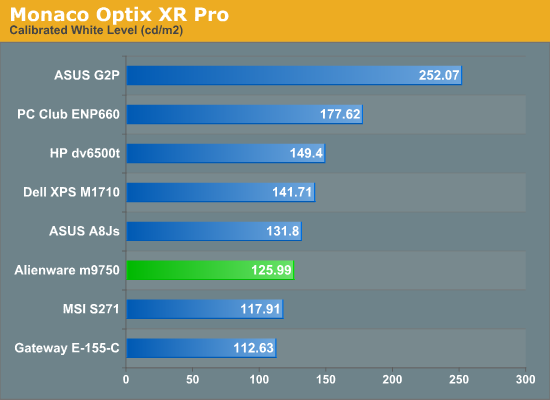
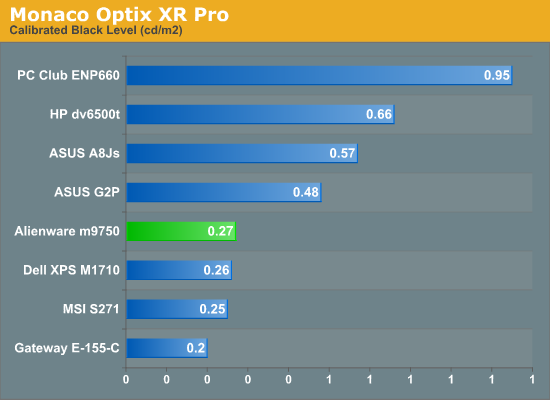
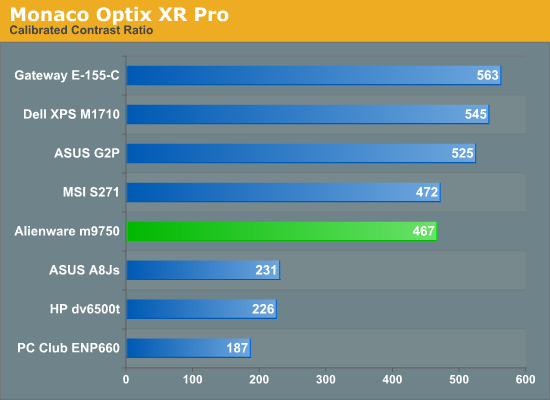
The calibrated white level is slightly lower than other LCDs, but maximum brightness prior to calibration was 146 nits, putting it on par with most other laptops. Black levels are also pretty good, and the result is a contrast ratio right around 500:1, give or take. (Without calibration, the black level was 0.28 resulting in a contrast ratio of 520:1.)
Turning down the brightness level rapidly reduces the display to the point where we wouldn't want to use it. Minimum brightness results in a white point of 6.65 nits and a black point of 0.01 nits, and while the measured contrast ratio actually goes up the quality certainly isn't better. There are eight total brightness settings available, but only the top four are really useful as the bottom four start with a white point of 50 nits and go down from there. The steps are also relatively coarse, changing the white level by 15-25 nits.
Brightness levels and contrast ratios aren't the only important aspects of a display, so here's a look at the viewing angles, taken at 30° from center. Images for the other laptops can be viewed using the links below.
ASUS A8Js
ASUS G2P
Dell M1710
HP dv6500t
Gateway E-155-C
MSI S271
PC Club ENP660
The viewing angles overall are pretty good for a laptop, ranking slightly ahead of most other laptops we've tested particularly in vertical viewing angles. In terms of overall quality we still prefer the ASUS G2P LCD, while the Gateway E-155-C has the best viewing angles.
Given that this is a gaming notebook, response times are going to be a bit more important. Using a 1/80s shutter speed, we can see remnants of at least four screen updates in the above image. Actual response times are thus similar to what we've seen in most other notebooks: somewhere between 25ms and 35ms. While that might seem slow for a modern LCD, consider that similar testing on "5 ms" LCDs indicates that they response times are also closer to 25ms in practical use. We weren't bothered by pixel smearing when using the notebook, but others may have more sensitive eyes. Test out some other laptops in person, and see if pixel smearing bothers you.
As always, we like to take a closer look at notebook displays to see how they measure up to the competition. We use ASTRA32 to probe for details about the LCD panel. However, ASTRA32 merely reads the information directly from the LCD panel using the VBE/DDC standard. Some LCD panels contain the wrong data, for example serial numbers, manufacturing date, etc. so we cannot guarantee all of the details are 100% accurate. Likewise, we cannot guarantee that the LCD panel used in our particular sample will be the same as that used in other notebooks of the same model.
ASTRA32 reports that the LCD panel in our test unit is an LG Philips LPL0B0A, manufactured in January 2005. Many of the notebook LCDs we've looked at have listed January 2005 as the manufacturing date, which seems a bit odd, so it may have been produced a bit more recently. However, looking at the LG Philips website, we could not find any details about this particular panel, which indicates that it was manufactured at least one if not two years ago. The overall display quality seems to be a bit better than some other 17" notebooks that we've seen, so Alienware may have purchased higher-quality LCD panels initially, but it's still safe to say that the LCD panel is a somewhat older model. Response times, color quality, and viewing angles are all pretty similar to what we've seen in other 1920x1200 17" notebooks.
Moving on to objective testing, we'll start with a look at brightness and contrast ratios along with viewing angles. We'll conclude on the following page with an examination of the color accuracy, before and after hardware calibration. For color accuracy, we are including results using ColorEyes Display Pro in addition to Monaco Optix XR Pro. Monaco Optix XR Pro uses the older ICCv2 profile specification and it may not be as accurate as software that uses the more recent ICCv4 specification. In testing we have discovered that there are certainly differences between the two software packages when it comes to color calibration, but neither one is universally better. We use a Monaco Optix XR Pro colorimeter (which is the same as the DTP-94) with both software packages.
The calibrated white level is slightly lower than other LCDs, but maximum brightness prior to calibration was 146 nits, putting it on par with most other laptops. Black levels are also pretty good, and the result is a contrast ratio right around 500:1, give or take. (Without calibration, the black level was 0.28 resulting in a contrast ratio of 520:1.)
Turning down the brightness level rapidly reduces the display to the point where we wouldn't want to use it. Minimum brightness results in a white point of 6.65 nits and a black point of 0.01 nits, and while the measured contrast ratio actually goes up the quality certainly isn't better. There are eight total brightness settings available, but only the top four are really useful as the bottom four start with a white point of 50 nits and go down from there. The steps are also relatively coarse, changing the white level by 15-25 nits.
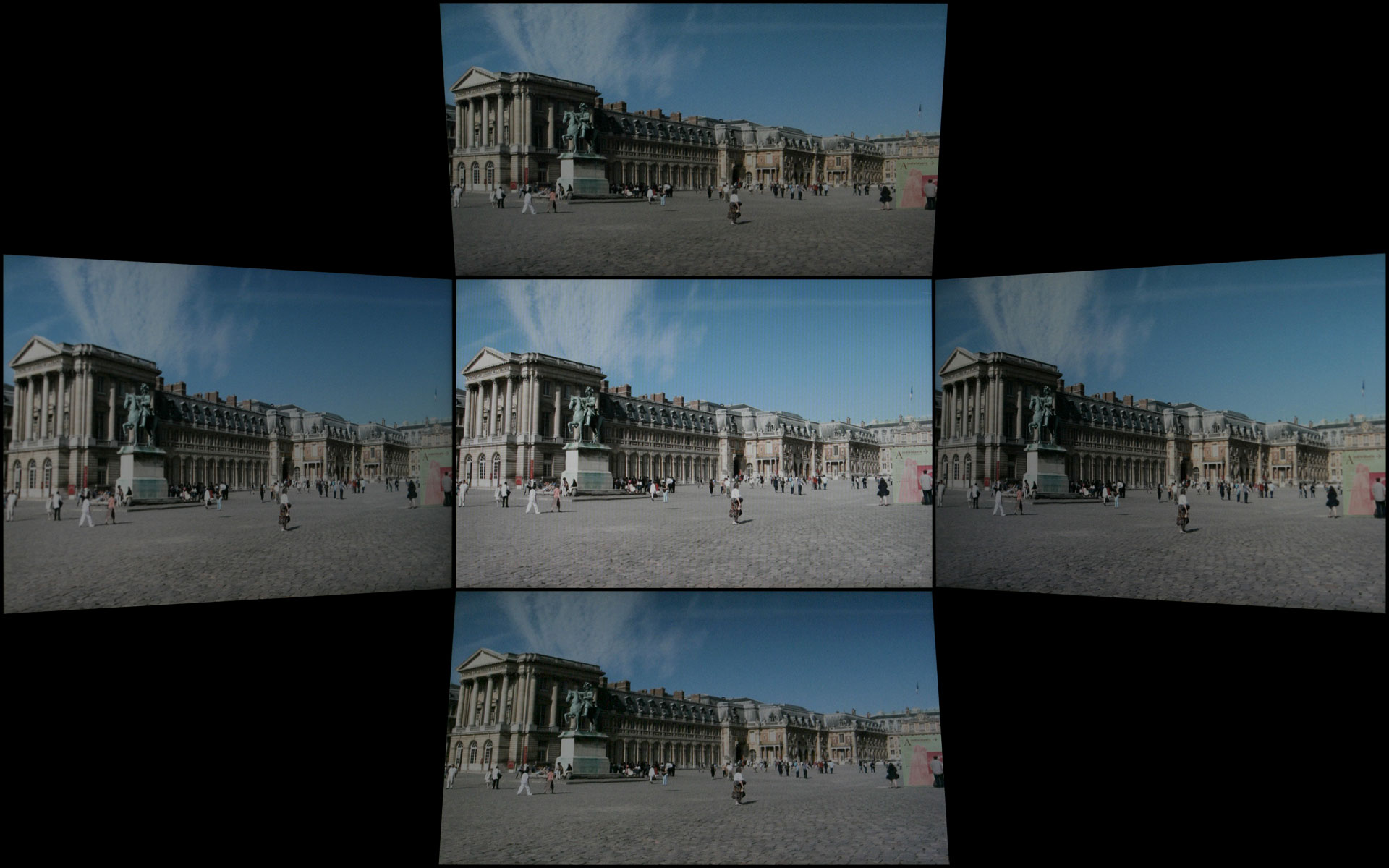
Brightness levels and contrast ratios aren't the only important aspects of a display, so here's a look at the viewing angles, taken at 30° from center. Images for the other laptops can be viewed using the links below.
 |
ASUS A8Js
ASUS G2P
Dell M1710
HP dv6500t

Gateway E-155-C
MSI S271
PC Club ENP660
The viewing angles overall are pretty good for a laptop, ranking slightly ahead of most other laptops we've tested particularly in vertical viewing angles. In terms of overall quality we still prefer the ASUS G2P LCD, while the Gateway E-155-C has the best viewing angles.
 |
Given that this is a gaming notebook, response times are going to be a bit more important. Using a 1/80s shutter speed, we can see remnants of at least four screen updates in the above image. Actual response times are thus similar to what we've seen in most other notebooks: somewhere between 25ms and 35ms. While that might seem slow for a modern LCD, consider that similar testing on "5 ms" LCDs indicates that they response times are also closer to 25ms in practical use. We weren't bothered by pixel smearing when using the notebook, but others may have more sensitive eyes. Test out some other laptops in person, and see if pixel smearing bothers you.
Originally published at https://www.anandtech.com/show/2307 (Wayback Machine).