
NVIDIA 680i SLI: Official 1333MHz FSB CPU Support Arrives
- Posted in
- CPUs
Test Setup:
Test conditions were maintained the same, as much as possible, over the platforms tested. Our game tests were run at settings of 1280x1024 HQ to ensure our GPU was not a bottleneck during testing. All results are reported in our charts and color-coded for easier identification of results.
We utilize new drive images on each board in order to minimize any potential driver conflicts. Our 3DMark results are generated utilizing the standard benchmark resolution for each program. We run each benchmark five times, throw out the two low and high scores, and report the remaining score. All results are run at stock speeds for this article with memory timings at 6-6-6-15 1333-DDR3 for the ASUS Blitz Extreme, 4-4-4-10 1066-DDR2 for the ASUS P5K Deluxe and 3-3-3-6 1T 800-DDR2 for the EVGA 680i SLI motherboard. In order for our tests to be fair, we did upgrade to the latest BIOS releases for the ASUS P35 boards for comparison scores.
Our choice of software applications to test is based on programs that enjoy widespread use and produce repeatable and consistent results during testing. Microsoft Vista has thrown a monkey wrench into testing as the aggressive nature of the operating system to constantly optimize application loading and retrieval from memory or the storage system presents some interesting obstacles. This along with the lack of driver maturity or features (Hello NVIDIA) will continue to present problems in the near future with benchmark selections.
Our normal process was to change our power settings to performance, delete the contents of the prefetch folder, and then reboot after each benchmark run. This is a lengthy process to be sure, but it results in consistency over the course of benchmark testing. All applications were run with administer privileges.
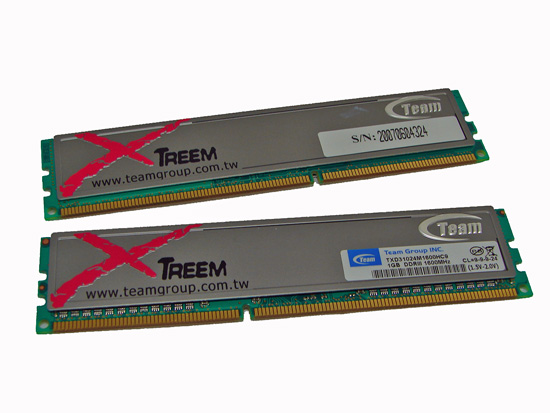
| Standard Test Bed Vista Ultimate 64-Bit Test Configuration |
|
| Processor | Intel Core 2 Duo QX6850 (3.00GHz, 8MB Unified Cache) |
| RAM | OCZ Reaper PC2-9200 (2x1GB) TEAM Xtreem DDR3-1600 (2x1GB) |
| Hard Drive | Western Digital 150GB 10,000RPM SATA 16MB Buffer |
| System Platform Drivers | Intel 8.3.0.1013 NVIDIA 15.00 |
| Video Cards | 1 x MSI 8800GTX |
| Video Drivers | NVIDIA 163.11 |
| CPU Cooling | Tuniq 120 |
| Power Supply | OCZ ProXStream 1000W |
| Optical Drives | Plextor PX-760A, Plextor PX-B900A |
| Case | Cooler Master CM Stacker 830 |
| Motherboards | ASUS Blitz Extreme (Intel P35 DDR3) - BIOS 0702 ASUS P5K Deluxe (Intel P35 DDR2) - BIOS 0404 EVGA 680i SLI (NVIDIA 680i DDR2) - BIOS P30 |
| Operating System | Windows Vista Ultimate 64-Bit |
| . | |
Test conditions were maintained the same, as much as possible, over the platforms tested. Our game tests were run at settings of 1280x1024 HQ to ensure our GPU was not a bottleneck during testing. All results are reported in our charts and color-coded for easier identification of results.
We utilize new drive images on each board in order to minimize any potential driver conflicts. Our 3DMark results are generated utilizing the standard benchmark resolution for each program. We run each benchmark five times, throw out the two low and high scores, and report the remaining score. All results are run at stock speeds for this article with memory timings at 6-6-6-15 1333-DDR3 for the ASUS Blitz Extreme, 4-4-4-10 1066-DDR2 for the ASUS P5K Deluxe and 3-3-3-6 1T 800-DDR2 for the EVGA 680i SLI motherboard. In order for our tests to be fair, we did upgrade to the latest BIOS releases for the ASUS P35 boards for comparison scores.
Our choice of software applications to test is based on programs that enjoy widespread use and produce repeatable and consistent results during testing. Microsoft Vista has thrown a monkey wrench into testing as the aggressive nature of the operating system to constantly optimize application loading and retrieval from memory or the storage system presents some interesting obstacles. This along with the lack of driver maturity or features (Hello NVIDIA) will continue to present problems in the near future with benchmark selections.
Our normal process was to change our power settings to performance, delete the contents of the prefetch folder, and then reboot after each benchmark run. This is a lengthy process to be sure, but it results in consistency over the course of benchmark testing. All applications were run with administer privileges.
Originally published at https://www.anandtech.com/show/2280 (Wayback Machine).