
Killing the Business Desktop PC Softly
- Posted in
- IT Computing
Blade PCs
Next up is the blade PC. The challenge is to make sure that the blade PC and the thin client consume less energy together than a typical business desktop. The big advantage of a blade PC is that all PCs draw from the same the power supply, which allows for the use of a more efficient power supply. HP has designed an enclosure that can house up to twenty blade PCs in a single 3U rack mount chassis, all of which are powered by the same redundant 600W power supply. That means that each blade PC consumes less than 30W.
The HP BladeSystem bc2000 and bc2500 consist of:
If you only need a 1.2 GHz Athlon 64, it becomes less clear why you would allocate a blade PC for each user. You might be better off with VDI for example (see below). It might seem like nitpicking, but if you want to add a full rack of relatively modern PCs with dual core CPUs, the system administrator of the data center has to cope with another 12-14 KW (bc2500). If you chose the bc2000 blade, you are looking at only 7.6KW per rack. Clearly there is nothing magical about blade PCs: a 50W blade PC and 15W-30W thin client are not going to save much power compared to a desktop with the same (low voltage) dual core CPU.
Let's take a closer look at the blade PC.
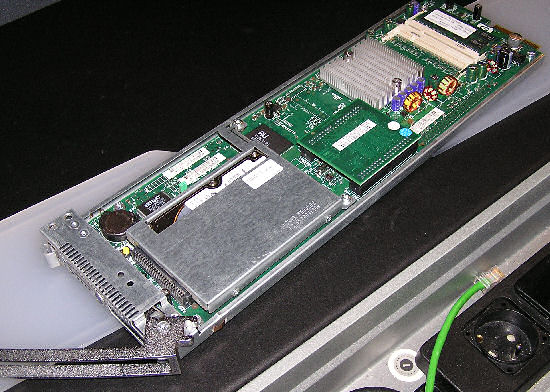
The HP blade PC bc2000
It is a pretty elegant and slim design with a small heatsink on top of the CPU, and two SO-DIMMs for memory expansion. If you don't like your blade PC to be headless, you can add an old Lynx EM4+ video chip which supports an 800x600 resolution when you access the blade PC directly.
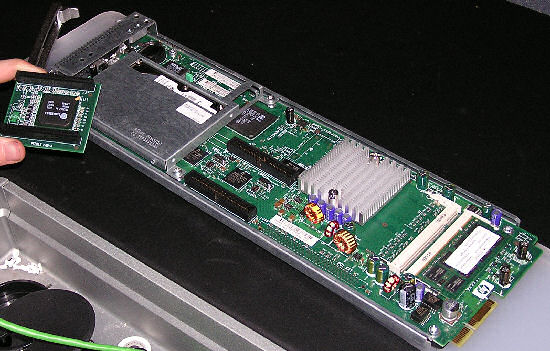
Adding a video chip to the blade PC
The video chip plugs into the black "IDE-like" connectors. The second generation of blade PCs still has room for improvement: why use a hard disk if your data is going to be saved on centralized network storage? Solid state drives were probably too expensive at the time of the new blade PC design, but basically the design right now has room for improvement.
Next up is the blade PC. The challenge is to make sure that the blade PC and the thin client consume less energy together than a typical business desktop. The big advantage of a blade PC is that all PCs draw from the same the power supply, which allows for the use of a more efficient power supply. HP has designed an enclosure that can house up to twenty blade PCs in a single 3U rack mount chassis, all of which are powered by the same redundant 600W power supply. That means that each blade PC consumes less than 30W.
The HP BladeSystem bc2000 and bc2500 consist of:
- Low voltage AMD Athlon 64 X2 Dual-Core 3000+ processor (1.60 GHz 2x512K L2) (bc2500) or AMD Athlon 64 2100+ (1.2 GHz 512K L2) (bc2000)
- ATI RS690T/SB600 w/integrated DirectX 9 compliant graphics
- Up to 2x2GB 667 MHz DDR2 SDRAM
- 2.5" 80GB 5400 rpm SATA 1.5 Gb/s
- 100 Mbit Ethernet (Broadcom 5906M)
If you only need a 1.2 GHz Athlon 64, it becomes less clear why you would allocate a blade PC for each user. You might be better off with VDI for example (see below). It might seem like nitpicking, but if you want to add a full rack of relatively modern PCs with dual core CPUs, the system administrator of the data center has to cope with another 12-14 KW (bc2500). If you chose the bc2000 blade, you are looking at only 7.6KW per rack. Clearly there is nothing magical about blade PCs: a 50W blade PC and 15W-30W thin client are not going to save much power compared to a desktop with the same (low voltage) dual core CPU.
Let's take a closer look at the blade PC.
The HP blade PC bc2000
It is a pretty elegant and slim design with a small heatsink on top of the CPU, and two SO-DIMMs for memory expansion. If you don't like your blade PC to be headless, you can add an old Lynx EM4+ video chip which supports an 800x600 resolution when you access the blade PC directly.
Adding a video chip to the blade PC
The video chip plugs into the black "IDE-like" connectors. The second generation of blade PCs still has room for improvement: why use a hard disk if your data is going to be saved on centralized network storage? Solid state drives were probably too expensive at the time of the new blade PC design, but basically the design right now has room for improvement.
Originally published at https://www.anandtech.com/show/2279 (Wayback Machine).