
A Messy Transition: Practical Problems With 32bit Addressing In Windows
- Posted in
- Software
Now that we've seen what can happen when we reach the 2GB barrier and how easy it can be to pass it, let's talk about what it took to remove it in the first place for Supreme Command. Supreme Commander is unfortunately not compiled as being large address aware and must be modified so that Windows thinks that it is. Microsoft supplies a tool as part of the Visual Studio suite, Editbin, that can do just this by rewriting the file header to report to Windows that it is in fact large address aware.
To the best of our knowledge Supreme Commander was programmed using proper programming practices and can handle the larger address space, and this is merely an issue of turning it on. However on a more pragmatic note this can break future patches, and disturbingly it doesn't set off any sort of multiplayer cheat detection in the game in spite of the fact that we have modified the executable in a very visible way. Out of the changes we need to make to deal with the 2GB barrier though, this is the safer of the two.
Update: Gas Powered Games contacted us and let us know that the modified executable not setting off any cheat detection is intentional. The game code is all in a DLL, and the executable is just a launcher; it's left unchecked because of the various Digital Rights Management systems used change the exectuable.
Changing Windows on the other hand to allocate more of the virtual address space to applications is in practice just as dangerous as we theorized earlier. We initially set our copy of Windows Vista to adjust the split to 1GB kernel mode, 3GB user mode, only for Vista to encounter a BSOD while booting. We had to settle for a 1.4GB/2.6GB split before Vista would boot, and even then Vista still periodically encounters a BSOD upon booting at that allocation or any other allocation other than 2GB/2GB. While what problems may occur and with what values is highly variable from system to system, this is why trying to move the barrier at all can be dangerous.
Having made the above changes, we also used the chance to take a look at system performance both in and outside of Supreme Commander, taking interest in to the effect of allocating more user mode space. As we theorized before, taking space away from the kernel may impact performance, and this is something that needs to be tested. For this we ran a cut-down version of our normal system test suite, with allocations of 1.4GB/2.6GB, 1.7GB/2.3GB, and the default 2GB/2GB.
| Software Test Bed | |
| Processor | AMD Athlon 64 4600+ (2x2.4GHz/512KB Cache, S939) |
| RAM | OCZ EL Platinum DDR-400 (4x512MB) |
| Motherboard | ASUS A8N-SLI Premium (nForce 4 SLI) |
| System Platform Drivers | NV 15.00 |
| Hard Drive | Maxtor MaXLine Pro 500GB SATA |
| Video Cards | 1 x GeForce 8800GTX |
| Video Drivers | NV ForceWare 158.45 |
| Power Supply | OCZ GameXStream 700W |
| Desktop Resolution | 1600x1200 |
| Operating System | Windows Vista Ultimate 32-Bit |
| . | |
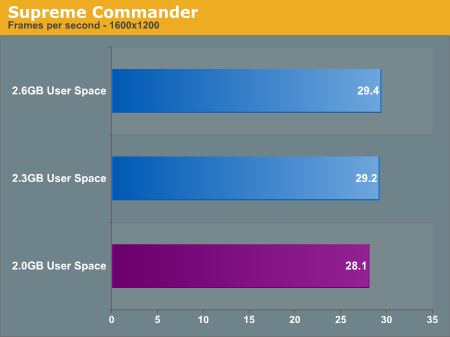
Starting with Supreme Commander, the only test here that can even utilize more than 2GB of user space, we do find a minor but consistent variation in performance. Increasing the user space improved Supreme Commander performance by about 1 frame per second, which at around a 3.5% performance improvement is right along the edge of either being significant or a normal variation. We repeated this test several times just to make sure that it wasn't a variation and the results remained consistent, so it doesn't appear to be a variation. With that said the instability caused by adjusting the user space size does not justify the extremely minor performance improvement.
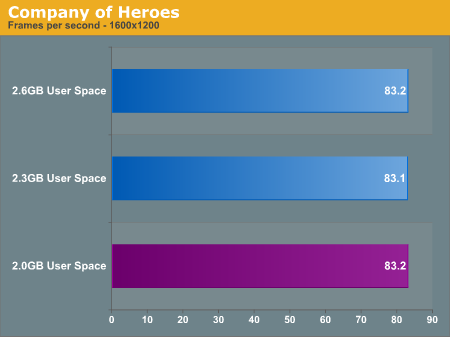
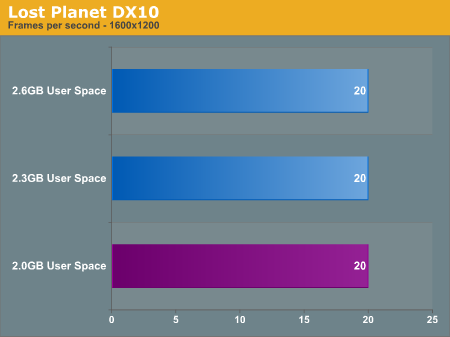
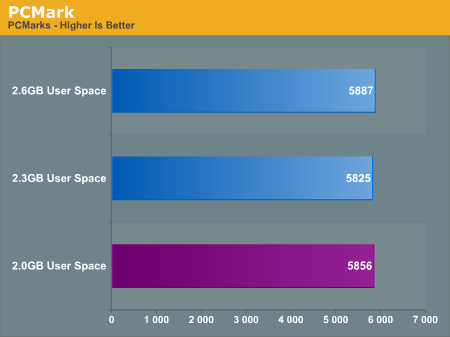
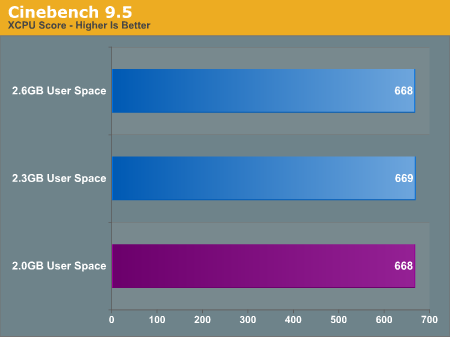
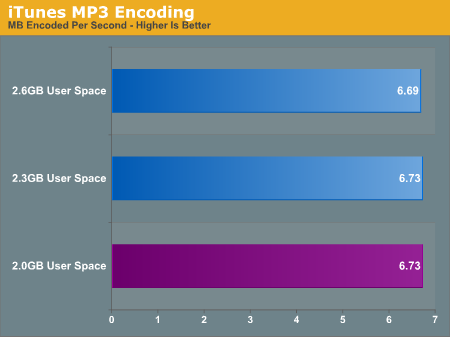
Going down the list of benchmarks, we find that there is no notable change in performance in any of our benchmarks. Since none of these benchmarks are capable of using more user space we weren't expecting an increase, but this puts to rest the idea of a performance decrease. There does not appear to be a performance decrease in adjusting the user space size; if it boots it'll perform well.
Originally published at https://www.anandtech.com/show/2272 (Wayback Machine).