
A Messy Transition: Practical Problems With 32bit Addressing In Windows
- Posted in
- Software
As we stated earlier, the inspiration behind this article is Supreme Commander, which was crashing during gameplay due to what we discovered to be was the game exhausting its user space. Without taking extreme and convoluted measures, most applications can do little besides (gracefully) crash when they've exhausted their user space. Server applications, which on the whole tend to be the king of memory hogs in the first place, tend to have some sort of compensation mechanism, but for more generalized applications like games this is not the case.
In this case, Supreme Commander was crashing late in to big games on a system that otherwise is completely stable. No amount of testing could come up with a problem outside of Supreme Commander, and most telltale of all was that it was only a problem with large maps with large number of players with high quality settings; turning anything down made the crashing stop. Although not clearly a memory error it greatly reduces the list of possible problems to a few things. The entire process, we suspect, will be similar for everyone hitting the 2GB barrier: the affected application is crashing under heavy load. Thankfully the problem is possible to debug, albeit with moderate difficulty.
With all of that said, I did not come up with the diagnosis or the solution myself and while the problem in retrospect is quite obvious, at the time I did not even take the 2GB barrier in to consideration. As such, credit for the diagnosis and solution belongs to MadBoris of the Gas Powered Games forums who identified Supreme Commander as hitting the 2GB barrier and publishing a solution for it, which we will cover here.
Getting to the root of the problem requires additional tools beyond what comes with Windows XP or Vista. The task manger, the logical tool for this task, doesn't track the information we need to know. At best, the task manager can list how much data is in the various memory pools altogether, however this is not the metric we're looking for. What we actually need to know is how much of the application's share of the virtual address space has been allocated (the fundamental problem after all is when we run out of unused virtual address space to allocate) which due to a multitude of reasons can be much greater than the amount of memory in use by an application. For finding this we'll need Sysinternals' Process Explorer.
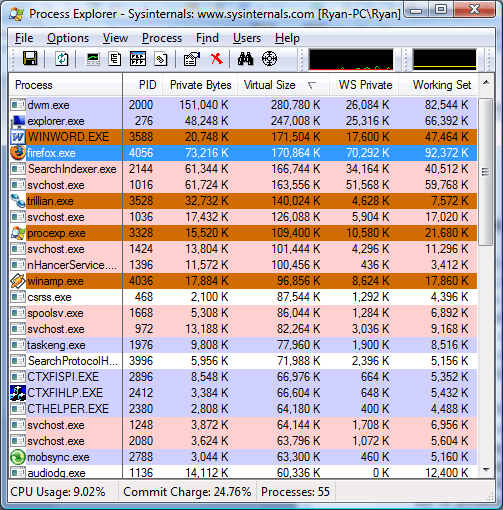
The above screenshot was taken as this paragraph was written, showcasing several different memory values for the running processes. The WS Private (Working Set Private) column lists how much physical memory the application is using, and this is the same column listed by the Windows Task Manager for memory usage. The Private Bytes column is the total amount of memory the application is using. Last but not least however is the Virtual Size column, which finally lists the amount of virtual address space allocated, the metric we're after.
We'll quickly focus on Microsoft Word as an example of the discrepancy between physical memory usage and private size. While Word is only using 17MB of physical memory, its virtual size is 170MB, 10 times the physical memory usage and 9 times the total memory usage. This is more or less a worse case scenario but it also points out just how misleading any memory usage - physical or total - is when trying to diagnose this kind of problem. Applications or games with high memory usage tend to not have nearly as a severe spread, but as we can see it's possible for an application to hit the 2GB barrier well before it needs 2GB of physical memory.

Getting to the meat of things however, the process readout for Supreme Commander basically says everything that needs to be said. In order to prove an exaggerated point, we started a 6 player game with 5 AI units on a maximum size map (81km x 81km) and set the game speed to maximum with maximum quality settings, while patching Supreme Commander and adjusting our system configuration to break the 2GB barrier. This actually isn't very playable for a variety of reasons (we'll overtax the CPU quickly due to all the AI units, slowing the game down dramatically) but represents not only what can happen in bad situations, but also is something that happens even in more manageable situations on smaller maps later in to the game.
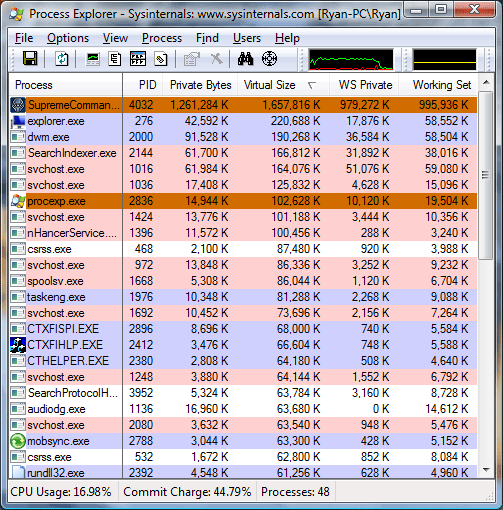
Just at the start of the game, our virtual size was already in excess of 1.6GB, dangerously close to the 2GB barrier. 16 minutes in to the game, we have already hit a virtual size of 2.2GB, meaning had we not broken the 2GB barrier the game would have already crashed. At this point our total memory usage (private bytes) is only at 1.7GB, with 1.4GB of that in physical memory, nearly maximizing the RAM usage of our 2GB system. Our spread between memory usage and virtual size is .5GB, showcasing how deceptive memory usage is in identifying 2GB barrier issues.
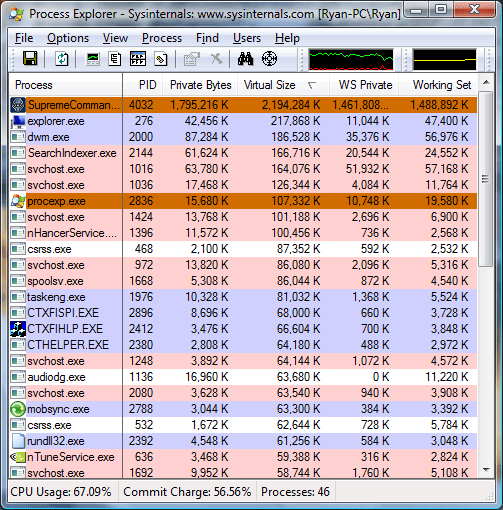
Finally at 22 minutes in to the game, the game crashes as the virtual size has reached the 2.6GB barrier we have reconfigured this system for. Perhaps the most troubling thing at this point is that Supreme Commander is not aware that it ran out of user space in its virtual address pool, as we are kicked out of the game with a generic error message. Unfortunately Windows Vista reverted to a non-accelerated desktop at this point, preventing us from capturing a screenshot of the exact memory readouts or the error message.
Originally published at https://www.anandtech.com/show/2272 (Wayback Machine).