
Gateway E-155-C: A Lightweight Convertible
- Posted in
- Laptops
Synthetic Graphics and Gaming Performance
We don't place a lot of stock in the performance results generated by Futuremark's 3DMark applications, and the Gateway E-155-C isn't designed with gaming or graphics performance in mind. About the best we can say is that the Intel GMA950 GPU manages to run Vista Aero Glass more or less acceptably. The system scores a 3.1 on the Windows Experience Index, and unlike the new X3100 graphics core SM3.0 is not supported. As a rough estimate of gaming performance, we're presenting the 3DMark results, and we will follow with a brief discussion of actual gaming tests.
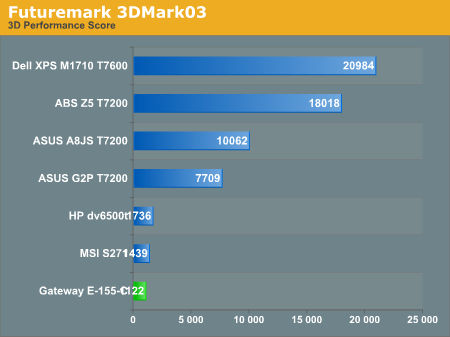
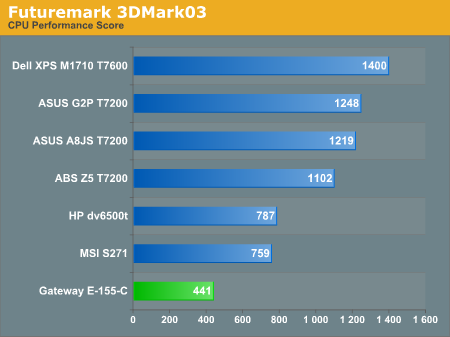
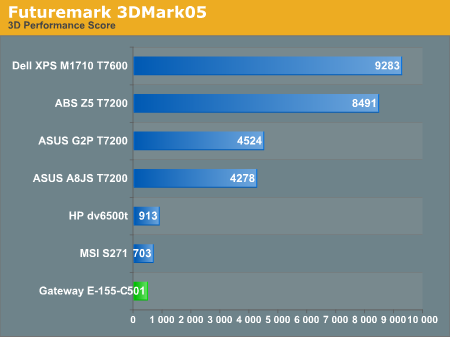
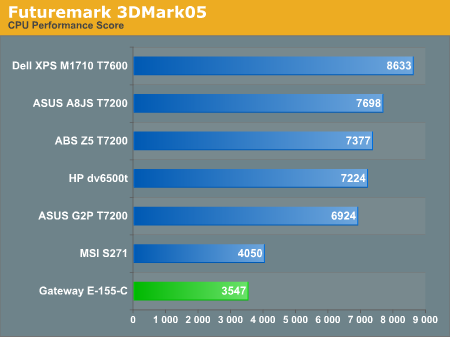
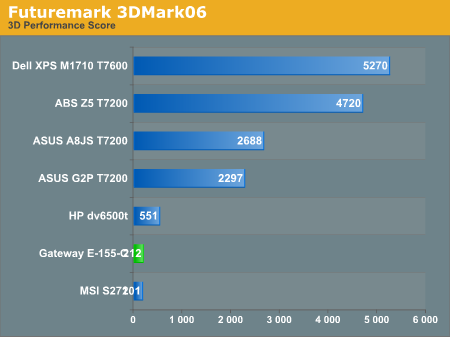
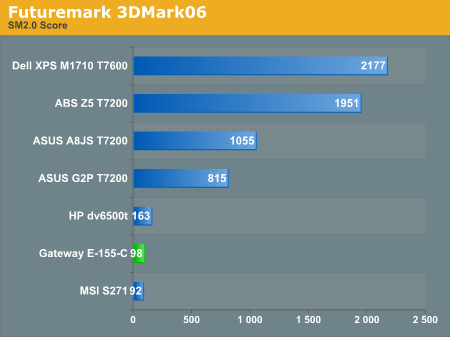
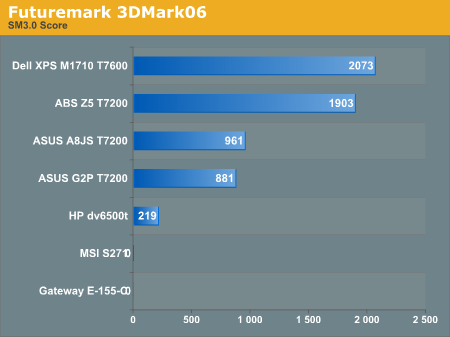
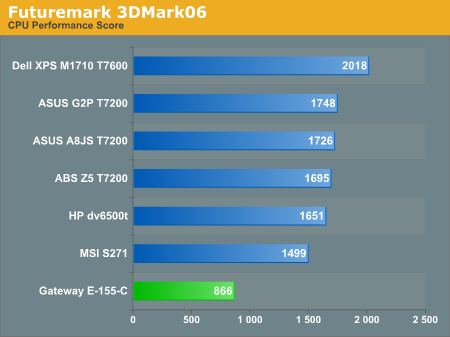
We'll let the charts speak for themselves here. Basically, you get CPU performance that's about half as fast as your typical desktop system these days, and integrated graphics performance that was already slow when the GMA950 first launched last year. It's somewhat entertaining to use the tablet PC interface to play solitaire, but anything beyond casual gaming most likely won't run properly (if at all).
Taking a quick look at actual gaming performance, we loaded up Quake 4 and turned off all of the graphical details after selecting low-quality defaults. That means we disabled bump-mapping, detailed textures, shadows, etc. At 640x480, the system managed to average 7.0 FPS. To its credit, frame rates didn't drop a whole lot as we increased resolution up to the native 1280x800, but regardless of resolution Quake 4 remained unplayable. Far Cry at minimum graphics detail settings didn't fare much better: 14 FPS at 640x480, and decreasing performance from there. At that point we decided to call it quits on any further graphics tests.
Something else that we should mention in regards to graphics concerns the drivers. The system shipped with drivers that were over one month old (the driver file from Intel's web site was named winvista_154.exe), and Intel recently updated all of their graphics drivers. Using the latest "winvista_1543.exe" drivers, we experienced problems with Vista whenever the system dropped out of Aero Glass mode into Vista Basic mode.
It appears that vsync isn't working in the latest drivers in Vista Basic mode, so when the Windows login screen first appears up until the time the graphics drivers are fully initialized, we experienced intense flickering. This also occurred with a few applications that forced the graphics to run in Vista Basic mode - 3DMark03/05 and Xmpeg both cause this to occur. You can see a horizontal dark area that extends the width of the screen in the above image; when you're actually sitting in front of the computer, this black area flickers around the entire screen rapidly. Long story short, stick with the older Intel drivers for now and don't worry too much about graphics performance.
We don't place a lot of stock in the performance results generated by Futuremark's 3DMark applications, and the Gateway E-155-C isn't designed with gaming or graphics performance in mind. About the best we can say is that the Intel GMA950 GPU manages to run Vista Aero Glass more or less acceptably. The system scores a 3.1 on the Windows Experience Index, and unlike the new X3100 graphics core SM3.0 is not supported. As a rough estimate of gaming performance, we're presenting the 3DMark results, and we will follow with a brief discussion of actual gaming tests.
We'll let the charts speak for themselves here. Basically, you get CPU performance that's about half as fast as your typical desktop system these days, and integrated graphics performance that was already slow when the GMA950 first launched last year. It's somewhat entertaining to use the tablet PC interface to play solitaire, but anything beyond casual gaming most likely won't run properly (if at all).
Taking a quick look at actual gaming performance, we loaded up Quake 4 and turned off all of the graphical details after selecting low-quality defaults. That means we disabled bump-mapping, detailed textures, shadows, etc. At 640x480, the system managed to average 7.0 FPS. To its credit, frame rates didn't drop a whole lot as we increased resolution up to the native 1280x800, but regardless of resolution Quake 4 remained unplayable. Far Cry at minimum graphics detail settings didn't fare much better: 14 FPS at 640x480, and decreasing performance from there. At that point we decided to call it quits on any further graphics tests.
Something else that we should mention in regards to graphics concerns the drivers. The system shipped with drivers that were over one month old (the driver file from Intel's web site was named winvista_154.exe), and Intel recently updated all of their graphics drivers. Using the latest "winvista_1543.exe" drivers, we experienced problems with Vista whenever the system dropped out of Aero Glass mode into Vista Basic mode.
 |
It appears that vsync isn't working in the latest drivers in Vista Basic mode, so when the Windows login screen first appears up until the time the graphics drivers are fully initialized, we experienced intense flickering. This also occurred with a few applications that forced the graphics to run in Vista Basic mode - 3DMark03/05 and Xmpeg both cause this to occur. You can see a horizontal dark area that extends the width of the screen in the above image; when you're actually sitting in front of the computer, this black area flickers around the entire screen rapidly. Long story short, stick with the older Intel drivers for now and don't worry too much about graphics performance.
Originally published at https://www.anandtech.com/show/2266 (Wayback Machine).