
Gateway E-155-C: A Lightweight Convertible
- Posted in
- Laptops
LCD Color Accuracy
So far the LCD has done relatively well. Now let's take a look at how it performs in regards to color accuracy. Not everyone wants a glaringly bright display, and if the E-155-C can provide accurate colors at reduced intensities there will certainly be some interested parties. As stated, we will be looking at the uncalibrated performance as well as calibrated performance using both Monaco Optix XR Pro and ColorEyes Display Pro.
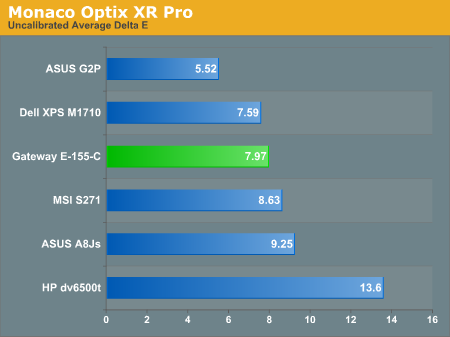
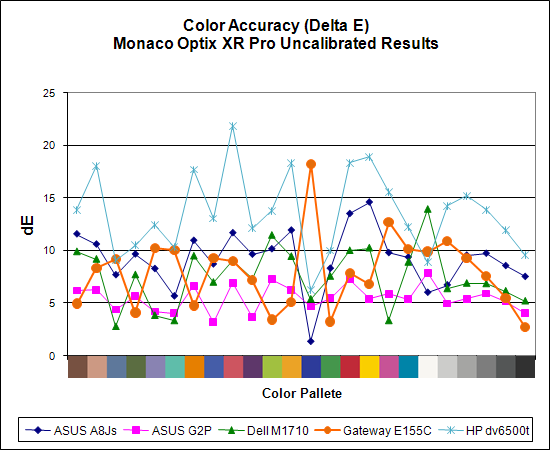
The uncalibrated results continue to be very poor for all of the laptops. Unfortunately, these results represent what the majority of people will see when they use any of these systems, and even if you're lucky enough to have appropriate calibration tools, video playback will still use the uncalibrated colors. The E-155-C is about average in terms of the laptops we've tested, with an average Delta E of 8.0 prior to calibration.
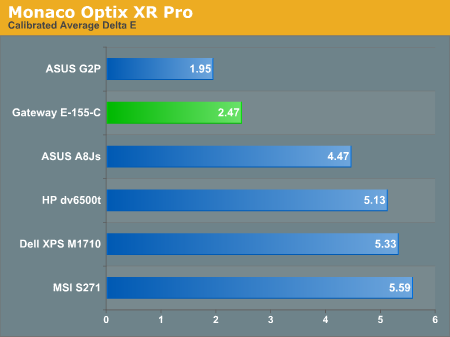
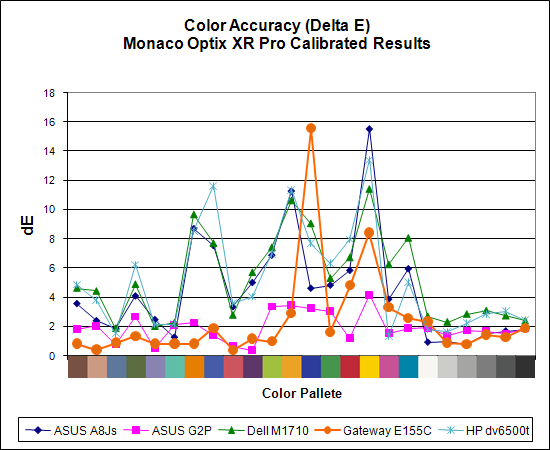
After calibration with Monaco Optix XR Pro, the situation for the E-155-C improves dramatically. It goes from the middle of the pack among generally poor results to having the second-best average Delta E. A score of 2.5 is still quite a bit higher than what most image professionals would like, and the huge spike on dark blue and relatively high spike on yellow are definitely undesirable. Without those two spikes, the average Delta E would improve to an impressive 1.6 - still not as good as the best desktop LCDs we've tested, but at that point the vast majority of users would no longer have any complaints about color accuracy. Now if only we could get a display that performs that well without calibration utilities....
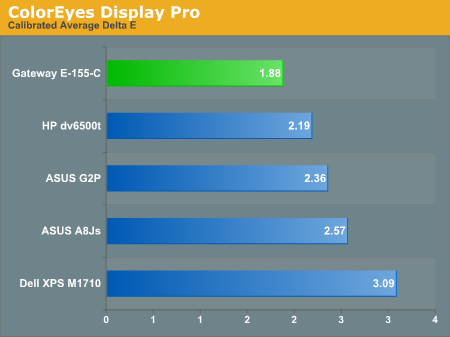
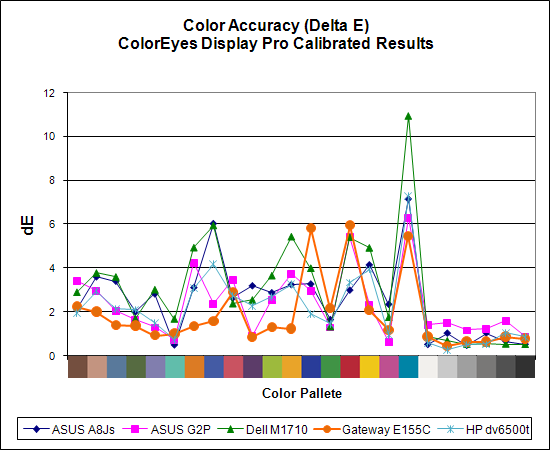
As we discovered in our last laptop article, ColorEyes Display Pro generally manages to provide even better color accuracy on laptops. The two software packages tend to have spikes on different colors, but the overall result usually improves. The average Delta E for the E-155-C when using ColorEyes Display Pro is reduced to 1.88, making it the best result we've seen from any laptop so far. However, it's worth noting that the ASUS G2P doesn't spike quite as high and overall we would still take that LCD over any of the others (size and weight considerations permitting).
We should also note that the default Delta E reported by ColorEyes is even better than what we're reporting here, but the selection of test colors is extremely limited. We validated color accuracy using a Gretag Macbeth chart, which is what Monaco Optix XR Pro uses. The default validation for ColorEyes uses 15 color swatches instead of 24, and the 15 swatches consist of 12 shades of gray and only three colors. While that may be fine for people that work in black and white, actual color accuracy means more to us, even if the display no longer scores a "perfect" Delta E of less than 1.0. (As an example of the distortion this sort of measuring can create, the E-155-C had an average Delta E of 0.286 using the default ColorEyes accuracy chart, thanks to nearly perfect scores in all of the various shades of gray.)
One final comment on the displays before we move on: trying to figure out the color management scheme of Windows Vista in comparison to Windows XP is more than a little confusing. In Windows XP, you set the default color profile and that's about it. Windows Vista has so many different options in the color profile section that we often wonder if we're doing things correctly; this is a case where we definitely don't feel that more is better! The color calibration software clearly enables a different color profile than what we normally get under Windows Vista even after we've supposedly look at the desired color profile. It seems that Microsoft is trying to help users improve their overall display experience, but the end result is simply confusing. (And don't even get us started on the irritation of having to jump through a couple extra dialogs in order to adjust the various display settings!)
So far the LCD has done relatively well. Now let's take a look at how it performs in regards to color accuracy. Not everyone wants a glaringly bright display, and if the E-155-C can provide accurate colors at reduced intensities there will certainly be some interested parties. As stated, we will be looking at the uncalibrated performance as well as calibrated performance using both Monaco Optix XR Pro and ColorEyes Display Pro.
The uncalibrated results continue to be very poor for all of the laptops. Unfortunately, these results represent what the majority of people will see when they use any of these systems, and even if you're lucky enough to have appropriate calibration tools, video playback will still use the uncalibrated colors. The E-155-C is about average in terms of the laptops we've tested, with an average Delta E of 8.0 prior to calibration.
After calibration with Monaco Optix XR Pro, the situation for the E-155-C improves dramatically. It goes from the middle of the pack among generally poor results to having the second-best average Delta E. A score of 2.5 is still quite a bit higher than what most image professionals would like, and the huge spike on dark blue and relatively high spike on yellow are definitely undesirable. Without those two spikes, the average Delta E would improve to an impressive 1.6 - still not as good as the best desktop LCDs we've tested, but at that point the vast majority of users would no longer have any complaints about color accuracy. Now if only we could get a display that performs that well without calibration utilities....
As we discovered in our last laptop article, ColorEyes Display Pro generally manages to provide even better color accuracy on laptops. The two software packages tend to have spikes on different colors, but the overall result usually improves. The average Delta E for the E-155-C when using ColorEyes Display Pro is reduced to 1.88, making it the best result we've seen from any laptop so far. However, it's worth noting that the ASUS G2P doesn't spike quite as high and overall we would still take that LCD over any of the others (size and weight considerations permitting).
We should also note that the default Delta E reported by ColorEyes is even better than what we're reporting here, but the selection of test colors is extremely limited. We validated color accuracy using a Gretag Macbeth chart, which is what Monaco Optix XR Pro uses. The default validation for ColorEyes uses 15 color swatches instead of 24, and the 15 swatches consist of 12 shades of gray and only three colors. While that may be fine for people that work in black and white, actual color accuracy means more to us, even if the display no longer scores a "perfect" Delta E of less than 1.0. (As an example of the distortion this sort of measuring can create, the E-155-C had an average Delta E of 0.286 using the default ColorEyes accuracy chart, thanks to nearly perfect scores in all of the various shades of gray.)
  |
  |
One final comment on the displays before we move on: trying to figure out the color management scheme of Windows Vista in comparison to Windows XP is more than a little confusing. In Windows XP, you set the default color profile and that's about it. Windows Vista has so many different options in the color profile section that we often wonder if we're doing things correctly; this is a case where we definitely don't feel that more is better! The color calibration software clearly enables a different color profile than what we normally get under Windows Vista even after we've supposedly look at the desired color profile. It seems that Microsoft is trying to help users improve their overall display experience, but the end result is simply confusing. (And don't even get us started on the irritation of having to jump through a couple extra dialogs in order to adjust the various display settings!)
Originally published at https://www.anandtech.com/show/2266 (Wayback Machine).