
Gateway E-155-C: A Lightweight Convertible
- Posted in
- Laptops
LCD Brightness, Contrast, and Viewing Angles
In keeping with our tradition of striving to provide the most detailed hardware reviews around, we took a closer look at the LCD used in the E-155-C. Unfortunately, as is generally the case with all laptops, we cannot guarantee that the LCD panel used in our particular sample will be the same as that used in other notebooks, even if they have the same model number. Many of the larger OEMs will source LCD panels from several manufacturers, and they could potentially change panels at any time. Certain panel types are more likely to have this occur than others, and the use of a touch-sensitive screen may mean that Gateway only has one panel source for this particular model. However, they have not indicated that this is the case and so we recommend you take our display measurements with these qualifications in mind.
Using ASTRA32, a utility to that probes for various low-level details about your computer hardware, the LCD panel in our test unit is listed as a BOE 089A apparently manufactured by BOE Technology Co., Ltd. It is entirely possible for ASTRA32 to make mistakes, but short of tearing apart the notebooks we review - and potentially ruining the LCD panels - that's the best information we can provide. The manufacturing date is listed as January 2006.
Our general impressions of the LCD panel are favorable, though we have to qualify that statement somewhat. We found the viewing angles to be much better than many other laptops, but at the same time the display does not get as bright as other units we've used. It could be that the touch-sensitive aspect may be affecting the brightness levels, but more likely is that the backlight is simply not as bright as we have seen in other notebooks. Considering this is a thin and light laptop, the latter would be our guess.
For our objective tests, we'll start with a look at brightness and contrast ratios along with viewing angles. We'll conclude on the following page with an examination of the color accuracy, before and after hardware calibration. For color accuracy, we are including results using ColorEyes Display Pro in addition to Monaco Optix XR Pro. One reader pointed out that Monaco Optix XR Pro uses the older ICCv2 profile specification and it may not be as accurate as software that uses the more recent ICCv4 specification. In testing we have discovered that there are certainly differences between the two software packages when it comes to color calibration, but neither one is consistently better. We use a Monaco Optix XR Pro colorimeter (which is the same as the DTP-94) with both software packages.
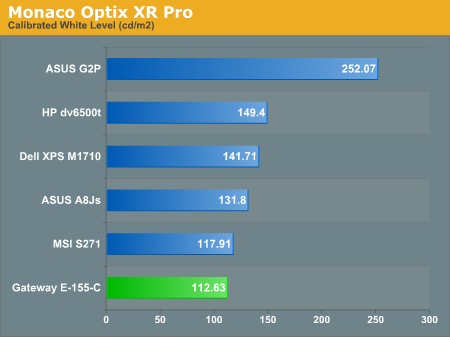
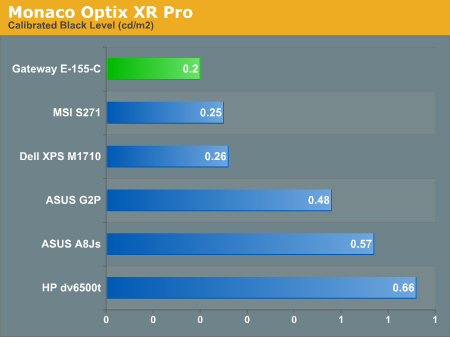
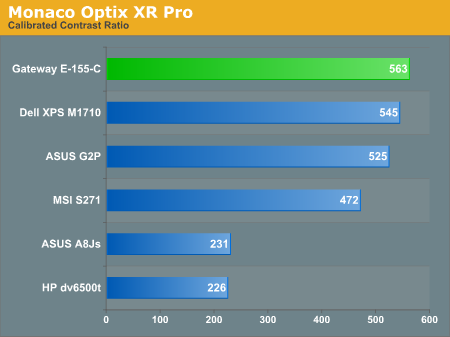
Our testing confirms what we noticed with our eyes: the white level is slightly lower than that of most other laptop LCDs, maxing out at around 113 nits; black levels on the other hand are very good, coming in at 0.20 nits. The net result is a relatively high contrast ratio of 563. Subjectively, we would agree with the measurements: the overall quality of the LCD panel is very good in terms of contrast ratio and black levels, but it's simply not very bright. Some people dislike overly bright LCDs, but we're pretty happy with 200-300 nits like what you find on most desktop LCDs. (We definitely agree that models rated at 500+ nits are taking things too far, however.) Whether or not you will like the E-155-C LCD will depend a lot on how bright you like your displays to be.
Brightness levels and contrast ratios aren't the only important aspects of a display, so let's look at the viewing angles, taken at 30° from center. Images for the other laptops can be viewed at the following links:
ASUS A8Js
ASUS G2P
Dell M1710
HP dv6500t
MSI S271
The reduced brightness level isn't immediately apparent when looking at the above images, but we chalk that up to minor variations in the photography and image editing process. (We may need to go back and redo some of the other laptops to make sure that our results are consistent.) At a perfect straight-on viewing angle, even something like the ASUS A8Js might seem pretty good. In actual use, however, we find viewing angles to be extremely important on laptops, and here the Gateway E-155-C excels. The horizontal viewing angles aren't really better than any of the other results, but one look at the vertical viewing angles and you can clearly see why we're impressed. Simply put, this is one of the better laptops we've used in terms of vertical viewing angles. It's a good thing too, since tablet PCs are even more likely to be used in off-angle viewing.
In keeping with our tradition of striving to provide the most detailed hardware reviews around, we took a closer look at the LCD used in the E-155-C. Unfortunately, as is generally the case with all laptops, we cannot guarantee that the LCD panel used in our particular sample will be the same as that used in other notebooks, even if they have the same model number. Many of the larger OEMs will source LCD panels from several manufacturers, and they could potentially change panels at any time. Certain panel types are more likely to have this occur than others, and the use of a touch-sensitive screen may mean that Gateway only has one panel source for this particular model. However, they have not indicated that this is the case and so we recommend you take our display measurements with these qualifications in mind.
Using ASTRA32, a utility to that probes for various low-level details about your computer hardware, the LCD panel in our test unit is listed as a BOE 089A apparently manufactured by BOE Technology Co., Ltd. It is entirely possible for ASTRA32 to make mistakes, but short of tearing apart the notebooks we review - and potentially ruining the LCD panels - that's the best information we can provide. The manufacturing date is listed as January 2006.
Our general impressions of the LCD panel are favorable, though we have to qualify that statement somewhat. We found the viewing angles to be much better than many other laptops, but at the same time the display does not get as bright as other units we've used. It could be that the touch-sensitive aspect may be affecting the brightness levels, but more likely is that the backlight is simply not as bright as we have seen in other notebooks. Considering this is a thin and light laptop, the latter would be our guess.
For our objective tests, we'll start with a look at brightness and contrast ratios along with viewing angles. We'll conclude on the following page with an examination of the color accuracy, before and after hardware calibration. For color accuracy, we are including results using ColorEyes Display Pro in addition to Monaco Optix XR Pro. One reader pointed out that Monaco Optix XR Pro uses the older ICCv2 profile specification and it may not be as accurate as software that uses the more recent ICCv4 specification. In testing we have discovered that there are certainly differences between the two software packages when it comes to color calibration, but neither one is consistently better. We use a Monaco Optix XR Pro colorimeter (which is the same as the DTP-94) with both software packages.
Our testing confirms what we noticed with our eyes: the white level is slightly lower than that of most other laptop LCDs, maxing out at around 113 nits; black levels on the other hand are very good, coming in at 0.20 nits. The net result is a relatively high contrast ratio of 563. Subjectively, we would agree with the measurements: the overall quality of the LCD panel is very good in terms of contrast ratio and black levels, but it's simply not very bright. Some people dislike overly bright LCDs, but we're pretty happy with 200-300 nits like what you find on most desktop LCDs. (We definitely agree that models rated at 500+ nits are taking things too far, however.) Whether or not you will like the E-155-C LCD will depend a lot on how bright you like your displays to be.
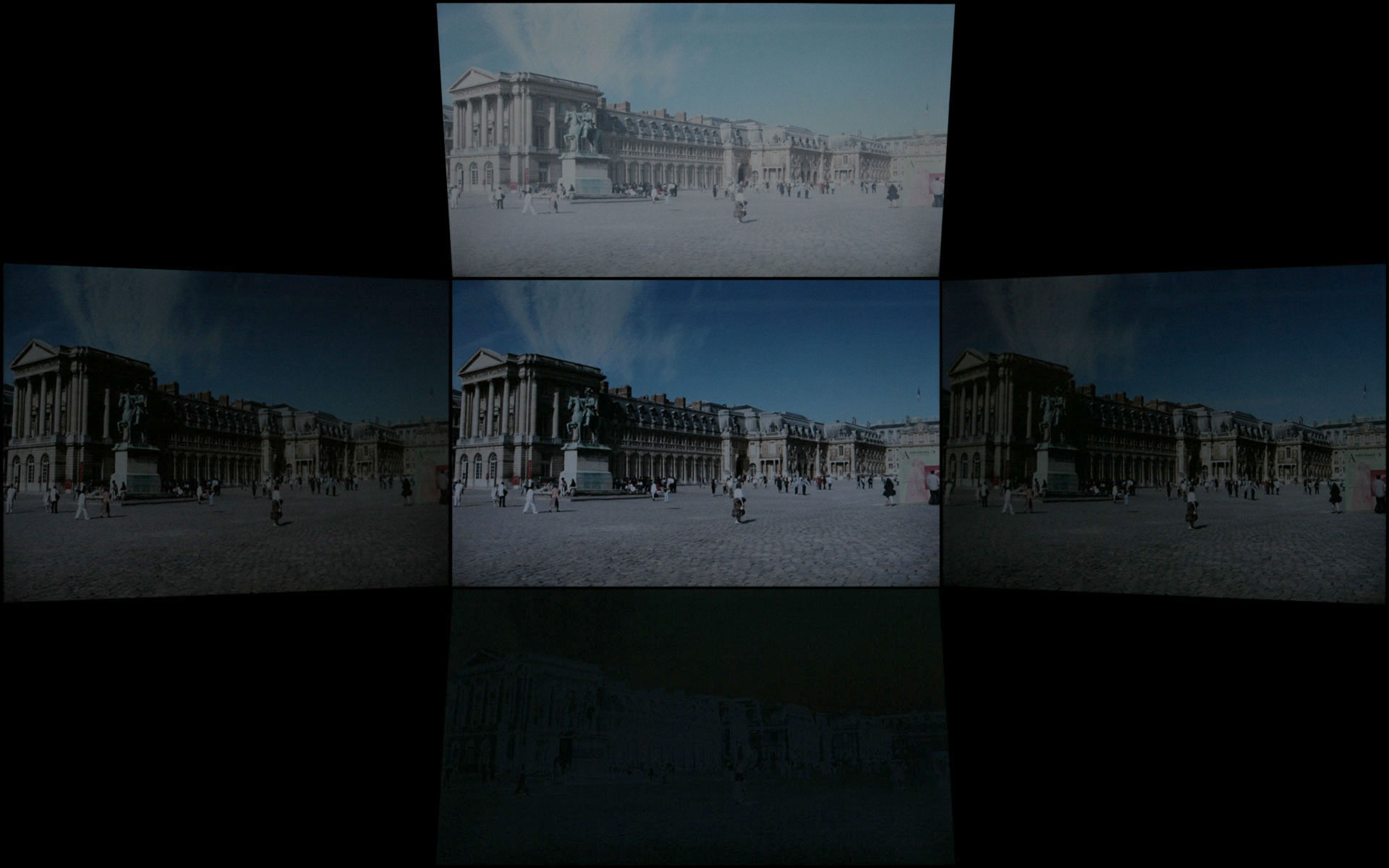
Brightness levels and contrast ratios aren't the only important aspects of a display, so let's look at the viewing angles, taken at 30° from center. Images for the other laptops can be viewed at the following links:
ASUS A8Js
ASUS G2P
Dell M1710
HP dv6500t
MSI S271
 |
The reduced brightness level isn't immediately apparent when looking at the above images, but we chalk that up to minor variations in the photography and image editing process. (We may need to go back and redo some of the other laptops to make sure that our results are consistent.) At a perfect straight-on viewing angle, even something like the ASUS A8Js might seem pretty good. In actual use, however, we find viewing angles to be extremely important on laptops, and here the Gateway E-155-C excels. The horizontal viewing angles aren't really better than any of the other results, but one look at the vertical viewing angles and you can clearly see why we're impressed. Simply put, this is one of the better laptops we've used in terms of vertical viewing angles. It's a good thing too, since tablet PCs are even more likely to be used in off-angle viewing.
Originally published at https://www.anandtech.com/show/2266 (Wayback Machine).