
EVGA nForce 650i Ultra: Performance on a Budget
- Posted in
- Motherboards
FSB Overclocking
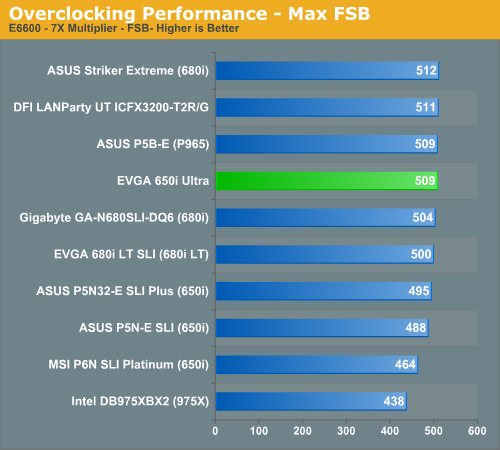
The EVGA 650i Ultra offers excellent overclocking capabilities for a $100 Intel motherboard but it quickly runs out of headroom around the 500FSB level. We believe this is a limitation of the 650i SPP based upon our results with other 650i boards. The board will not satisfy the requirements of the extreme overclocker but should be fine for a majority of users looking to extract additional performance out of their system.
We found during overclocking that we had to set the CPU voltages a little higher than on some other boards to attain the same or better overclocks. We experienced this with the MSI 650i, ASUS 650i, and EVGA 680i LT SLI boards and it was generally due to tighter memory/chipset timings in order to improve the performance of the board at stock speeds. We also had to set the SPP voltage option to 1.30V in order to ensure our memory was stable at 1T command rates due to the lack of memory voltage options over 2.10V. Overall, our overclocking experiences were great given the price, but we felt like a few extra voltage/BIOS options would have transformed the capability of this budget board from very good to excellent when considering the price to performance ratio.
Audio Performance
We are no longer showing the individual CPU utilization rates as the use of a dual core processor means the driver load is balanced between each processor with our audio solutions. The 2.3 version of Rightmark properly supports dual core processors but considering the results they are almost meaningless for most users. We have found the CPU utilization rate improvements with the dual core setup in this test do not have any bearing on actual game benchmarks as the reduction in frame rate percentages are the same on our single core systems.
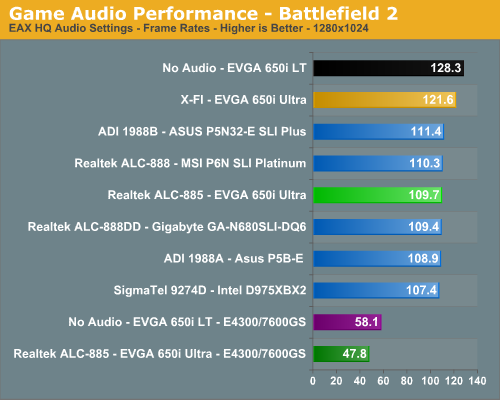
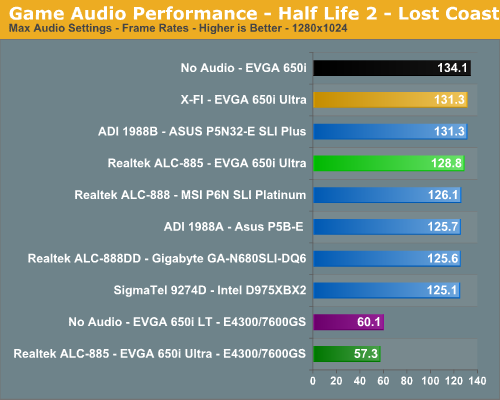
The audio performance numbers remain consistent between the Analog Devices and Realtek Codecs but both finish consistently behind the SoundBlaster X-Fi in the benchmarks. This is to be expected as the ADI and Realtek Codecs are host processing units dependent upon the CPU and drivers for generating their audio streams. The SoundBlaster X-Fi on the other hand has dedicated hardware that generates its audio streams and offloads this burden from the CPU.
We are finding the CPU utilization rates to be constantly decreasing for the onboard solutions as CPU processing power increases and driver optimizations improve, but they still take a toll in certain games. This is reflected in our numbers as Battlefield 2 has an average loss of 17% and Half Life 2: Lost Coast loses 4%. We set Battlefield 2 to utilize EAX 2 in our ADI and Realtek HD results which creates another significant demand on the CPU to process the audio streams, especially with the sound effects quality set to high.
Analog Devices has made news lately claiming other host-based audio solutions (Realtek is obviously in their crosshairs) do not properly generate EAX compatible audio in their drivers. After comparing the ADI 1988B to the Realtek ALC-885 in Battlefield 2 we completely agree and this continues to be an issue even with the latest Realtek 1.64 drivers. The audio quality differences in EAX 2.0 capable games between the ADI and Realtek HD Audio Codecs are almost startling at times.
We firmly believe this is due to obstructions and occlusions still not being implemented correctly in the Realtek drivers although we have found minor improvements in the recent driver releases. There are also some bugs in EAX 2 capable games that feature outdoor areas or vast expanses: we found sounds in BF2 at one end of the map to have the same volume and distance correlation as sounds in front of the character. We suggest turning off EAX 2 in games when utilizing the Realtek solution; the games will just sound better the majority of time.
Obviously, if you are a serious gamer, then a dedicated sound card is still useful to ensure consistent frame rate averages across a wide variety of games, and in the case of the Sound Blaster X-Fi, you also get improved audio quality and EAX3/4/5 support. Unfortunately, users of Vista may have to jump through some extra hoops to get X-Fi support to work properly, due to the changes made to the Vista sound model. If you'd like more details on the Realtek or ADI solutions, you can refer to the Realtek HD Audio Codec Specifications or SoundMAX HD Audio Codec Specifications.
The EVGA 650i Ultra offers excellent overclocking capabilities for a $100 Intel motherboard but it quickly runs out of headroom around the 500FSB level. We believe this is a limitation of the 650i SPP based upon our results with other 650i boards. The board will not satisfy the requirements of the extreme overclocker but should be fine for a majority of users looking to extract additional performance out of their system.
We found during overclocking that we had to set the CPU voltages a little higher than on some other boards to attain the same or better overclocks. We experienced this with the MSI 650i, ASUS 650i, and EVGA 680i LT SLI boards and it was generally due to tighter memory/chipset timings in order to improve the performance of the board at stock speeds. We also had to set the SPP voltage option to 1.30V in order to ensure our memory was stable at 1T command rates due to the lack of memory voltage options over 2.10V. Overall, our overclocking experiences were great given the price, but we felt like a few extra voltage/BIOS options would have transformed the capability of this budget board from very good to excellent when considering the price to performance ratio.
Audio Performance
We are no longer showing the individual CPU utilization rates as the use of a dual core processor means the driver load is balanced between each processor with our audio solutions. The 2.3 version of Rightmark properly supports dual core processors but considering the results they are almost meaningless for most users. We have found the CPU utilization rate improvements with the dual core setup in this test do not have any bearing on actual game benchmarks as the reduction in frame rate percentages are the same on our single core systems.
The audio performance numbers remain consistent between the Analog Devices and Realtek Codecs but both finish consistently behind the SoundBlaster X-Fi in the benchmarks. This is to be expected as the ADI and Realtek Codecs are host processing units dependent upon the CPU and drivers for generating their audio streams. The SoundBlaster X-Fi on the other hand has dedicated hardware that generates its audio streams and offloads this burden from the CPU.
We are finding the CPU utilization rates to be constantly decreasing for the onboard solutions as CPU processing power increases and driver optimizations improve, but they still take a toll in certain games. This is reflected in our numbers as Battlefield 2 has an average loss of 17% and Half Life 2: Lost Coast loses 4%. We set Battlefield 2 to utilize EAX 2 in our ADI and Realtek HD results which creates another significant demand on the CPU to process the audio streams, especially with the sound effects quality set to high.
Analog Devices has made news lately claiming other host-based audio solutions (Realtek is obviously in their crosshairs) do not properly generate EAX compatible audio in their drivers. After comparing the ADI 1988B to the Realtek ALC-885 in Battlefield 2 we completely agree and this continues to be an issue even with the latest Realtek 1.64 drivers. The audio quality differences in EAX 2.0 capable games between the ADI and Realtek HD Audio Codecs are almost startling at times.
We firmly believe this is due to obstructions and occlusions still not being implemented correctly in the Realtek drivers although we have found minor improvements in the recent driver releases. There are also some bugs in EAX 2 capable games that feature outdoor areas or vast expanses: we found sounds in BF2 at one end of the map to have the same volume and distance correlation as sounds in front of the character. We suggest turning off EAX 2 in games when utilizing the Realtek solution; the games will just sound better the majority of time.
Obviously, if you are a serious gamer, then a dedicated sound card is still useful to ensure consistent frame rate averages across a wide variety of games, and in the case of the Sound Blaster X-Fi, you also get improved audio quality and EAX3/4/5 support. Unfortunately, users of Vista may have to jump through some extra hoops to get X-Fi support to work properly, due to the changes made to the Vista sound model. If you'd like more details on the Realtek or ADI solutions, you can refer to the Realtek HD Audio Codec Specifications or SoundMAX HD Audio Codec Specifications.
Originally published at https://www.anandtech.com/show/2207 (Wayback Machine).