
Dell 2707WFP: Looking for the Middle Ground of Large LCDs
- Posted in
- Displays
Brightness and Contrast Ratio
For those that need accurate colors, hardware color calibration is basically a given. Here, we report scores for the same areas as we did on the previous page, only this time the results are taken after we have used Monaco Optix XR Pro to calibrate the display.
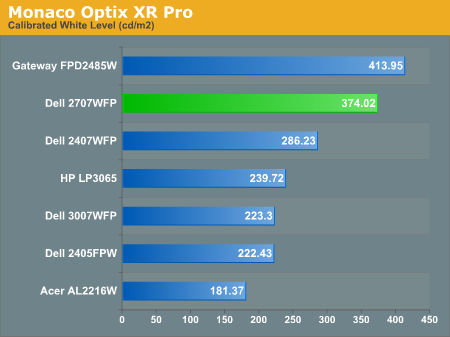
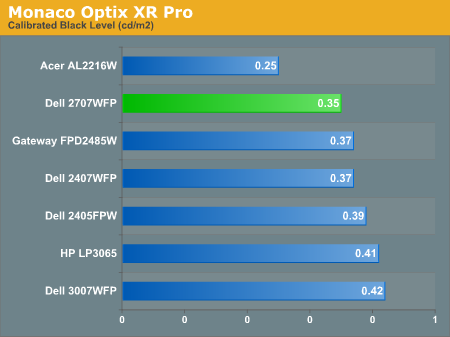
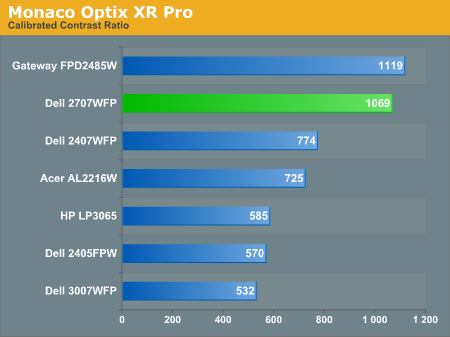
The most significant changes from calibration come in the area of brightness, where all of the displays end up running at less than their maximum brightness. You can of course choose to run a display at a higher than recommended brightness level, and the ambient lighting in a room will also determine what brightness setting is best. Our testing was performed indoors with a moderate amount of lighting, and the displays were adjusted according to directions. We also found that manually reducing the brightness level to something more reasonable (like 200-300 cd/m2) did not significantly affect the results on any of these displays, so consider the above charts as more of a maximum recommended brightness for each particular LCD.
Color Accuracy
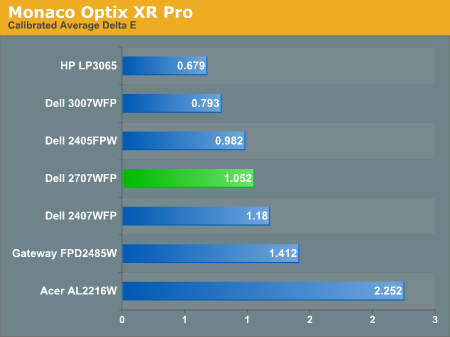
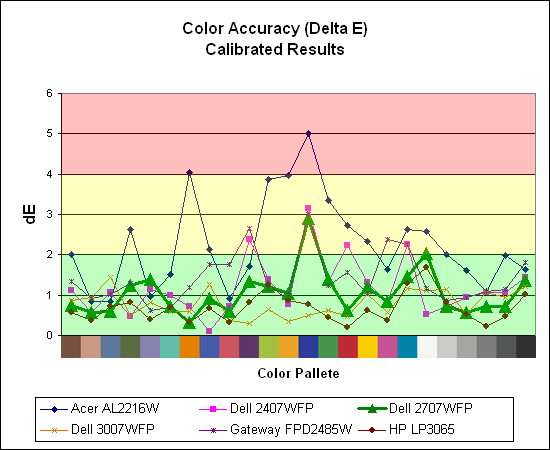
The 2707WFP's uncalibrated results were quite poor, but calibration helps it improve drastically. A few colors show a bit of a spike (dark blue and bright white), but the majority of the color results are very close to the "perfect" range and certainly acceptable for the vast majority of users. Both of the 30" displays are at the top of the charts, and it's likely that their S-IPS panels are simply better overall at providing accurate colors (post-calibration). Note also how all of the S-PVA have very similar curves, including a nearly identical spike on dark blue.
For those that need accurate colors, hardware color calibration is basically a given. Here, we report scores for the same areas as we did on the previous page, only this time the results are taken after we have used Monaco Optix XR Pro to calibrate the display.
The most significant changes from calibration come in the area of brightness, where all of the displays end up running at less than their maximum brightness. You can of course choose to run a display at a higher than recommended brightness level, and the ambient lighting in a room will also determine what brightness setting is best. Our testing was performed indoors with a moderate amount of lighting, and the displays were adjusted according to directions. We also found that manually reducing the brightness level to something more reasonable (like 200-300 cd/m2) did not significantly affect the results on any of these displays, so consider the above charts as more of a maximum recommended brightness for each particular LCD.
Color Accuracy
The 2707WFP's uncalibrated results were quite poor, but calibration helps it improve drastically. A few colors show a bit of a spike (dark blue and bright white), but the majority of the color results are very close to the "perfect" range and certainly acceptable for the vast majority of users. Both of the 30" displays are at the top of the charts, and it's likely that their S-IPS panels are simply better overall at providing accurate colors (post-calibration). Note also how all of the S-PVA have very similar curves, including a nearly identical spike on dark blue.
Originally published at https://www.anandtech.com/show/2204 (Wayback Machine).