
Dell 2707WFP: Looking for the Middle Ground of Large LCDs
- Posted in
- Displays
Brightness and Contrast Ratio
For those who have a need to match colors between their computer displays and their cameras and printers, what works well for computing purposes often isn't the best suited for doing other image related work. To help people who work in such areas match their computer colors to their paper colors better, some standards were established. Generally speaking for print work the standard is a gamma of 2.2, a black point of 0.60 cd/m2, and a white point of 100 cd/m2. We attempted to calibrate all the monitors for these settings as well.
Finding the appropriate OSD settings to reach these levels can be a time-consuming process for some of the displays. It may require numerous iterations through the calibration process to end up with the desired white point, and on some LCDs it might not even be possible to reach a satisfactory result. The nature of LCDs is such that we were unable to get both an accurate white point and an accurate black point according to printing requirements (our black levels always ended up darker than they were supposed to be), but we did manage to get near the desired 100 cd/m2 white point on all of the tested displays. This required adjusting the individual color levels on most of the displays, and the following table shows the settings we ended up using:
Like the Gateway FPD2485W and Dell 2407WFP, dropping just the brightness on the 2707WFP did not allow us to reach the desired white point. We also found that dropping the brightness level to zero and then further reducing the color levels did not generate desirable results. We were most successful when we set the color levels to a moderate value and then tweaked the brightness and color levels as necessary to get the desired result. Here's how the brightness and contrast ratios changed with these tweaks. For reference, we have included the target values in the following graphs, so the greater the deviance of a display from the targeted value, the less suitable a display becomes for print work.
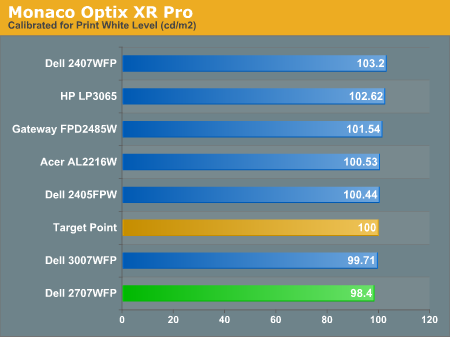
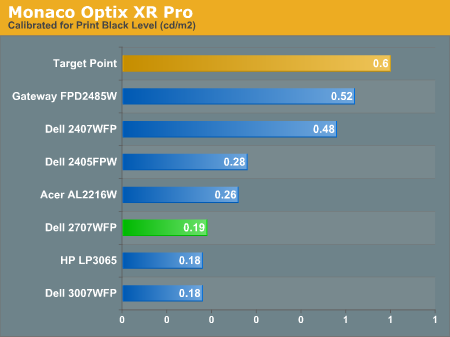
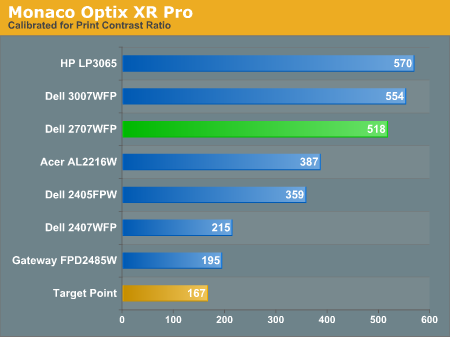
Since very slight differences in brightness are not a huge deal, we did not attempt to get 100% accuracy on the white point, but further tuning of the various displays would have likely made it possible to get closer to 100 cd/m2. The primary goal was to merely get the white point near 100 cd/m2. The target black point is nearly impossible to achieve once we have reached the target white point with any LCD that we have used. Due to the reduced brightness, contrast ratios are also lower, but that is expected with print material. Having calibrated the displays for printing, let's see how they actually fare.
Color Accuracy
Given the importance of accurate colors for printing work, we have adjusted the Delta E scale appropriately. A Delta E of less than 1.0 is definitely the goal here, and 1.0 to 2.0 is merely acceptable. Scores above 2.0 basically mean that a display is not fit for printing professionals.
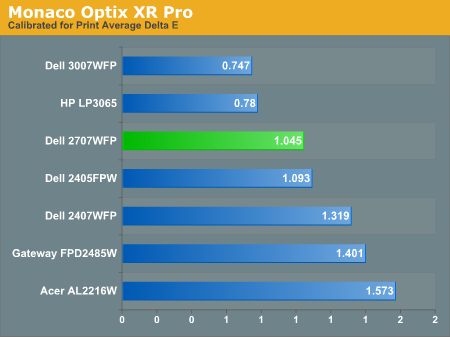
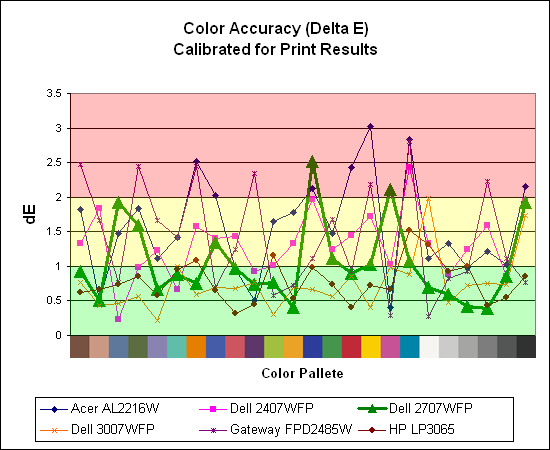
The 30" displays are clearly ahead in this particular test, not only because they are far easier to calibrate (you just turn down the brightness level) but also because they score very well. The Dell 3007WFP and HP LP3065 are the best displays we have tested when it comes to printing work, with very low average Delta E scores. Whether it's the overall quality of the displays or simply the S-IPS panels on the 30" LCDs, the fact is that these displays appear to be targeted more at professionals than any of the others. Considering the cost, that's probably not too surprising.
Meanwhile, the 2707WFP places third in terms of average Delta E, but the individual scores again show several spikes. It's not a bad display for print applications, but considering the cost and the fact that 30" displays don't cost a whole lot more (especially some of the slightly older 30" models), and we would recommend that most print/photo professionals look elsewhere.
For those who have a need to match colors between their computer displays and their cameras and printers, what works well for computing purposes often isn't the best suited for doing other image related work. To help people who work in such areas match their computer colors to their paper colors better, some standards were established. Generally speaking for print work the standard is a gamma of 2.2, a black point of 0.60 cd/m2, and a white point of 100 cd/m2. We attempted to calibrate all the monitors for these settings as well.
Finding the appropriate OSD settings to reach these levels can be a time-consuming process for some of the displays. It may require numerous iterations through the calibration process to end up with the desired white point, and on some LCDs it might not even be possible to reach a satisfactory result. The nature of LCDs is such that we were unable to get both an accurate white point and an accurate black point according to printing requirements (our black levels always ended up darker than they were supposed to be), but we did manage to get near the desired 100 cd/m2 white point on all of the tested displays. This required adjusting the individual color levels on most of the displays, and the following table shows the settings we ended up using:
| Calibrated for Print Settings Gamma 2.2, White 100 cd/m2, Black 0.60 cd/m2 |
|||||||
| Acer AL2216W | Dell 2405FPW | Dell 2407WFP | Dell 2707WFP | Dell 3007WFP | Gateway FPD2485W | HP LP3065 | |
| Brightness | 80 | 50 | 100 | 30 | 25 | 100 | 91 |
| Contrast | 80 | N/A | N/A | 100 | N/A | 100 | N/A |
| Red | 40 | 7 | 49 | 50 | N/A | 32 | N/A |
| Green | 39 | 10 | 50 | 51 | N/A | 32 | N/A |
| Blue | 39 | 11 | 46 | 50 | N/A | 32 | N/A |
Like the Gateway FPD2485W and Dell 2407WFP, dropping just the brightness on the 2707WFP did not allow us to reach the desired white point. We also found that dropping the brightness level to zero and then further reducing the color levels did not generate desirable results. We were most successful when we set the color levels to a moderate value and then tweaked the brightness and color levels as necessary to get the desired result. Here's how the brightness and contrast ratios changed with these tweaks. For reference, we have included the target values in the following graphs, so the greater the deviance of a display from the targeted value, the less suitable a display becomes for print work.
Since very slight differences in brightness are not a huge deal, we did not attempt to get 100% accuracy on the white point, but further tuning of the various displays would have likely made it possible to get closer to 100 cd/m2. The primary goal was to merely get the white point near 100 cd/m2. The target black point is nearly impossible to achieve once we have reached the target white point with any LCD that we have used. Due to the reduced brightness, contrast ratios are also lower, but that is expected with print material. Having calibrated the displays for printing, let's see how they actually fare.
Color Accuracy
Given the importance of accurate colors for printing work, we have adjusted the Delta E scale appropriately. A Delta E of less than 1.0 is definitely the goal here, and 1.0 to 2.0 is merely acceptable. Scores above 2.0 basically mean that a display is not fit for printing professionals.
The 30" displays are clearly ahead in this particular test, not only because they are far easier to calibrate (you just turn down the brightness level) but also because they score very well. The Dell 3007WFP and HP LP3065 are the best displays we have tested when it comes to printing work, with very low average Delta E scores. Whether it's the overall quality of the displays or simply the S-IPS panels on the 30" LCDs, the fact is that these displays appear to be targeted more at professionals than any of the others. Considering the cost, that's probably not too surprising.
Meanwhile, the 2707WFP places third in terms of average Delta E, but the individual scores again show several spikes. It's not a bad display for print applications, but considering the cost and the fact that 30" displays don't cost a whole lot more (especially some of the slightly older 30" models), and we would recommend that most print/photo professionals look elsewhere.
Originally published at https://www.anandtech.com/show/2204 (Wayback Machine).