
EVGA 680i LT SLI: NVIDIA's 680i Cost Reduced
- Posted in
- CPUs
Heavy Multitasking
We devised a script that would compress our standard test folder consisting of 444 files, ten subfolders, and 602MB worth of data, convert a 137MB High Definition QuickTime movie clip to a 37MB MPEG-4 format, play back the first two chapters of Office Space with PowerDVD, and run our AVG anti-virus program in the background. We stop the script when the file compression and video conversion are complete. This is a very taxing script for the CPU, memory, and storage subsystems. We also found it to be a good indicator of system stability during our overclocking testing.
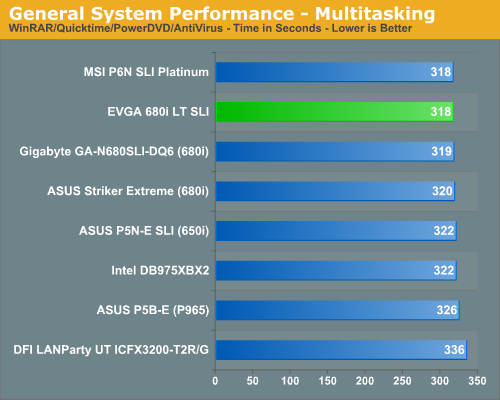
The performance difference basically mirrors our PCMark 2005 multithreaded test results with the MSI and EVGA boards finishing first due to great disk performance, although the Intel boards consistently completed the QuickTime conversion first. The DFI RD600 board scored last although it generated the best overall video playback results.
Media Encoding Performance
Our first encoding test is quite easy: we take our original Office Space DVD and use AnyDVD Ripper to copy the full DVD to the hard drive without compression, thus providing an almost exact duplicate of the DVD. We then fire up Nero Recode 2, select our Office Space copy on the hard drive, and perform a shrink operation to allow the entire movie along with extras to fit on a single 4.5GB DVD disc. We leave all options on their defaults except we turn off the advanced analysis option. The scores reported include the full encoding process and are in seconds, with lower numbers indicating better performance.
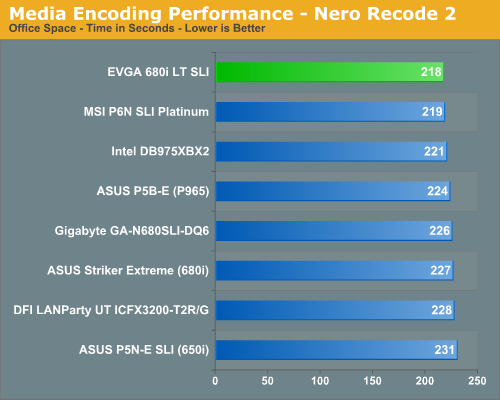
We continue to see a strong performance from the EVGA 680i LT SLI in our application tests with it once again finishing ever so slightly in front of the MSI board. In previous testing our ASUS 650i and 680i boards were almost two minutes slower in this test as we consistently found the performance of the 680i/650i to be lacking due to disk access issues. The conversion process would consistently slow down while the disk was being accessed. The quality of the video conversion was never affected but it appeared under heavy CPU usage that disk performance suffered. After the latest round of BIOS and driver updates these issues appear to be solved on the NVIDIA boards.
Audio Encoding Performance
While the media encoding prowess of the boards were superb in our initial media encoding testing, we wanted to see how they faired on the audio side. Our audio test suite consists of Exact Audio Copy v095.b4 and LAME 3.98a3. We utilize the INXS Greatest Hits CD that contains 16 tracks totaling 606MB of one time '80s hits.
We set up EAC for variable bit rate encoding, burst mode for extraction, use external program for compression, and to start the external compressor upon extraction (EAC will read the next track while LAME is working on the previous track, thus removing a potential bottleneck with the optical drive). We also set the number of active threads to two to ensure both cores are active during testing. The results are in seconds for the encoding process, with lower numbers being better.
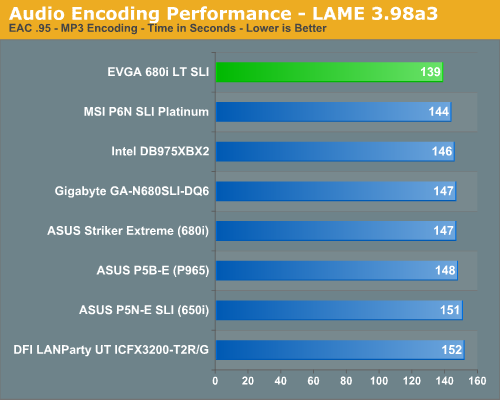
Our Plextor drive consistently took two minutes and nine seconds to read all sixteen tracks. This means our test systems were only utilizing one core during testing until the midway point of the extraction process where the drive speed was exceeding the capability of the encoder and required the use of a second thread.
Previously in the media encoding tests, the more intensive CPU and storage system tests seemed to favor the 975X over the P965/NV650i-680i/RD600 when running at the same memory timings. However, we are starting to notice a pattern in the latest NVIDIA releases where this is no longer the case, especially with 1T settings enabled on the NVIDIA chipset boards. We are currently retesting all of our NVIDIA boards with 1T settings as the latest BIOS releases are now offering stable 1T operation at DDR2-800 in our experience. While the overall differences are minimal in the grand scheme of things, 1T performance can make a slight difference in overall system performance. Our latest BIOS from MSI finally allows stable 1T operation with the initial test results equaling 136 seconds in this benchmark.
File Compression Performance
In order to save space on our hard drives and ensure we had another CPU crunching utility, we will be reporting our file compression results with the latest version of WinRAR that fully supports multi-treaded operations and should be of particular interest for those users with dual core or multi-processor systems. Our series of file compression tests utilizes WinRAR 3.62 to compress our test folder that contains 444 files, ten subfolders, and 602MB worth of data. All default settings are utilized in WinRAR along with our hard drive being defragmented before each test.
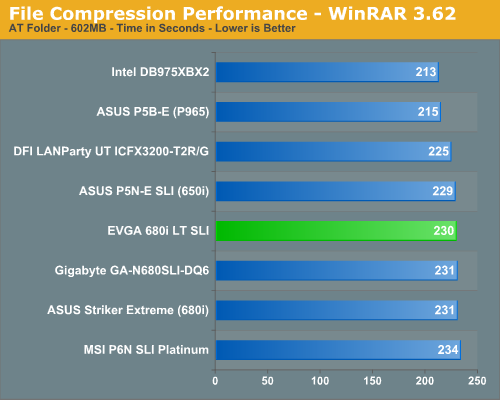
In a complete reversal of the other application results we see our EVGA board finishing near the bottom (all of the NVIDIA chipset boards are nearly tied). We see the Intel P965 and 975X chipsets leading once again as both seem to thrive in this CPU intensive task. The DFI RD600 board finishes in the middle of the pack. Historically, the NV Intel chipsets have not done well in this test due to CPU throughput being lower than the Intel chipsets. Changing our memory timings did not really affect the results overall although the EVGA board scores improved by 10 seconds with 1T enabled. In this particular test of CPU crunching power (which also makes use of a lot of memory bandwidth), the Intel chipsets win hands down.
We devised a script that would compress our standard test folder consisting of 444 files, ten subfolders, and 602MB worth of data, convert a 137MB High Definition QuickTime movie clip to a 37MB MPEG-4 format, play back the first two chapters of Office Space with PowerDVD, and run our AVG anti-virus program in the background. We stop the script when the file compression and video conversion are complete. This is a very taxing script for the CPU, memory, and storage subsystems. We also found it to be a good indicator of system stability during our overclocking testing.
The performance difference basically mirrors our PCMark 2005 multithreaded test results with the MSI and EVGA boards finishing first due to great disk performance, although the Intel boards consistently completed the QuickTime conversion first. The DFI RD600 board scored last although it generated the best overall video playback results.
Media Encoding Performance
Our first encoding test is quite easy: we take our original Office Space DVD and use AnyDVD Ripper to copy the full DVD to the hard drive without compression, thus providing an almost exact duplicate of the DVD. We then fire up Nero Recode 2, select our Office Space copy on the hard drive, and perform a shrink operation to allow the entire movie along with extras to fit on a single 4.5GB DVD disc. We leave all options on their defaults except we turn off the advanced analysis option. The scores reported include the full encoding process and are in seconds, with lower numbers indicating better performance.
We continue to see a strong performance from the EVGA 680i LT SLI in our application tests with it once again finishing ever so slightly in front of the MSI board. In previous testing our ASUS 650i and 680i boards were almost two minutes slower in this test as we consistently found the performance of the 680i/650i to be lacking due to disk access issues. The conversion process would consistently slow down while the disk was being accessed. The quality of the video conversion was never affected but it appeared under heavy CPU usage that disk performance suffered. After the latest round of BIOS and driver updates these issues appear to be solved on the NVIDIA boards.
Audio Encoding Performance
While the media encoding prowess of the boards were superb in our initial media encoding testing, we wanted to see how they faired on the audio side. Our audio test suite consists of Exact Audio Copy v095.b4 and LAME 3.98a3. We utilize the INXS Greatest Hits CD that contains 16 tracks totaling 606MB of one time '80s hits.
We set up EAC for variable bit rate encoding, burst mode for extraction, use external program for compression, and to start the external compressor upon extraction (EAC will read the next track while LAME is working on the previous track, thus removing a potential bottleneck with the optical drive). We also set the number of active threads to two to ensure both cores are active during testing. The results are in seconds for the encoding process, with lower numbers being better.
Our Plextor drive consistently took two minutes and nine seconds to read all sixteen tracks. This means our test systems were only utilizing one core during testing until the midway point of the extraction process where the drive speed was exceeding the capability of the encoder and required the use of a second thread.
Previously in the media encoding tests, the more intensive CPU and storage system tests seemed to favor the 975X over the P965/NV650i-680i/RD600 when running at the same memory timings. However, we are starting to notice a pattern in the latest NVIDIA releases where this is no longer the case, especially with 1T settings enabled on the NVIDIA chipset boards. We are currently retesting all of our NVIDIA boards with 1T settings as the latest BIOS releases are now offering stable 1T operation at DDR2-800 in our experience. While the overall differences are minimal in the grand scheme of things, 1T performance can make a slight difference in overall system performance. Our latest BIOS from MSI finally allows stable 1T operation with the initial test results equaling 136 seconds in this benchmark.
File Compression Performance
In order to save space on our hard drives and ensure we had another CPU crunching utility, we will be reporting our file compression results with the latest version of WinRAR that fully supports multi-treaded operations and should be of particular interest for those users with dual core or multi-processor systems. Our series of file compression tests utilizes WinRAR 3.62 to compress our test folder that contains 444 files, ten subfolders, and 602MB worth of data. All default settings are utilized in WinRAR along with our hard drive being defragmented before each test.
In a complete reversal of the other application results we see our EVGA board finishing near the bottom (all of the NVIDIA chipset boards are nearly tied). We see the Intel P965 and 975X chipsets leading once again as both seem to thrive in this CPU intensive task. The DFI RD600 board finishes in the middle of the pack. Historically, the NV Intel chipsets have not done well in this test due to CPU throughput being lower than the Intel chipsets. Changing our memory timings did not really affect the results overall although the EVGA board scores improved by 10 seconds with 1T enabled. In this particular test of CPU crunching power (which also makes use of a lot of memory bandwidth), the Intel chipsets win hands down.
Originally published at https://www.anandtech.com/show/2198 (Wayback Machine).