
EVGA 680i LT SLI: NVIDIA's 680i Cost Reduced
- Posted in
- CPUs
Overclocking - QX6700
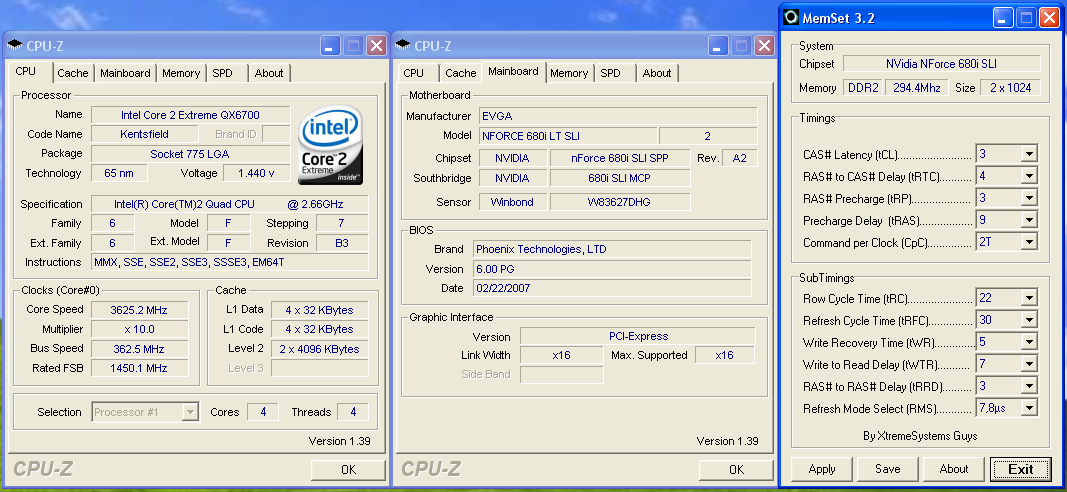
Needless to say, quad core overclocking on the 680i platforms has been a huge disappointment until recently. There is a new hardware revision of the EVGA 680i board and the latest BIOS on the ASUS Striker now allows 400+ FSB operation. Our board reached a final 362FSB at the stock multiplier and this was a setting that we found to be very stable during testing. We were able to POST and enter XP at 368FSB but could not complete our benchmark testing. Once again, the lack of voltage options hindered our results but they are still very good.
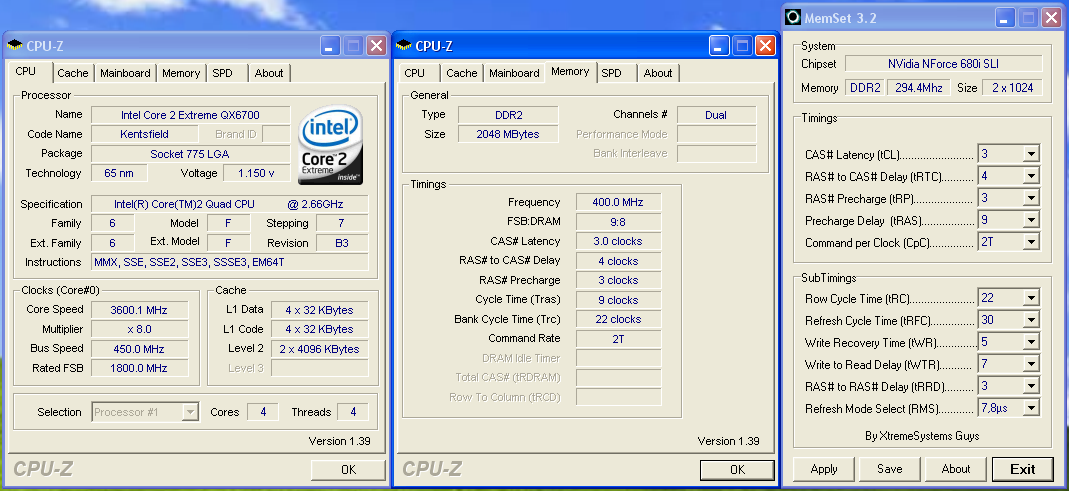
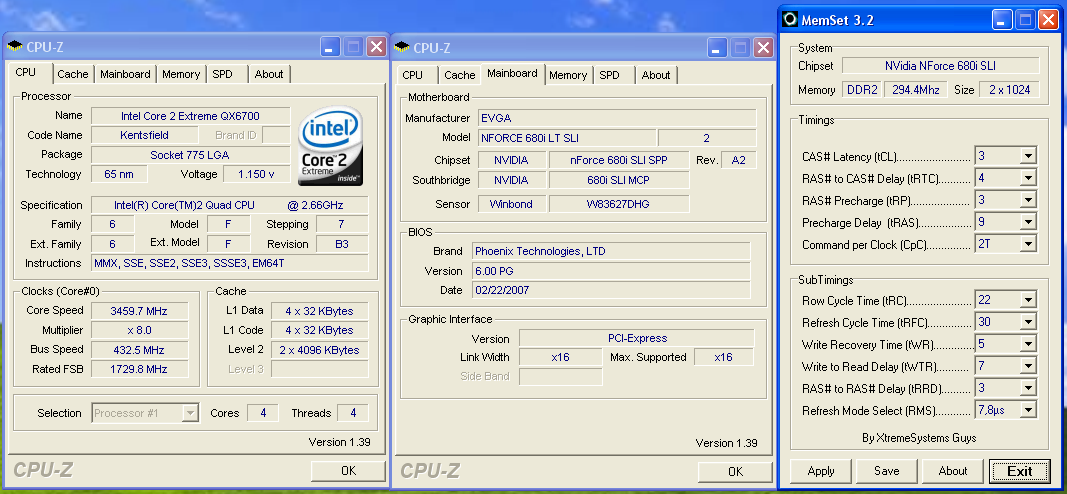
We dropped the multiplier on our QX6700 and were able to hit 8x450. The board completed the majority of our benchmarks at this setting but could not pass quad Prime95 or our four application multitasking test without the number three core waving the white flag. We finally reached a benchmark stable setting of 432FSB and probably could have gone higher but we had one of the dreaded FSB holes in the 440FSB range.
The one problem noted during testing is that we had to set our processor voltage to 1.4750V in order to maintain system stability. Our processor normally will run in the 3600MHz range at 1.4125V, and this was the highest voltage we have required on a board to reach this range. The reason for this is that Vdroop is terrible on this board with the quad core processor. We would see drops as high as .07V under load testing with the average drop being around .04V during game testing. The board also liked to "sing" to us while overclocked with the quad core installed. It was the one noise emitting from our case that we found to be louder than the chipset fans.
While we sound a bit pessimistic, this board did deliver results beyond our expectations in quad core testing. We just feel like a couple of the "corner cutting" activities inside the BIOS limited us once again from reaching the board's true capabilities.
Test Setup
A 2GB memory configuration is standard in our XP test beds as most enthusiasts are currently purchasing this amount of RAM. Our choice of mid-range OCZ Flex XLC PC-6400 memory represents an excellent balance of price and performance that offers a very wide range of memory settings during our stock and overclocked test runs. We also utilized our Corsair XMS2 Dominator (Twin2x2048-9136C5D) memory on this board to verify DDR2-1066 to DDR2-1200 compatibility with another memory type.
We are currently completing testing of several other memory modules ranging from Transcend, TwinMOS, and WINTEC DDR2-800 down to A-DATA DDR2-533 for compatibility and performance benchmarks in our roundup article. Our memory timings are set based upon determining the best memory bandwidth via MemTest86 and test application results for each board. We only optimize the four main memory settings with sub-timings remaining at Auto settings.
We are utilizing the MSI 8800GTX video card to ensure our 1280x1024 resolutions are not completely GPU bound for our motherboard test results. We did find in testing that applying a 4xAA/8xAF setting in most of today's latest games created a situation where the performance of the system at our standard resolution did not really change. Our video tests are run at 1280x1024 resolutions for this article at High Quality settings. We also tested at 1600x1200 and 1920x1200 4xAA/8xAF for our NVIDIA SLI results that will be presented in our next article.
All of our tests are run in an enclosed case with a dual optical/hard drive setup to reflect a moderately loaded system platform. Windows XP SP2 is fully updated and we load a clean drive image for each system to ensure driver conflicts are kept to a minimum. We were able to run our memory test modules at 3-4-3-9 1T for our benchmark results and will be updating the results of our other boards with 1T operation shortly.
| EVGA 680i LT SLI Quad Core Overclocking Testbed |
|
| Processor: | Intel Core 2 Extreme QX6700 Quad Core, 2.66GHz, 8MB Unified Cache 1066FSB, 10x Multiplier |
| CPU Voltage: | 1.4500V (default 1.3500V) |
| NB Voltage: | 1.40V |
| FSB Voltage: | 1.40V |
| Cooling: | Tuniq 120 Air Cooling |
| Power Supply: | OCZ ProXStream 1000W |
| Memory: | OCZ Flex XLC PC2-6400 (2x1GB) (ProMOS Memory Chips) |
| Video Cards: | 1 x MSI 8800GTX |
| Hard Drive: | Western Digital 150GB 10,000RPM SATA 16MB Buffer |
| Case: | Cooler Master CM Stacker 830 |
| Maximum OC: | 362x10 (3-4-3-9 2T, 797MHz, 2.20V), CPU 1.4500V 3625MHz (+36%) |
| Maximum FSB OC: | 432x8 (3-4-3-9 2T, 798MHz, 2.20V), CPU 1.4500V 3460MHz (+62% FSB) |
| . | |
 |
| Click to enlarge |
Needless to say, quad core overclocking on the 680i platforms has been a huge disappointment until recently. There is a new hardware revision of the EVGA 680i board and the latest BIOS on the ASUS Striker now allows 400+ FSB operation. Our board reached a final 362FSB at the stock multiplier and this was a setting that we found to be very stable during testing. We were able to POST and enter XP at 368FSB but could not complete our benchmark testing. Once again, the lack of voltage options hindered our results but they are still very good.
 |
| Click to enlarge |
 |
| Click to enlarge |
We dropped the multiplier on our QX6700 and were able to hit 8x450. The board completed the majority of our benchmarks at this setting but could not pass quad Prime95 or our four application multitasking test without the number three core waving the white flag. We finally reached a benchmark stable setting of 432FSB and probably could have gone higher but we had one of the dreaded FSB holes in the 440FSB range.
The one problem noted during testing is that we had to set our processor voltage to 1.4750V in order to maintain system stability. Our processor normally will run in the 3600MHz range at 1.4125V, and this was the highest voltage we have required on a board to reach this range. The reason for this is that Vdroop is terrible on this board with the quad core processor. We would see drops as high as .07V under load testing with the average drop being around .04V during game testing. The board also liked to "sing" to us while overclocked with the quad core installed. It was the one noise emitting from our case that we found to be louder than the chipset fans.
While we sound a bit pessimistic, this board did deliver results beyond our expectations in quad core testing. We just feel like a couple of the "corner cutting" activities inside the BIOS limited us once again from reaching the board's true capabilities.
Test Setup
| Standard Test Bed Performance Test Configuration |
|
| Processor: | Intel Core 2 Duo E6600 (2.4GHz, 4MB Unified Cache) |
| RAM: | OCZ Flex XLC PC2-6400 (2x1GB) 2.20V, 3-4-3-9 (1T where applicable) (ProMOS Memory Chips) |
| Hard Drive: | Western Digital 150GB 10,000RPM SATA 16MB Buffer |
| System Platform Drivers: | Intel - 8.1.1.1010 NVIDIA - 9.35, 8.43 ATI - 6.10 |
| Video Cards: | 1 x MSI 8800GTX |
| Video Drivers: | NVIDIA 97.92 |
| CPU Cooling: | Tuniq 120 |
| Power Supply: | OCZ ProXStream 1000W |
| Optical Drive: | Plextor PX-760A |
| Case: | Cooler Master CM Stacker 830 |
| Motherboards: | ASUS Striker Extreme (NVIDIA 680i) - BIOS 1002 ASUS P5N-E SLI (NVIDIA 650i) - BIOS 0401 ASUS P5B-E (Intel P965) - BIOS 0402 DFI LANParty UT ICFX3200-T2R/G (AMD RD600) - BIOS 12/22 EVGA 680i LT SLI (680i LT) - BIOS Award 721N0P01 GIGABYTE GA-N680SLI-DQ6 - BIOS F4B Intel D975XBX2 (Intel 975X) - BIOS 2333 MSI P6N SLI Platinum (nForce 650i) - BIOS 1.22 |
| Operating System: | Windows XP Professional SP2 |
| . | |
A 2GB memory configuration is standard in our XP test beds as most enthusiasts are currently purchasing this amount of RAM. Our choice of mid-range OCZ Flex XLC PC-6400 memory represents an excellent balance of price and performance that offers a very wide range of memory settings during our stock and overclocked test runs. We also utilized our Corsair XMS2 Dominator (Twin2x2048-9136C5D) memory on this board to verify DDR2-1066 to DDR2-1200 compatibility with another memory type.
We are currently completing testing of several other memory modules ranging from Transcend, TwinMOS, and WINTEC DDR2-800 down to A-DATA DDR2-533 for compatibility and performance benchmarks in our roundup article. Our memory timings are set based upon determining the best memory bandwidth via MemTest86 and test application results for each board. We only optimize the four main memory settings with sub-timings remaining at Auto settings.
We are utilizing the MSI 8800GTX video card to ensure our 1280x1024 resolutions are not completely GPU bound for our motherboard test results. We did find in testing that applying a 4xAA/8xAF setting in most of today's latest games created a situation where the performance of the system at our standard resolution did not really change. Our video tests are run at 1280x1024 resolutions for this article at High Quality settings. We also tested at 1600x1200 and 1920x1200 4xAA/8xAF for our NVIDIA SLI results that will be presented in our next article.
All of our tests are run in an enclosed case with a dual optical/hard drive setup to reflect a moderately loaded system platform. Windows XP SP2 is fully updated and we load a clean drive image for each system to ensure driver conflicts are kept to a minimum. We were able to run our memory test modules at 3-4-3-9 1T for our benchmark results and will be updating the results of our other boards with 1T operation shortly.
Originally published at https://www.anandtech.com/show/2198 (Wayback Machine).