
Gateway FX530: Mad Cows and Quad Core Overclocking
- Posted in
- Systems
Exterior Appearance
From the outside, the Gateway FX530 reminds us a lot of the Dell XPS 410 we looked at a while ago. It won't win any awards for being the most attractive case on the block, but it certainly doesn't look bad. The majority of the case is a metallic silver/gray color, with black accents. The case is also available with slightly modified accents in red, blue, or copper. These color changes primarily affect a small part of the front panel as well as the FX logo on the sides of the case.
The front of the system comes with two externally accessible 5.25" drive bays, both of which are occupied in our test configuration. Note that at present gateway does not give the option of including a Blu-ray or HD-DVD optical drive, so the top bay is occupied by a 16X DVD+/-RW unit and the lower bay has either a second identical optical drive or a DVD-ROM/CD-RW combo drive (or it can be left empty on certain models). Below the optical drives is what appears to be a third 5.25" drive bay, but in reality this is a cover over two internal 3.5" drive bays. One of these bays houses the 9-in-1 flash memory reader, and there is no option to install any other externally accessible 3.5" drives. (Death to the floppy - Hooray!) The middle of the front panel is unadorned except for the Gateway logo, with vents on the side for the CPU cooling to draw in fresh air. The bottom of the front panel is dominated by additional ventilation slots that will help to cool the hard drives, and in the bottom right are headphone and microphone jacks, two USB ports, and two FireWire ports.
The right and left sides of the case are identical and are the same silver/gray color with the FX logo emblazoned in the middle. As mentioned previously, the color of the FX logo can be customized, but otherwise there's not much to see. The right panel can be removed to access the interior of the case, and the design is such that all of the ventilation comes in the front of the chassis and is expelled at the rear. This sort of design works well for people that put their PCs in desk cabinets, as otherwise the side ventilation is blocked.
As usual, the rear of the case is home to the majority of the external connections. At the top is the power supply, and below this is the I/O panel. Many of the larger system builders are now moving towards legacy free I/O panels, which means no PS/2 ports, and no serial or parallel ports either; instead, you often get additional USB ports. Gateway bucks that trend here by including a parallel port and a COM port as well as PS/2 mouse and keyboard ports, so people will still be able to use most legacy devices. There are four more USB ports, a FireWire port, and a Gigabit Ethernet port. Five audio jacks allow for 7.1 audio along with a microphone, and optical and coaxial S/PDIF output is also provided. For systems with a sound card, of course, that will take priority over the integrated audio.
To the side of the I/O panel is a large 120mm fan exhaust, and the fan is also temperature controlled allowing it to spin at lower speeds and generate less noise when the system is idling. Below the I/O panel and fan are the five expansion slot brackets, all of which are occupied on our test system. At the top is an X1950 XTX CrossFire card, followed by the ATI Theater 550 TV tuner. The second X1950 XTX card is next, and at the bottom is the Creative X-Fi soundcard. A thumbscrew holds a metal plate in place that helps to secure all of the expansion cards. You can also see the single thumbscrew and lever at the top-left of the case that are used to remove the side panel.
One thing that isn't apparent from looking at the case is how heavy it is. This is easily one of the heaviest cases we have picked up in recent memory, particularly when we consider that it's not all that large. Certainly all of the components in the interior contribute to the overall weight, and even though the system is heavier than we expected it's not too heavy. Still, this definitely isn't a lightweight aluminum chassis. If you like to move your PC around a lot, that might be somewhat annoying, but for most people the weight of a PC isn't an important factor. One benefit is that the system also seems to be extremely sturdy (outside of a few plastic parts), and it feels like it could take a lot of abuse. Not that we recommend beating up on your computer, but you don't feel like you have to handle this case with velvet gloves.
From the outside, the Gateway FX530 reminds us a lot of the Dell XPS 410 we looked at a while ago. It won't win any awards for being the most attractive case on the block, but it certainly doesn't look bad. The majority of the case is a metallic silver/gray color, with black accents. The case is also available with slightly modified accents in red, blue, or copper. These color changes primarily affect a small part of the front panel as well as the FX logo on the sides of the case.
 |
| Click to enlarge |
The front of the system comes with two externally accessible 5.25" drive bays, both of which are occupied in our test configuration. Note that at present gateway does not give the option of including a Blu-ray or HD-DVD optical drive, so the top bay is occupied by a 16X DVD+/-RW unit and the lower bay has either a second identical optical drive or a DVD-ROM/CD-RW combo drive (or it can be left empty on certain models). Below the optical drives is what appears to be a third 5.25" drive bay, but in reality this is a cover over two internal 3.5" drive bays. One of these bays houses the 9-in-1 flash memory reader, and there is no option to install any other externally accessible 3.5" drives. (Death to the floppy - Hooray!) The middle of the front panel is unadorned except for the Gateway logo, with vents on the side for the CPU cooling to draw in fresh air. The bottom of the front panel is dominated by additional ventilation slots that will help to cool the hard drives, and in the bottom right are headphone and microphone jacks, two USB ports, and two FireWire ports.
 |
 |
| Click to enlarge | |
The right and left sides of the case are identical and are the same silver/gray color with the FX logo emblazoned in the middle. As mentioned previously, the color of the FX logo can be customized, but otherwise there's not much to see. The right panel can be removed to access the interior of the case, and the design is such that all of the ventilation comes in the front of the chassis and is expelled at the rear. This sort of design works well for people that put their PCs in desk cabinets, as otherwise the side ventilation is blocked.
 |
| Click to enlarge |
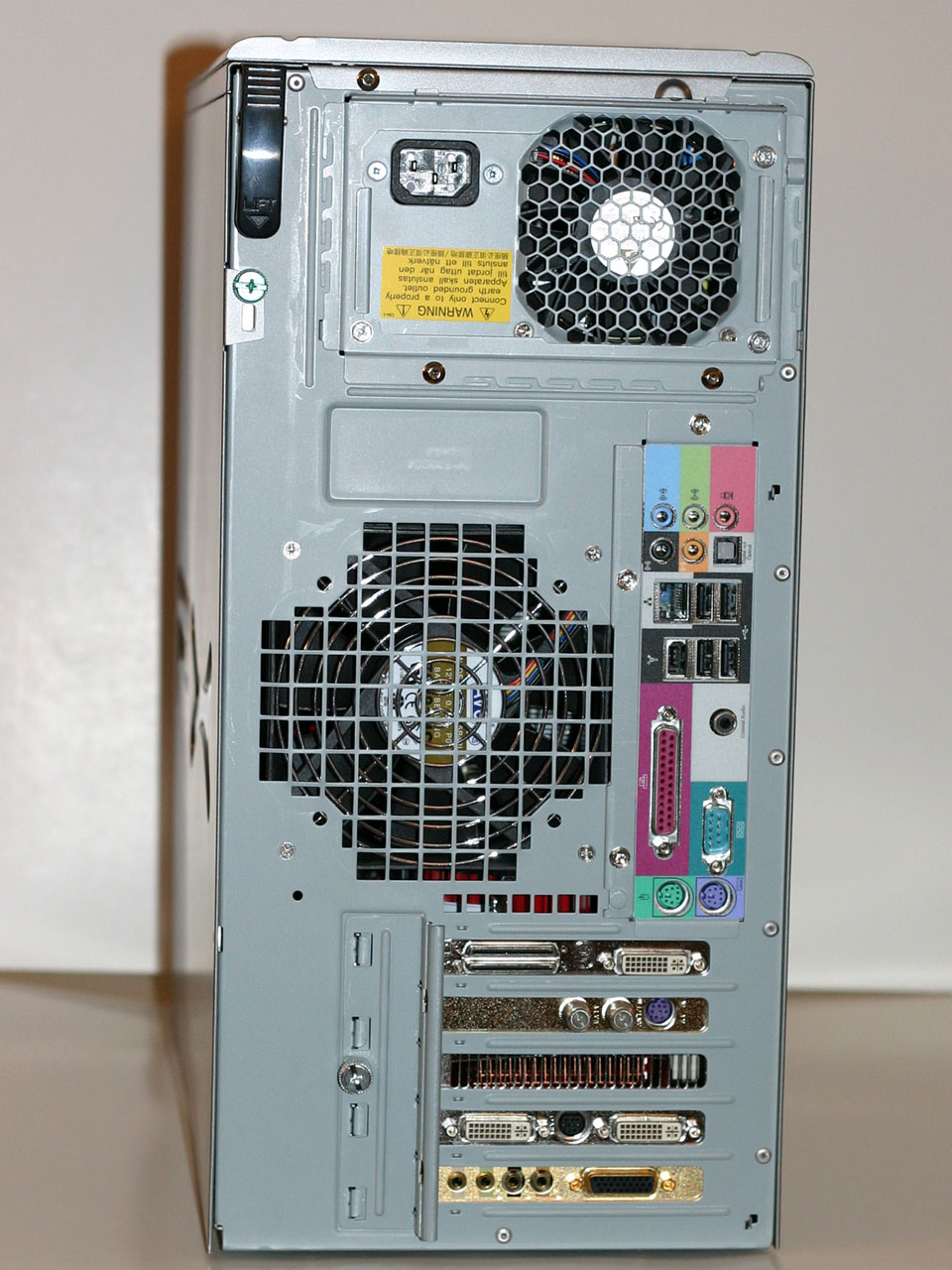
As usual, the rear of the case is home to the majority of the external connections. At the top is the power supply, and below this is the I/O panel. Many of the larger system builders are now moving towards legacy free I/O panels, which means no PS/2 ports, and no serial or parallel ports either; instead, you often get additional USB ports. Gateway bucks that trend here by including a parallel port and a COM port as well as PS/2 mouse and keyboard ports, so people will still be able to use most legacy devices. There are four more USB ports, a FireWire port, and a Gigabit Ethernet port. Five audio jacks allow for 7.1 audio along with a microphone, and optical and coaxial S/PDIF output is also provided. For systems with a sound card, of course, that will take priority over the integrated audio.
To the side of the I/O panel is a large 120mm fan exhaust, and the fan is also temperature controlled allowing it to spin at lower speeds and generate less noise when the system is idling. Below the I/O panel and fan are the five expansion slot brackets, all of which are occupied on our test system. At the top is an X1950 XTX CrossFire card, followed by the ATI Theater 550 TV tuner. The second X1950 XTX card is next, and at the bottom is the Creative X-Fi soundcard. A thumbscrew holds a metal plate in place that helps to secure all of the expansion cards. You can also see the single thumbscrew and lever at the top-left of the case that are used to remove the side panel.
One thing that isn't apparent from looking at the case is how heavy it is. This is easily one of the heaviest cases we have picked up in recent memory, particularly when we consider that it's not all that large. Certainly all of the components in the interior contribute to the overall weight, and even though the system is heavier than we expected it's not too heavy. Still, this definitely isn't a lightweight aluminum chassis. If you like to move your PC around a lot, that might be somewhat annoying, but for most people the weight of a PC isn't an important factor. One benefit is that the system also seems to be extremely sturdy (outside of a few plastic parts), and it feels like it could take a lot of abuse. Not that we recommend beating up on your computer, but you don't feel like you have to handle this case with velvet gloves.
Originally published at https://www.anandtech.com/show/2169 (Wayback Machine).