
Coming Soon to HD DVD: Silicon Optix HD HQV
- Posted in
- GPUs
The HD HQV Tests
The version of HQV Silicon Optix provided for us contains tests for a couple different aspects of HD video decoding: noise reduction, resolution loss, and deinterlacing artifacts (jaggies). We will break down the specifics of each test and talk about what we are looking for. This time around, Silicon Optix's scoring system is broken down with more variability in each test, but we will try to be as objective as possible in our analysis.
Noise Reduction
The first test in the suite is the noise reduction test which is broken down into two parts. Initially, we have an image of a flower that shows large blocks of nearly solid color without much motion. This tests the ability of the video processor to remove spatial noise.

When no noise reduction is applied, we see some static or sparking in the flower and background. Hardware will score higher the more noise it is able to eliminate without introducing any artifacts into the image.
The second test that looks at noise reduction presents us with a scene in motion. It is more difficult to eliminate noise while keeping objects in motion crisp and clear. In this test, we are looking for noise reduction as well as a lack of blurring on the ship.
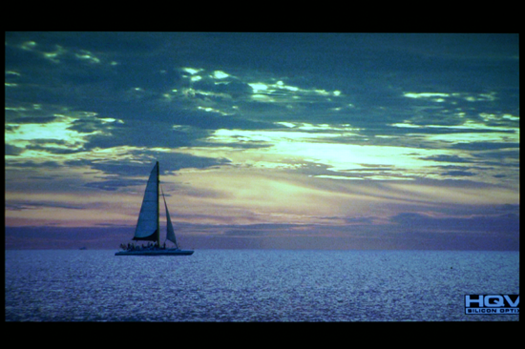
Scoring for these tests ranges from 0 to 25, with the highest score going to hardware that is able to reduce noise while maintaining a clear image that has no artifacts. While Silicon Optix has stated that scores can range anywhere from 0 to 25, they break down four suggested scores to use as a guide. Here's the breakdown:
25 - The level of noise is noticeably reduced without loss of detail
15 - The level of noise is somewhat reduced and detail is preserved
7 - The level of noise is somewhat reduced but detail is lost
0 - There is no apparent reduction in noise and/or image detail is significantly reduced or artifacts are introduced.
Until we have a better feel for the tests and the variability between hardware, we will stick with only using these delineations.
Video Resolution Loss
After noise reduction, we look at video resolution loss. Resolution loss can occur as a result of deinterlacing, and effectively reduces the amount of information that is displayed. In interlaced HD video, alternating fields display odd and even scanlines of one image. Simple deinterlacing techniques can choose to simply duplicate the data in the first field and toss out the rest of the information, and others will simply average the data in two fields together to create a frame. Both of these techniques have issues that cause artifacts, and both remove detail from the image.
When objects are not in motion, interlaced fields can simply be combined into one frame with no issue, and good hardware should be able to detect whether anything is moving or not and perform the appropriate deinterlacing method. In order to test the ability of hardware to accurately reproduce material from interlaced video in motion, Silicon Optix has included an SMPTE test image at 1920x1080 with a spinning bar over top to force hardware to employ the type of deinterlacing it would use when motion is detected. In the top and bottom left corners of the SMPTE test pattern are boxes that have alternating black and white horizontal lines that are one pixel wide. A high quality deinterlacing algorithm will be able to reproduce these very fine lines, and it is these that we are looking for in our test pattern.
Interestingly, AMD, NVIDIA, and PowerDVD software all fail to adequately reproduce the SMPTE resolution chart. We'll have to show a lower resolution example based on a smaller 512x512 version of the chart, but our comments apply to the full resolution results.
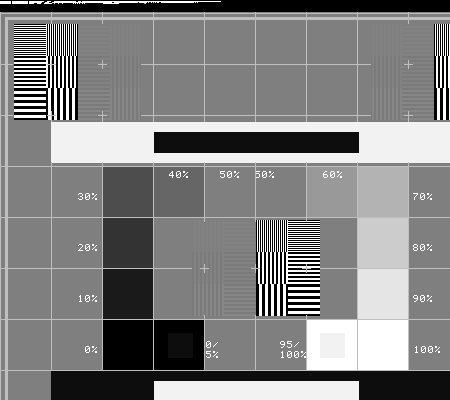
If the hardware averages the interlaced fields, the fine lines will be displayed as a grey block, while if data is thrown out, the block will be either solid black or solid white (depending on which field is left out).
Scoring for this test is an all or nothing 25 or 0 - either the hardware loses resolution or it does not.
Jaggies
A good deinterlacing algorithm should be able to avoid aliasing in diagonal lines apparent in less sophisticated techniques. This test returns from the original standard definition HQV test, and is a good judge of how well hardware is able to handle diagonal lines of varying slope.
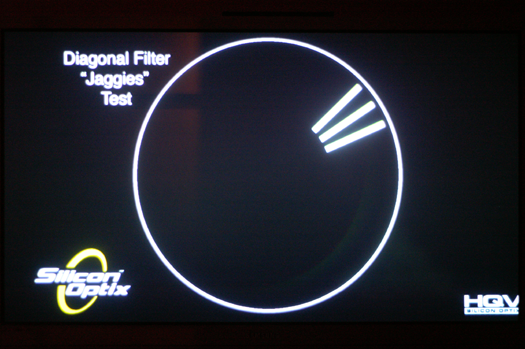
Here we want each of the three lines to maintain smoothness while moving back and forth around part of the circle. Scoring is based on a sliding scale between 0 and 20 with suggested breakdowns based on which bars maintain smooth edges. We will again be sticking with a score that matches the suggested options Silicon Optix provides rather than picking numbers in between these values.
20 - All three bars have smooth edges at all times
10 - The top two bars have smooth edges, but the bottom bar does not
5 - Only the top bar has a smooth edge
0 - None of the bars have smooth edges
Film Resolution Loss
This test is nearly the same as the video resolution loss test, and the score breakdown is the same: 25 if it works or 0 if it does not. This time around, interlaced video of the SMPTE test pattern is generated using a telecine process to produce 1080i video at 60 fps from a 24 fps progressive source. Because of the difference in frame rates between video and film, a 3:2 cadence must be used where one frame of film is stretched across 3 interlaced fields and the next frame of film is stretched across 2 fields.
One major advantage of this process is that it is reversible, meaning that less guess work needs to go into properly deinterlacing video produced from a film source. The process of reversing this 3:2 pulldown is called inverse telecine, and can be employed very effectively to produce a progressive image from interlaced media. If this is done correctly, no resolution needs to be lost.
Rather than having a moving bar over top of the test pattern, the image shifts back and forth from left to right and resolution loss can make the image appear to strobe or produce the appearance of vertical lines along the edges of fine lines.
Film Resolution Loss - Stadium Test
The final test is a practical test of film resolution loss, showing what can happen when a film source is not accurately reproduced. In this case, flickering in the stadiums or a moiré pattern can become apparent.
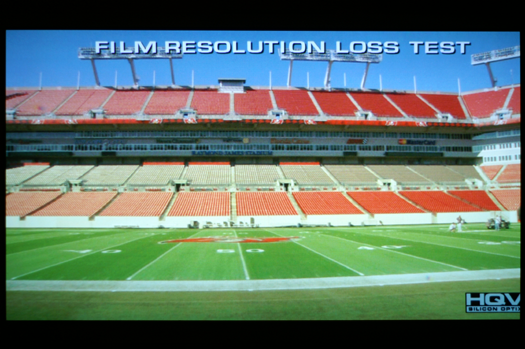
Scoring for this test is another all or nothing score granting the video decoder being tested either a 10 or a 0.
Now that we've gotten familiar with these tests, let's take a look at how AMD and NVIDIA stack up under HD HQV.
The version of HQV Silicon Optix provided for us contains tests for a couple different aspects of HD video decoding: noise reduction, resolution loss, and deinterlacing artifacts (jaggies). We will break down the specifics of each test and talk about what we are looking for. This time around, Silicon Optix's scoring system is broken down with more variability in each test, but we will try to be as objective as possible in our analysis.
Noise Reduction
The first test in the suite is the noise reduction test which is broken down into two parts. Initially, we have an image of a flower that shows large blocks of nearly solid color without much motion. This tests the ability of the video processor to remove spatial noise.
When no noise reduction is applied, we see some static or sparking in the flower and background. Hardware will score higher the more noise it is able to eliminate without introducing any artifacts into the image.
The second test that looks at noise reduction presents us with a scene in motion. It is more difficult to eliminate noise while keeping objects in motion crisp and clear. In this test, we are looking for noise reduction as well as a lack of blurring on the ship.
Scoring for these tests ranges from 0 to 25, with the highest score going to hardware that is able to reduce noise while maintaining a clear image that has no artifacts. While Silicon Optix has stated that scores can range anywhere from 0 to 25, they break down four suggested scores to use as a guide. Here's the breakdown:
25 - The level of noise is noticeably reduced without loss of detail
15 - The level of noise is somewhat reduced and detail is preserved
7 - The level of noise is somewhat reduced but detail is lost
0 - There is no apparent reduction in noise and/or image detail is significantly reduced or artifacts are introduced.
Until we have a better feel for the tests and the variability between hardware, we will stick with only using these delineations.
Video Resolution Loss
After noise reduction, we look at video resolution loss. Resolution loss can occur as a result of deinterlacing, and effectively reduces the amount of information that is displayed. In interlaced HD video, alternating fields display odd and even scanlines of one image. Simple deinterlacing techniques can choose to simply duplicate the data in the first field and toss out the rest of the information, and others will simply average the data in two fields together to create a frame. Both of these techniques have issues that cause artifacts, and both remove detail from the image.
When objects are not in motion, interlaced fields can simply be combined into one frame with no issue, and good hardware should be able to detect whether anything is moving or not and perform the appropriate deinterlacing method. In order to test the ability of hardware to accurately reproduce material from interlaced video in motion, Silicon Optix has included an SMPTE test image at 1920x1080 with a spinning bar over top to force hardware to employ the type of deinterlacing it would use when motion is detected. In the top and bottom left corners of the SMPTE test pattern are boxes that have alternating black and white horizontal lines that are one pixel wide. A high quality deinterlacing algorithm will be able to reproduce these very fine lines, and it is these that we are looking for in our test pattern.
Interestingly, AMD, NVIDIA, and PowerDVD software all fail to adequately reproduce the SMPTE resolution chart. We'll have to show a lower resolution example based on a smaller 512x512 version of the chart, but our comments apply to the full resolution results.
If the hardware averages the interlaced fields, the fine lines will be displayed as a grey block, while if data is thrown out, the block will be either solid black or solid white (depending on which field is left out).
Scoring for this test is an all or nothing 25 or 0 - either the hardware loses resolution or it does not.
Jaggies
A good deinterlacing algorithm should be able to avoid aliasing in diagonal lines apparent in less sophisticated techniques. This test returns from the original standard definition HQV test, and is a good judge of how well hardware is able to handle diagonal lines of varying slope.
Here we want each of the three lines to maintain smoothness while moving back and forth around part of the circle. Scoring is based on a sliding scale between 0 and 20 with suggested breakdowns based on which bars maintain smooth edges. We will again be sticking with a score that matches the suggested options Silicon Optix provides rather than picking numbers in between these values.
20 - All three bars have smooth edges at all times
10 - The top two bars have smooth edges, but the bottom bar does not
5 - Only the top bar has a smooth edge
0 - None of the bars have smooth edges
Film Resolution Loss
This test is nearly the same as the video resolution loss test, and the score breakdown is the same: 25 if it works or 0 if it does not. This time around, interlaced video of the SMPTE test pattern is generated using a telecine process to produce 1080i video at 60 fps from a 24 fps progressive source. Because of the difference in frame rates between video and film, a 3:2 cadence must be used where one frame of film is stretched across 3 interlaced fields and the next frame of film is stretched across 2 fields.
One major advantage of this process is that it is reversible, meaning that less guess work needs to go into properly deinterlacing video produced from a film source. The process of reversing this 3:2 pulldown is called inverse telecine, and can be employed very effectively to produce a progressive image from interlaced media. If this is done correctly, no resolution needs to be lost.
Rather than having a moving bar over top of the test pattern, the image shifts back and forth from left to right and resolution loss can make the image appear to strobe or produce the appearance of vertical lines along the edges of fine lines.
Film Resolution Loss - Stadium Test
The final test is a practical test of film resolution loss, showing what can happen when a film source is not accurately reproduced. In this case, flickering in the stadiums or a moiré pattern can become apparent.
Scoring for this test is another all or nothing score granting the video decoder being tested either a 10 or a 0.
Now that we've gotten familiar with these tests, let's take a look at how AMD and NVIDIA stack up under HD HQV.
Originally published at https://www.anandtech.com/show/2168 (Wayback Machine).