
Tuniq Tower 120: Air Cooling to the Max
- Posted in
- Cases/Cooling/PSUs
Noise
Improved cooling and higher overclocks often come with additional noise. For some users the goal is maximum stable overclock, and they will live with the inconvenience of a louder system. For others silence is the most important factor, and these users will forgo overclocking if this increases system noise levels.Fortunately, both the stock Intel retail HSF and the Tuniq Tower 120 pay serious attention to the noise factor. Intel uses a low speed 80mm fan that runs at about 1100 RPM under normal operating conditions. The Tuniq Tower 120 uses a massive 120mm 9-blade fan that moves a lot of air and that can be manually adjusted between 1000 and 2100 RPM.
It should be pointed out that the fan speeds reported by NVIDIA Monitor are double the actual fan speeds. Fan speeds were measured and confirmed with the well-known SpeedFan, which is a free download. SpeedFan confirmed the adjustment range of the Tuniq Tower 120 to be 1000 RPM to 2100 RPM, which is just a bit better than the specified 1000 to 2000 RPM.
In looking at noise measurements, the test environment was first considered. The noise floor in the test room, with all computers and fans off, is 36.4dB. There are also virtually no power supplies that do not have a fan. While Zalman and perhaps others make expensive fanless PSUs, we are not aware of one that is larger than 500W, or that would be used for seriously overclocking a system. With that in mind the noise level of the system with all fans turned off except the power supply was measured. The power supply used for the cooling test bed was the OCZ PowerStream 520, which is one of the quieter high performance power supplies. The noise level of the power supply was 38.3dB from 24" (61cm) and 47dB from 6" (152mm).
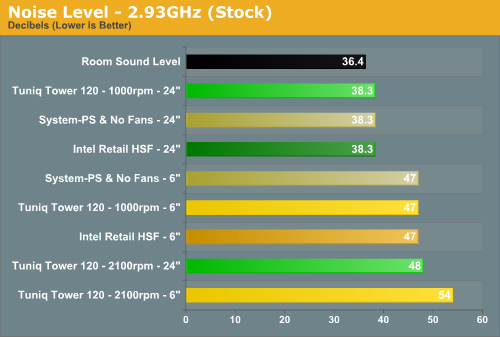
Measured noise levels in this chart should be considered worst case. Measurements were taken from an open side of a mid tower case 6" from the open HSF and 24" from the open HSF. Real world would be a completely closed case with a further reduction in noise.
The Intel retail HSF and the Tuniq Tower 120 at the 1000RPM setting were below the system noise floor at all tested speeds. That means they produced noise levels that were below the noise already produced by the quiet OCZ 520w power supply.
As already pointed out the Tuniq Tower 120 comes with a rheostat for adjusting fan speed from 1000 to 2100 RPM. At 1000 RPM the Tuniq can be considered as good as silent, but noise does go up as fan speed is manually increased. At the highest speed from 24" away the Tuniq measured 48dB compared to the system "floor" of 38.3dB. At a 6" distance the difference was 54dB to 47dB. Keep in mind that the dB scale is logarithmic and not linear, so a 3dB increase represents a doubling of sound power. Some studies suggest that while the human ear can discern small differences in sound level, the human ear perceives a doubling of loudness at a 10dB increase. Others quote double the sound level as 6db. In either case the increased noise of the Tuniq at 2100 RPM will definitely be noticeable to almost any user.
In most cases the 1000 RPM setting of the Tuniq Tower 120 will cool very adequately and sat very low noise levels. We found no difference in cooling with 1000 or 2100 RPM up to 3.73GHz. Above this point the higher 2100 speed cooled about 2C to 5C cooler than the 1000 low-speed setting. The system still topped out at 3.9GHz on low speed, but at a bit higher temperatures. This, of course, is with the Core 2 Duo processor, which runs rather cool. Your results with other CPUs will vary from this.
In the end whether you choose silence or maximum cooling with a bit more noise is up to you. With the adjustable fan speed you can dial in what is tolerable to you - from silence to some noise but a bit better cooling. It is worth mentioning that noise remained below the system noise floor until a speed of about 1600 RPM was reached. Above that speed noise increased rapidly.
Originally published at https://www.anandtech.com/show/2152 (Wayback Machine).