
Notebook Trio: ASUS A8JS and G2P and ABS Mayhem Z5
- Posted in
- Laptops
ABS Mayhem Z5 - Exterior and Features
ABS is a relatively well-known computer systems manufacturer, although they are likely far more familiar to our readers as the parent company of Newegg.com and ChiefValue.com. For people that are more interested in getting a prebuilt system rather than building something themselves, ABS is a reasonable option. Not surprisingly, prices are going to be slightly higher for their computers than if you were to purchase all of the individual parts separately from Newegg.com and assemble it yourself. However, while that is a very common activity among enthusiasts when it comes to building a desktop computer, the do-it-yourself notebook market is virtually nonexistent. The amount of work that goes into creating a high-performance laptop involves a lot more research and specific design decisions, so it's not too surprising that we don't have standards for notebook chassis, motherboards, displays, GPUs, keyboards, etc. We ran into a few problems with the last ABS desktop computer that we reviewed, but hopefully the Mayhem Z5 will fare better.
Where ASUS went for a lot of bling with their G2P "gaming" laptop and backed it up with lackluster 3D performance, ABS actually packs in the necessary goods to provide serious gaming performance. The model we were sent for review includes the NVIDIA GeForce Go 7900 GTX, and ABS has informed us of plans to provide an update that will include the GeForce Go 7950 GTX. No word yet on final pricing of the upgrade, but the 7950 GTX should be about 15% faster in terms of raw 3D capability. Of course, the faster gaming performance is going to come at a serious penalty to battery life, but there's not much that can be done about that short of packing around a bunch of extra batteries.
The exterior of the Mayhem Z5 is composed of brushed aluminum, with the top cover being charcoal colored anodized aluminum. Silver and black trim provide accents, and there's also the obligatory Mayhem logo on the cover. Somewhat similar to the ASUS G2P, multimedia buttons are visible along the front edge of the laptop in can be accessed even when the laptop cover is closed. The Mayhem Z5 is also pretty hefty in terms of weight, although you would expect that with a 17" gaming notebook. This definitely feels like more of a desktop replacement notebook than the G2P, though their weight is similar. Something else worth mentioning is that there are a lot more options in terms of customization than you get with the ASUS models, so you can decide to put in whatever processor, memory, etc. you might want and ABS will do that for you. That said, the configuration we were sent includes a good selection of components for the target market.
Out of these three laptops, the Mayhem Z5 has the most to see on the front of the unit. Of course we have the obligatory latches; the left latch locks into place to prevent you from accidentally opening the laptop and can be useful during transportation, while the right latch is a more traditional spring-loaded mechanism. On the left and right sides are multimedia keys that include a power button (which similar to the G2P will turn the system on but it won't turn it off), volume control, repeat, next and previous track, play/pause, and stop/eject. There's a small LED panel located front and center that shows the time, and track/time during CD playback. The LED panel also has indicators for hard drive activity, power, WiFi, webcam, battery, AC power, keyboard indicators, email, and a couple other items that we're not sure about (because they never lit up).
The right side is home to a flash memory reader (MS/MS Pro/MS Duo, SD/Mini-SD, MMC/RSMMC) along with an ExpressCard 54 port. Towards the front you have the headphone and microphone audio ports, and along the middle of the right side you get an unpowered FireWire port and two USB ports. At the back of the laptop you can see some ventilation that appears to be for the built-in speakers, but there's still a lot of unused space. It would have been great to have two more audio ports along the side to make it easier to connect 5.1/7.1 speakers.
The left side of the Mayhem Z5 is almost entirely empty. The optical drive bay is located towards the front, and there's a security locking mechanism at the back. Mirroring the right side there are some perforations at the back of the laptop for the internal speaker. It definitely seems like more ports could have been added to the left side, which would be nice considering it's a bit inconvenient to reach behind your laptop to get to the some of the remaining ports.
As usual, the back of the laptop is home to the majority of the connections. At the far left is the primary cooling ventilation, which expels heat generated from both the CPU as well as the GPU. Surprisingly, even during heavy use the vent doesn't get very warm. Just do the right of the ventilation are two more audio ports, which as mentioned are a bit far away from the other audio ports if you're planning on hooking up surround sound speakers. Two more USB ports are next, followed by a DVI port, TV input, modem and network connections, and a TV output port. Once again, the DVI port only works in single-link resolutions, so 2560x1600 output is not possible. The power socket is just to the right of the TV out, and at the far right is a legacy serial port. It's a bit odd to see a serial port on the laptop these days, but some people still need them for various equipment and it's good to see that at least a few high-end laptops continue to support that market.
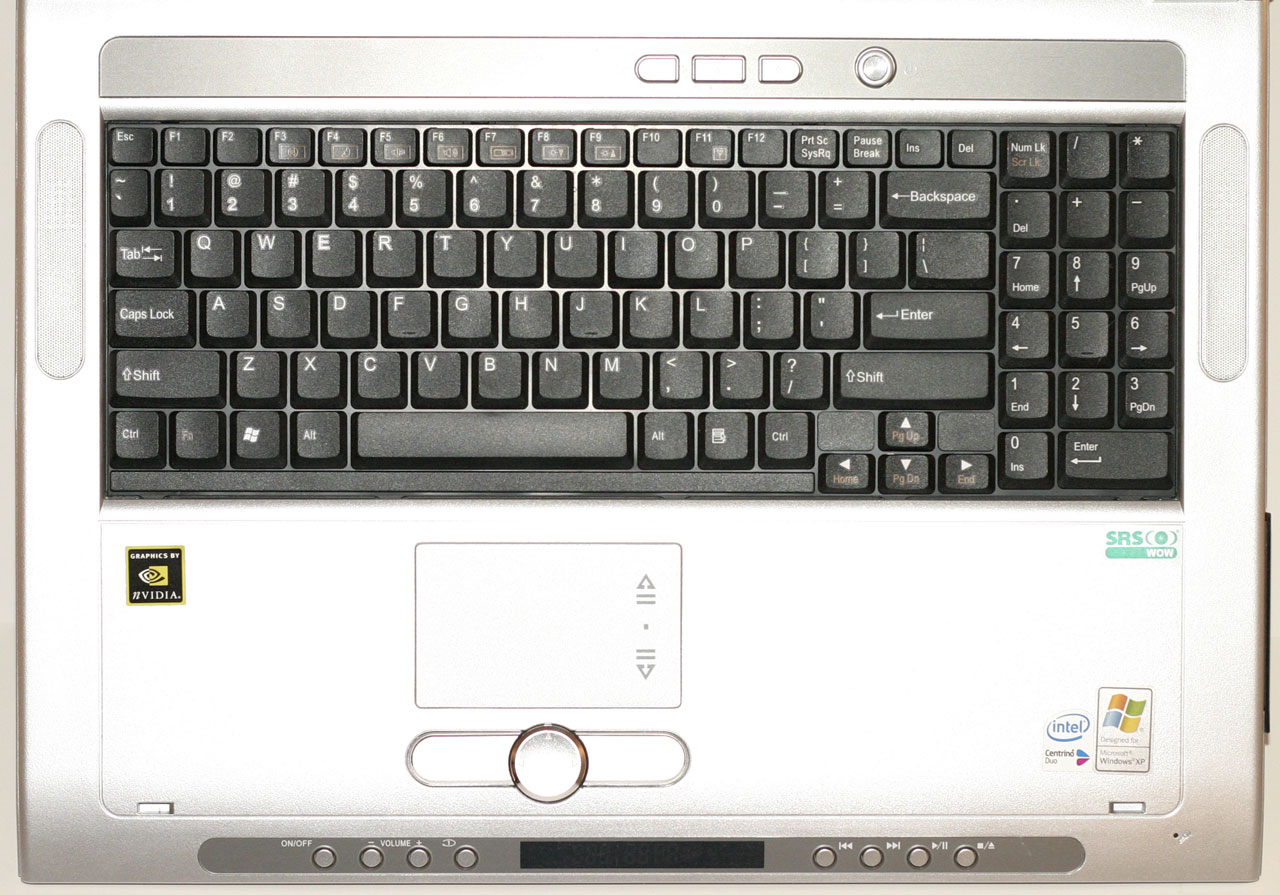
Opening up the Mayhem Z5, we're greeted with the large display and keyboard. The latest thing for laptops appears to the inclusion of webcams, and all three laptops in this article have them. The ABS laptop includes a 1.3 megapixel model that seems to be about the same as the G2P webcam. The microphone on the ABS is located on the bottom right of the hand rest, however, which may or may not be the best place for it. The trackpad is as you would expect, only there's also a circular button in the middle that can be used to scroll (left/right/up/down) within applications.
Unlike the G2P, ABS has chosen to include a full keyboard as well as number keypad. That's the good news and we commend them for putting a proper keyboard on a 17" laptop. Unfortunately, there are still a few "missing" keys that we found ourselves searching for. Throughout several weeks of testing, we never did get used to the missing Home/End/PgUp/PgDn keys. Of course, I wasn't using the laptop exclusively, so in time we could likely get used to using these keys over on the number keypad (although that would require turning off the Num-Lock option). The other option is to use the Fn key along with the cursor (arrow) keys, but we found that to be less than ideal. Not everyone necessarily uses all of those keys a lot, so some people might not notice that they're even missing, but we most definitely did notice. Another minor keyboard item that we did like is the location of the Ctrl and Fn keys in the bottom left of the keyboard. A lot of laptops put the Fn key in the corner, but we are used to having the Ctrl key in that location, so we prefer the layout used on the G2P and the Mayhem Z5.
The final item to discuss is the display, which is similar to most other high-end 17" laptops we've reviewed in that it has a native resolution of 1920x1200. We would much rather have a higher resolution display than not, as you can still run at a lower resolution at times if necessary, whereas if you have a lower native resolution there's nothing you can do to increase it. We did find that the LCD functions very well in lower resolution modes, so as the laptop gets older it shouldn't be any problem to run next-generation games at settings other than the LCD's native resolution. In terms of display quality, the Mayhem Z5 LCD is falls between the two ASUS offerings: it's slightly brighter and has better colors than the A8JS, but it's not as bright of vibrant as the G2P. We would still rate the G2P's display as having the best overall image quality, but unfortunately we aren't aware of any laptops that combine both options to give people the ideal laptop LCD. Given the choice between the two options right now, we prefer the higher resolution over the better image quality, but that is definitely a personal preference and others might disagree.
ABS is a relatively well-known computer systems manufacturer, although they are likely far more familiar to our readers as the parent company of Newegg.com and ChiefValue.com. For people that are more interested in getting a prebuilt system rather than building something themselves, ABS is a reasonable option. Not surprisingly, prices are going to be slightly higher for their computers than if you were to purchase all of the individual parts separately from Newegg.com and assemble it yourself. However, while that is a very common activity among enthusiasts when it comes to building a desktop computer, the do-it-yourself notebook market is virtually nonexistent. The amount of work that goes into creating a high-performance laptop involves a lot more research and specific design decisions, so it's not too surprising that we don't have standards for notebook chassis, motherboards, displays, GPUs, keyboards, etc. We ran into a few problems with the last ABS desktop computer that we reviewed, but hopefully the Mayhem Z5 will fare better.
 |
 |
| Click to enlarge |
Where ASUS went for a lot of bling with their G2P "gaming" laptop and backed it up with lackluster 3D performance, ABS actually packs in the necessary goods to provide serious gaming performance. The model we were sent for review includes the NVIDIA GeForce Go 7900 GTX, and ABS has informed us of plans to provide an update that will include the GeForce Go 7950 GTX. No word yet on final pricing of the upgrade, but the 7950 GTX should be about 15% faster in terms of raw 3D capability. Of course, the faster gaming performance is going to come at a serious penalty to battery life, but there's not much that can be done about that short of packing around a bunch of extra batteries.
The exterior of the Mayhem Z5 is composed of brushed aluminum, with the top cover being charcoal colored anodized aluminum. Silver and black trim provide accents, and there's also the obligatory Mayhem logo on the cover. Somewhat similar to the ASUS G2P, multimedia buttons are visible along the front edge of the laptop in can be accessed even when the laptop cover is closed. The Mayhem Z5 is also pretty hefty in terms of weight, although you would expect that with a 17" gaming notebook. This definitely feels like more of a desktop replacement notebook than the G2P, though their weight is similar. Something else worth mentioning is that there are a lot more options in terms of customization than you get with the ASUS models, so you can decide to put in whatever processor, memory, etc. you might want and ABS will do that for you. That said, the configuration we were sent includes a good selection of components for the target market.
 |
| Click to enlarge |
Out of these three laptops, the Mayhem Z5 has the most to see on the front of the unit. Of course we have the obligatory latches; the left latch locks into place to prevent you from accidentally opening the laptop and can be useful during transportation, while the right latch is a more traditional spring-loaded mechanism. On the left and right sides are multimedia keys that include a power button (which similar to the G2P will turn the system on but it won't turn it off), volume control, repeat, next and previous track, play/pause, and stop/eject. There's a small LED panel located front and center that shows the time, and track/time during CD playback. The LED panel also has indicators for hard drive activity, power, WiFi, webcam, battery, AC power, keyboard indicators, email, and a couple other items that we're not sure about (because they never lit up).
 |
| Click to enlarge |
The right side is home to a flash memory reader (MS/MS Pro/MS Duo, SD/Mini-SD, MMC/RSMMC) along with an ExpressCard 54 port. Towards the front you have the headphone and microphone audio ports, and along the middle of the right side you get an unpowered FireWire port and two USB ports. At the back of the laptop you can see some ventilation that appears to be for the built-in speakers, but there's still a lot of unused space. It would have been great to have two more audio ports along the side to make it easier to connect 5.1/7.1 speakers.
 |
| Click to enlarge |
The left side of the Mayhem Z5 is almost entirely empty. The optical drive bay is located towards the front, and there's a security locking mechanism at the back. Mirroring the right side there are some perforations at the back of the laptop for the internal speaker. It definitely seems like more ports could have been added to the left side, which would be nice considering it's a bit inconvenient to reach behind your laptop to get to the some of the remaining ports.
 |
| Click to enlarge |
As usual, the back of the laptop is home to the majority of the connections. At the far left is the primary cooling ventilation, which expels heat generated from both the CPU as well as the GPU. Surprisingly, even during heavy use the vent doesn't get very warm. Just do the right of the ventilation are two more audio ports, which as mentioned are a bit far away from the other audio ports if you're planning on hooking up surround sound speakers. Two more USB ports are next, followed by a DVI port, TV input, modem and network connections, and a TV output port. Once again, the DVI port only works in single-link resolutions, so 2560x1600 output is not possible. The power socket is just to the right of the TV out, and at the far right is a legacy serial port. It's a bit odd to see a serial port on the laptop these days, but some people still need them for various equipment and it's good to see that at least a few high-end laptops continue to support that market.
 |
| Click to enlarge |
Opening up the Mayhem Z5, we're greeted with the large display and keyboard. The latest thing for laptops appears to the inclusion of webcams, and all three laptops in this article have them. The ABS laptop includes a 1.3 megapixel model that seems to be about the same as the G2P webcam. The microphone on the ABS is located on the bottom right of the hand rest, however, which may or may not be the best place for it. The trackpad is as you would expect, only there's also a circular button in the middle that can be used to scroll (left/right/up/down) within applications.
 |
| Click to enlarge |
Unlike the G2P, ABS has chosen to include a full keyboard as well as number keypad. That's the good news and we commend them for putting a proper keyboard on a 17" laptop. Unfortunately, there are still a few "missing" keys that we found ourselves searching for. Throughout several weeks of testing, we never did get used to the missing Home/End/PgUp/PgDn keys. Of course, I wasn't using the laptop exclusively, so in time we could likely get used to using these keys over on the number keypad (although that would require turning off the Num-Lock option). The other option is to use the Fn key along with the cursor (arrow) keys, but we found that to be less than ideal. Not everyone necessarily uses all of those keys a lot, so some people might not notice that they're even missing, but we most definitely did notice. Another minor keyboard item that we did like is the location of the Ctrl and Fn keys in the bottom left of the keyboard. A lot of laptops put the Fn key in the corner, but we are used to having the Ctrl key in that location, so we prefer the layout used on the G2P and the Mayhem Z5.
The final item to discuss is the display, which is similar to most other high-end 17" laptops we've reviewed in that it has a native resolution of 1920x1200. We would much rather have a higher resolution display than not, as you can still run at a lower resolution at times if necessary, whereas if you have a lower native resolution there's nothing you can do to increase it. We did find that the LCD functions very well in lower resolution modes, so as the laptop gets older it shouldn't be any problem to run next-generation games at settings other than the LCD's native resolution. In terms of display quality, the Mayhem Z5 LCD is falls between the two ASUS offerings: it's slightly brighter and has better colors than the A8JS, but it's not as bright of vibrant as the G2P. We would still rate the G2P's display as having the best overall image quality, but unfortunately we aren't aware of any laptops that combine both options to give people the ideal laptop LCD. Given the choice between the two options right now, we prefer the higher resolution over the better image quality, but that is definitely a personal preference and others might disagree.
Originally published at https://www.anandtech.com/show/2145 (Wayback Machine).