
Notebook Trio: ASUS A8JS and G2P and ABS Mayhem Z5
- Posted in
- Laptops
ASUS G2P - Internals and Usage
Looking at the bottom of the laptop, there are three access panels this time instead of just two, along with the battery.
This time, we didn't have any problems taking out the battery. There are two latches that hold the battery in place, however, one of which is a locking mechanism that snaps into place rather than the typical spring-loaded lock. This prevents the battery from accidentally being released. Once you unlock the battery latch, the second spring-loaded latch can be used to release the battery.
The battery is again an 8-cell model rated at 4800 mAHr, only this time it is a 14.8V battery (14.8V x 4800 = 71 WHr). The larger capacity is likely required because of the 17" LCD, and in testing the G2P requires quite a bit more power than the A8JS. As can be seen in the picture, the battery is also a long, narrow design instead of the rectangle used in the A8JS.
Removing the bottom covers grants access to three different areas. At the top is the 2.5" SATA hard drive location. The bottom left holds a mini PCI slot (which was unoccupied on our unit) along with a Bluetooth/WiFi adapter. The third access panel hides the CPU, GPU, and memory. If you actually want to remove the CPU heatsink and swap processors, you will have to remove the rest of the plastic shell in order to expose a few more screws. As with the A8JS, this is not a simple process, and it will void your warranty, but it can be done if necessary. What is somewhat interesting to note is that there's only one SO-DIMM memory socket on the bottom of the laptop. However, the laptop comes equipped with 2GB of memory, so where's the other memory socket?
In a rather unique twist, ASUS puts the second SO-DIMM slot underneath the keyboard. Perhaps this might help with cooling in some way, but it makes upgrading the memory extremely inconvenient. Luckily, as the laptop already has 2GB of memory, and as that's the maximum supported it won't be a problem.
The ASUS G2P has the largest hard drive out of these laptops, and it's also the largest 2.5" SATA size currently available: a 160GB Hitachi Travelstar. Just like you don't see 10,000 RPM desktop drives with a ton of storage space, the fastest 7200 RPM 2.5" drives are only 100GB. Some people will prefer slightly faster hard drives and others will prefer having more capacity available. Most of us tend to prefer capacity first, and especially with laptops even the largest hard drives can easily be filled if you start storing movies and install a few games.
In actual use the ASUS G2P provides a very good experience, with one exception that we'll get to in a moment. Battery life is still decent, coming in slightly lower than the A8JS in some cases and essentially tied in others, which is expected given the larger display. Battery life during DVD playback was actually two minutes longer than the A8JS, but given the margin of error we would call that a tie. Viewing movies on the G2P is much better than on the other laptops, simply because of the brighter, more vibrant display. In other applications, performance is basically identical to the A8JS and Mayhem Z5. Stability was excellent as well, and like the A8JS we didn't have any problems there. So what's the big problem? As you might expect from what we've said already, it's gaming performance.
We could overlook gaming performance were it not for the fact that this is so heavily marketed as a "gaming notebook". The highlighted WASD keys, red accents on the side of the display and keyboard, and the bold "ASUS Gaming Series" proclamation that appears when you first boot the laptop all give you the impression that this should be able to run most games without difficulties. Unless you like playing games that were made in 2005 and earlier, for the most part the G2P is inadequate for gaming. The GeForce Go 7700 in the ASUS A8JS already has issues running the latest games at maximum quality at the native LCD resolution, and in our tests it's 20% to 75% faster than the Radeon Mobility X1700. On average, it ends up being about 50% faster, especially at the most reasonable settings. The X1700 usually closes the performance gap as you increase the resolution and enable 4xAA, but at that point average FPS can drop into the low teens or even single digits making any further discussion of performance rather meaningless.
Without having all of the other components identical in the two laptops, it's impossible to say for sure what the specific advantages of the X1700 might be over the 7700. It might use less power and thus generate less heat (you'll see later that this appears to be the case), but long battery life is usually not a critical factor for gaming laptops, as few laptops can manage more than about an hour of battery life when running modern 3D titles. The overall focus of the G2P definitely doesn't appear to be battery life or mobility, so choosing a slower GPU doesn't make much sense.
One final item to note is a small issue with our the keyboard. We said earlier that it is largely the same as the layout used on the A8JS, and that's true. However, the version we were sent for review is a prerelease model, and we noticed that some of the keys were mislabeled. For example, to the left of the Enter key are two keys, @ ' and ~ #. On versions of the laptop designed for European countries, those labels are probably correct, but using a standard US Windows XP installation the keys were actually " ' and | \ respectively. Also, we really would have liked to see some of the empty space on the top of the laptop put to better use.
If ASUS is serious about their Gaming Series notebooks, they really need to pay more attention to the actual gaming performance that the graphics chip can provide. As it is, the G2P might please casual gamers who are more interested in outward appearances, and it generally offers good multimedia functionality. The larger hard drive will also be good for multimedia purposes. If you don't mind the added weight, the display is easier on your eyes, and the somewhat low native resolution (for a 17" LCD on a notebook) might also be preferable for some people. In short, everything about the G2P design is good and we like the display a lot, but the chosen graphics chip just doesn't make much sense. A GeForce Go 7700 would have been a much better choice, and with the 17" chassis would also like to see models with even faster graphics chips like the GeForce Go 7900 series. As it stands, the G2P merely pays lip service to gaming and is likely to disappoint users looking for something in that niche market. As long as you aren't looking for gaming performance, though, there's still quite a bit to like with the design.
Looking at the bottom of the laptop, there are three access panels this time instead of just two, along with the battery.
 |
| Click to enlarge |
This time, we didn't have any problems taking out the battery. There are two latches that hold the battery in place, however, one of which is a locking mechanism that snaps into place rather than the typical spring-loaded lock. This prevents the battery from accidentally being released. Once you unlock the battery latch, the second spring-loaded latch can be used to release the battery.
 |
| Click to enlarge |
The battery is again an 8-cell model rated at 4800 mAHr, only this time it is a 14.8V battery (14.8V x 4800 = 71 WHr). The larger capacity is likely required because of the 17" LCD, and in testing the G2P requires quite a bit more power than the A8JS. As can be seen in the picture, the battery is also a long, narrow design instead of the rectangle used in the A8JS.
 |
| Click to enlarge |
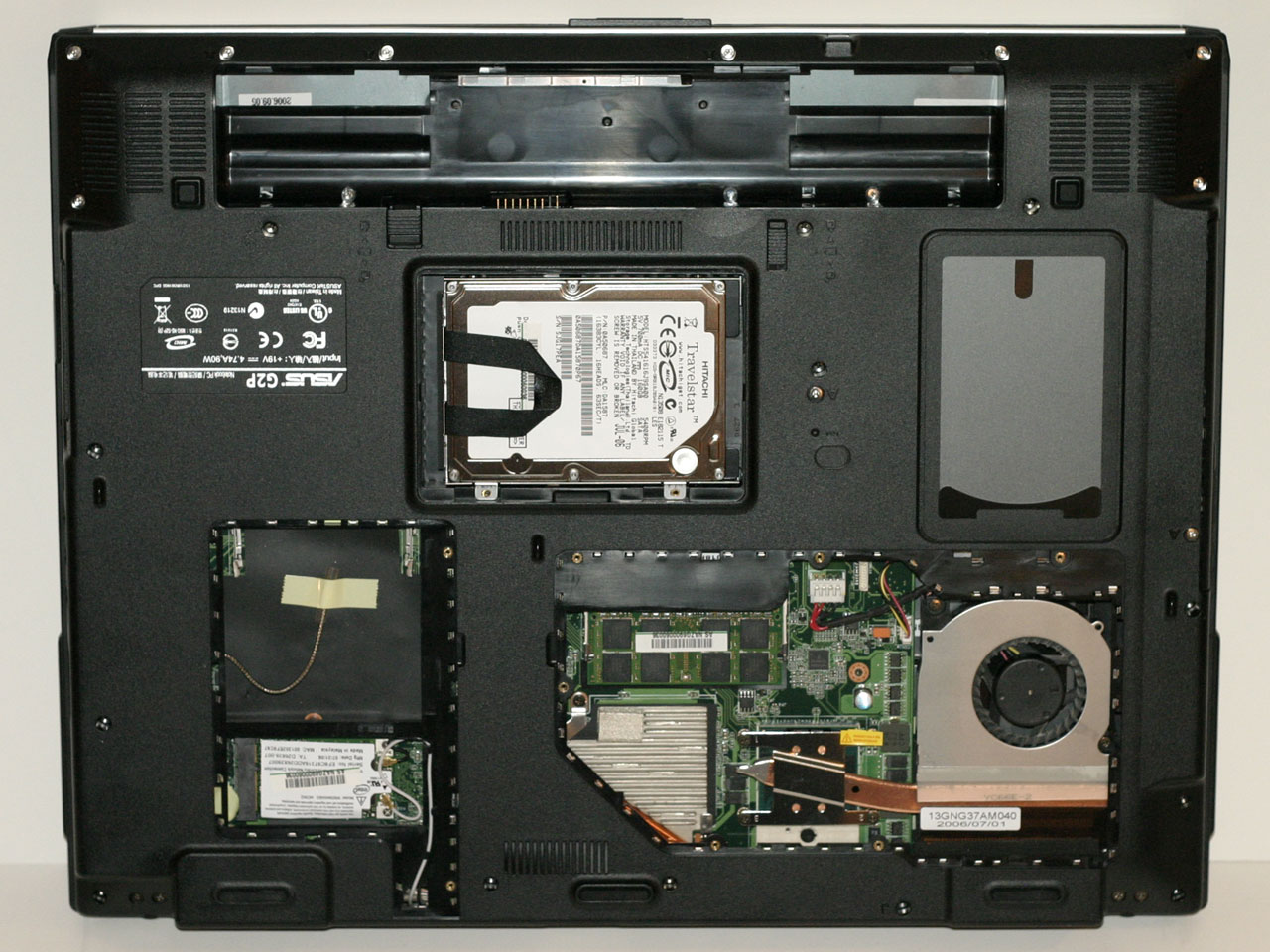
Removing the bottom covers grants access to three different areas. At the top is the 2.5" SATA hard drive location. The bottom left holds a mini PCI slot (which was unoccupied on our unit) along with a Bluetooth/WiFi adapter. The third access panel hides the CPU, GPU, and memory. If you actually want to remove the CPU heatsink and swap processors, you will have to remove the rest of the plastic shell in order to expose a few more screws. As with the A8JS, this is not a simple process, and it will void your warranty, but it can be done if necessary. What is somewhat interesting to note is that there's only one SO-DIMM memory socket on the bottom of the laptop. However, the laptop comes equipped with 2GB of memory, so where's the other memory socket?
 |
| Click to enlarge |
In a rather unique twist, ASUS puts the second SO-DIMM slot underneath the keyboard. Perhaps this might help with cooling in some way, but it makes upgrading the memory extremely inconvenient. Luckily, as the laptop already has 2GB of memory, and as that's the maximum supported it won't be a problem.
 |
| Click to enlarge |
The ASUS G2P has the largest hard drive out of these laptops, and it's also the largest 2.5" SATA size currently available: a 160GB Hitachi Travelstar. Just like you don't see 10,000 RPM desktop drives with a ton of storage space, the fastest 7200 RPM 2.5" drives are only 100GB. Some people will prefer slightly faster hard drives and others will prefer having more capacity available. Most of us tend to prefer capacity first, and especially with laptops even the largest hard drives can easily be filled if you start storing movies and install a few games.
In actual use the ASUS G2P provides a very good experience, with one exception that we'll get to in a moment. Battery life is still decent, coming in slightly lower than the A8JS in some cases and essentially tied in others, which is expected given the larger display. Battery life during DVD playback was actually two minutes longer than the A8JS, but given the margin of error we would call that a tie. Viewing movies on the G2P is much better than on the other laptops, simply because of the brighter, more vibrant display. In other applications, performance is basically identical to the A8JS and Mayhem Z5. Stability was excellent as well, and like the A8JS we didn't have any problems there. So what's the big problem? As you might expect from what we've said already, it's gaming performance.
We could overlook gaming performance were it not for the fact that this is so heavily marketed as a "gaming notebook". The highlighted WASD keys, red accents on the side of the display and keyboard, and the bold "ASUS Gaming Series" proclamation that appears when you first boot the laptop all give you the impression that this should be able to run most games without difficulties. Unless you like playing games that were made in 2005 and earlier, for the most part the G2P is inadequate for gaming. The GeForce Go 7700 in the ASUS A8JS already has issues running the latest games at maximum quality at the native LCD resolution, and in our tests it's 20% to 75% faster than the Radeon Mobility X1700. On average, it ends up being about 50% faster, especially at the most reasonable settings. The X1700 usually closes the performance gap as you increase the resolution and enable 4xAA, but at that point average FPS can drop into the low teens or even single digits making any further discussion of performance rather meaningless.
Without having all of the other components identical in the two laptops, it's impossible to say for sure what the specific advantages of the X1700 might be over the 7700. It might use less power and thus generate less heat (you'll see later that this appears to be the case), but long battery life is usually not a critical factor for gaming laptops, as few laptops can manage more than about an hour of battery life when running modern 3D titles. The overall focus of the G2P definitely doesn't appear to be battery life or mobility, so choosing a slower GPU doesn't make much sense.
One final item to note is a small issue with our the keyboard. We said earlier that it is largely the same as the layout used on the A8JS, and that's true. However, the version we were sent for review is a prerelease model, and we noticed that some of the keys were mislabeled. For example, to the left of the Enter key are two keys, @ ' and ~ #. On versions of the laptop designed for European countries, those labels are probably correct, but using a standard US Windows XP installation the keys were actually " ' and | \ respectively. Also, we really would have liked to see some of the empty space on the top of the laptop put to better use.
If ASUS is serious about their Gaming Series notebooks, they really need to pay more attention to the actual gaming performance that the graphics chip can provide. As it is, the G2P might please casual gamers who are more interested in outward appearances, and it generally offers good multimedia functionality. The larger hard drive will also be good for multimedia purposes. If you don't mind the added weight, the display is easier on your eyes, and the somewhat low native resolution (for a 17" LCD on a notebook) might also be preferable for some people. In short, everything about the G2P design is good and we like the display a lot, but the chosen graphics chip just doesn't make much sense. A GeForce Go 7700 would have been a much better choice, and with the 17" chassis would also like to see models with even faster graphics chips like the GeForce Go 7900 series. As it stands, the G2P merely pays lip service to gaming and is likely to disappoint users looking for something in that niche market. As long as you aren't looking for gaming performance, though, there's still quite a bit to like with the design.
Originally published at https://www.anandtech.com/show/2145 (Wayback Machine).