
Intel P965: Foxconn P9657AA- 8KS2H
- Posted in
- Motherboards
FSB Overclocking Results
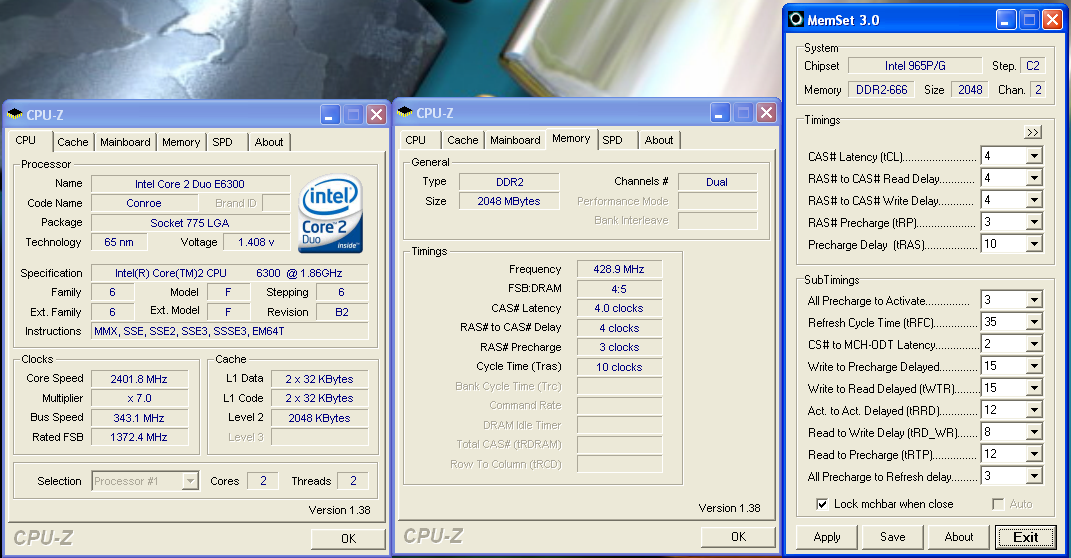
We were able to reach a final benchmark stable setting of 7x343 FSB resulting in a clock speed of 2401MHz. The board was capable of running at 7x354 FSB but would consistently fail our dual Prime95 test along with a few game benchmarks. We settled on the 7x343 FSB setting and set our VCore to an acceptable 1.4000V with Vdroop being around .03V during load testing. We were able to operate our GEIL memory at 4-3-3-10 at 2.2V at these settings, our Crucial Tenth Anniversary 2GB DDR2-667 kit at 4-4-4-3-12 at 2.2V, and the TwinMOS PC2-5300 at 5-4-4-10 at 2.15V.
Although not shown in our charts we had one anomaly with this board when overclocking and using a P4 processor. We generally found that our SATA drives would not be recognized when reaching overclocks around 285 FSB. This did not occur with our Core 2 Duo products although this same issue could explain why the board will not post above 354 FSB in our testing. There is not an option to change the PCI Express speed and we wonder if it is floating when overclocking the board. Foxconn is currently looking into this issue.
Memory Stress Testing
We take a look now at seeing how well our GEIL PC2-6400 memory operates in this board in both two and four DIMM testing. The screenshot above shows the actual memory settings used in our benchmark tests of the board. We do not modify the memory timings beyond the four major settings in our charts. The remaining memory settings are implemented automatically via the BIOS. Foxconn implements slightly tighter memory and MCH timings than some of the other P965 boards we have tested.
We were able to set our timings to 4-3-3-10 by increasing the memory voltage to 2.20V with our GEIL memory. We were able to hold these timings up to DDR2-840 on this board along with timings of 4-4-4-12 up to DDR2-860. We could not run a CAS 3 setting in a stable manner at DDR2-800 settings or above. However, the performance penalty with this board set to CAS 4 was minimal with most benchmarks not varying more than 1%~2%.
Our settings of 4-4-4-12 at 2.20V were not quite as good as our ASUS P5B-E 1.02G settings of 3-4-3-10 but due to fairly tight memory latencies the benchmarks were still competitive. We were able to keep this setting up to DDR2-820 before switching over to 5-4-4-12 settings that held stable until we reached DDR2-860 during our overclocking tests.
| Standard Test Bed Performance Test Configuration |
|
| Processor: | Intel Core 2 Duo E6300 Dual Core, 1.86GHz, 2MB Unified Cache 1066FSB, 7x Multiplier |
| RAM: | Geil PC2-6400 800MHz Plus (2x1GB- GX22GB6400PDC) (Micron Memory Chips) |
| Hard Drive: | Seagate 320GB 7200RPM SATA2 16MB Buffer |
| System Platform Drivers: | Intel - 8.1.1.1010 |
| Video Cards: | 1 x MSI X1950XTX |
| Video Drivers: | ATI Catalyst 6.11 |
| CPU Cooling: | Scythe Infinity |
| Power Supply: | OCZ GameXstream 700W |
| Optical Drive: | Sony 18X AW-Q170A-B2 |
| Case: | Cooler Master CM Stacker 830 |
| Motherboards: | Asus P5B-E (Intel P965 C2, 1.01G) - BIOS 0601 - Memory at 2.10V Asus P5B-E (Intel P965 C2, 1.02G) - BIOS 0601 Asus P5NSLI (NVIDIA 570SLI) - BIOS 0601 Asus P5W-Deluxe (Intel 975X) - BIOS 1407 Abit AB9-Pro (Intel P965 C1) - BIOS 1.5 BioStar T-Force 965 Deluxe (Intel P965 C1) - BIOS IP96a803 BioStar T-Force 965PT (Intel P965 C1) - BIOS P96CA914BS FOXCONN P9657AA-8KS2H (Intel P965 C2) - BIOS P32 Gigabyte GA-965P-DS3 (Intel P965 C2) - BIOS F7 Gigabyte GA-965P-S3 (Intel P965 C2) - BIOS F6 |
| Operating System: | Windows XP Professional SP2 |
| . | |
 |
| Click to enlarge |
We were able to reach a final benchmark stable setting of 7x343 FSB resulting in a clock speed of 2401MHz. The board was capable of running at 7x354 FSB but would consistently fail our dual Prime95 test along with a few game benchmarks. We settled on the 7x343 FSB setting and set our VCore to an acceptable 1.4000V with Vdroop being around .03V during load testing. We were able to operate our GEIL memory at 4-3-3-10 at 2.2V at these settings, our Crucial Tenth Anniversary 2GB DDR2-667 kit at 4-4-4-3-12 at 2.2V, and the TwinMOS PC2-5300 at 5-4-4-10 at 2.15V.
Although not shown in our charts we had one anomaly with this board when overclocking and using a P4 processor. We generally found that our SATA drives would not be recognized when reaching overclocks around 285 FSB. This did not occur with our Core 2 Duo products although this same issue could explain why the board will not post above 354 FSB in our testing. There is not an option to change the PCI Express speed and we wonder if it is floating when overclocking the board. Foxconn is currently looking into this issue.
Memory Stress Testing
 |
| Click to enlarge |
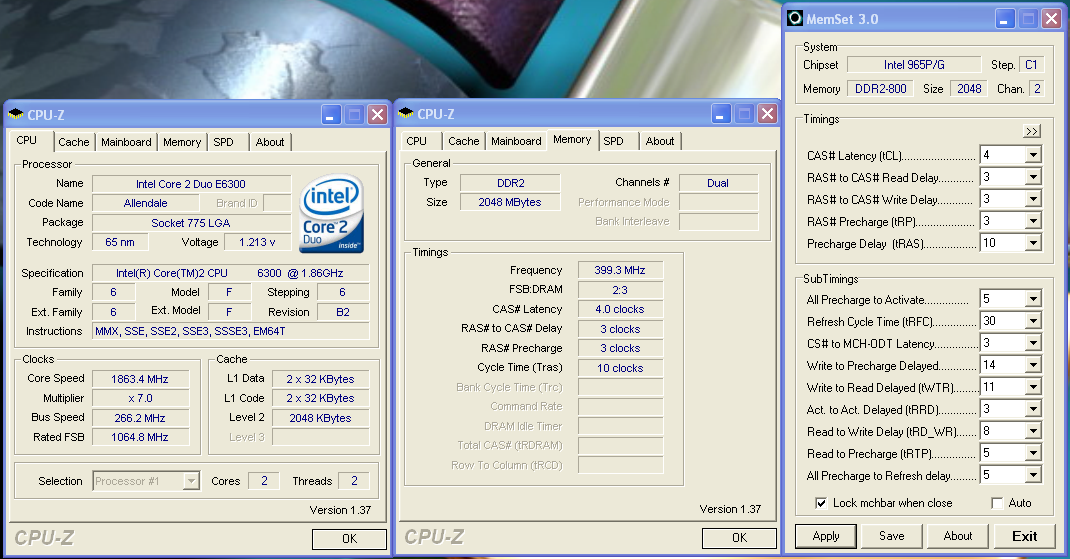
We take a look now at seeing how well our GEIL PC2-6400 memory operates in this board in both two and four DIMM testing. The screenshot above shows the actual memory settings used in our benchmark tests of the board. We do not modify the memory timings beyond the four major settings in our charts. The remaining memory settings are implemented automatically via the BIOS. Foxconn implements slightly tighter memory and MCH timings than some of the other P965 boards we have tested.
| FOXCONN P9657AA-8KS2H Stable DDR2-800 Timings - 2 DIMMs (2/4 slots populated - 1 Dual-Channel Bank) |
|
| Clock Speed: | 800MHz |
| CAS Latency: | 4 |
| RAS to CAS Delay: | 3 |
| RAS Precharge: | 3 |
| RAS Cycle Time: | 10 |
| Voltage: | 2.20V |
We were able to set our timings to 4-3-3-10 by increasing the memory voltage to 2.20V with our GEIL memory. We were able to hold these timings up to DDR2-840 on this board along with timings of 4-4-4-12 up to DDR2-860. We could not run a CAS 3 setting in a stable manner at DDR2-800 settings or above. However, the performance penalty with this board set to CAS 4 was minimal with most benchmarks not varying more than 1%~2%.
| FOXCONN P9657AA-8KS2H Stable DDR2-800 Timings - 4 DIMMs (4/4 slots populated - 2 Dual-Channel Bank) |
|
| Clock Speed: | 800MHz |
| CAS Latency: | 4 |
| RAS to CAS Delay: | 4 |
| RAS Precharge: | 4 |
| RAS Cycle Time: | 12 |
| Voltage: | 2.20V |
Our settings of 4-4-4-12 at 2.20V were not quite as good as our ASUS P5B-E 1.02G settings of 3-4-3-10 but due to fairly tight memory latencies the benchmarks were still competitive. We were able to keep this setting up to DDR2-820 before switching over to 5-4-4-12 settings that held stable until we reached DDR2-860 during our overclocking tests.
Originally published at https://www.anandtech.com/show/2144 (Wayback Machine).