
Intel P965: Foxconn P9657AA- 8KS2H
- Posted in
- Motherboards
Board Layout and Features
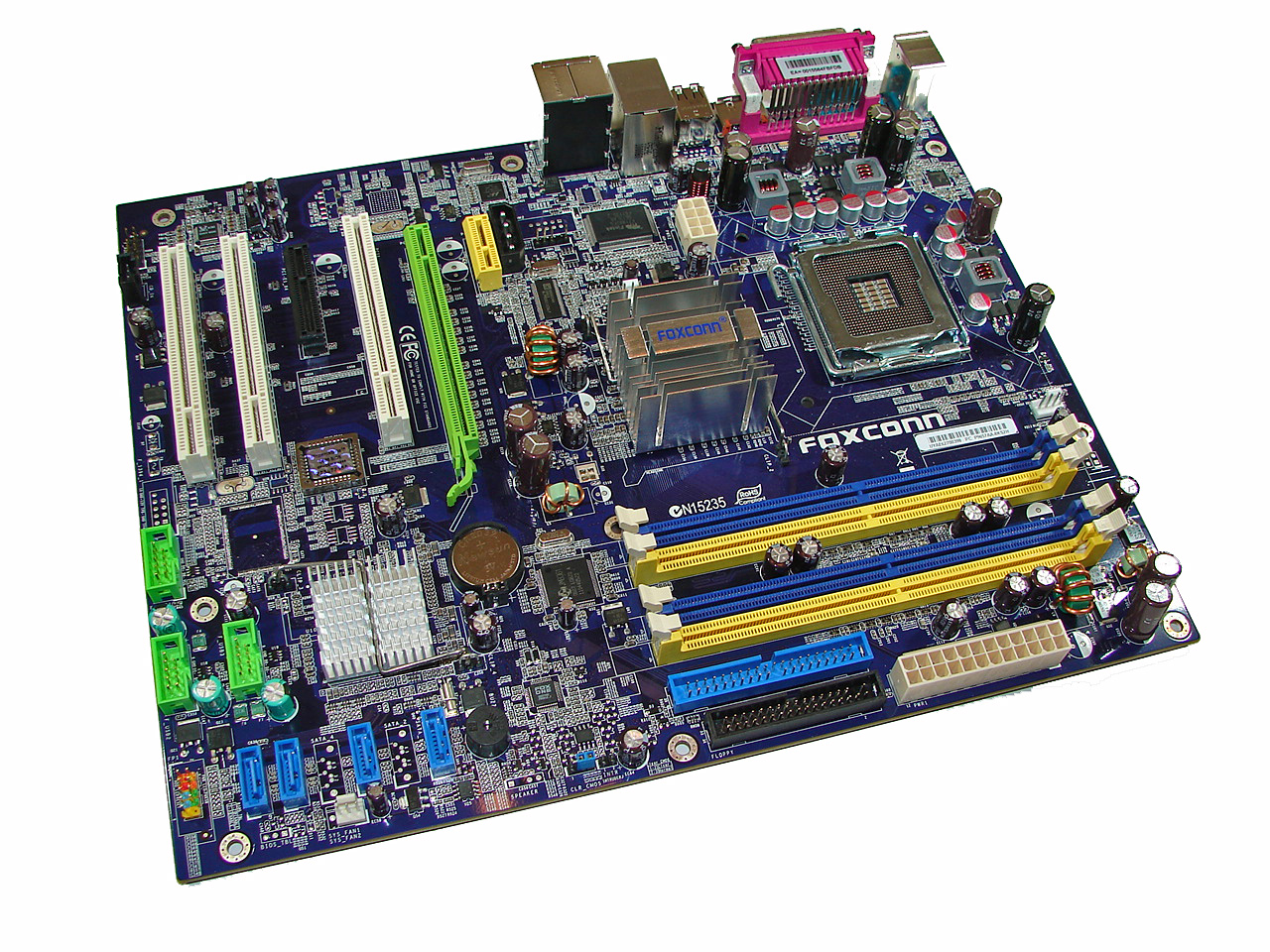
Foxconn did a really nice job with the layout of this board and the color combination is subdued and almost elegant when compared to some of the more garish color schemes we have seen recently on other boards. The board was a breeze to install in our Cooler Master CM Stacker 830. However, we have concerns about the location of the 8-pin ATX connector near the CPU area causing cable management issues with larger air coolers like the Scythe Infinity. We recommend installing the 8-pin ATX connector first as it is difficult to attach it once your air cooler is installed. The board features a total of three fan headers that are controlled via the BIOS. A fourth one would have been preferred near the I/O panel. The board features a three-phase voltage regulator system that provided superb stability throughout testing.
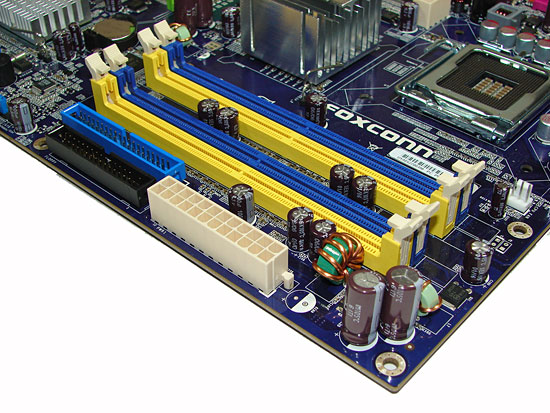
The DIMM module slots' color coordination is correct for dual channel setup based upon the premise of installing DIMMs in the same colored slots for dual-channel operation. It was very easy to install memory modules with a full size video card placed in the PCI Express x16 slot. Foxconn places the CPU fan header above the first DIMM slot and it is an easy reach for most CPU fan/heatsink cables.
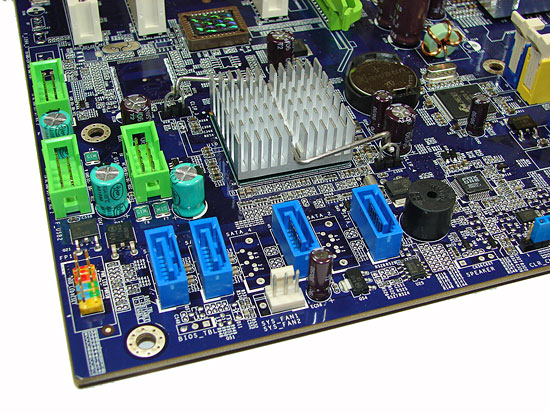
The four Intel ICH8 SATA ports are blue and are conveniently located below the ICH8 Southbridge along with the second fan header. The SATA ports feature the newer clamp and latch design. We found the positioning of the SATA ports to be very good when utilizing the PCI 2.3 slots although we had to bend our SATA cable a little when using the first port with an NVIDIA 8800GTX . The ICH8 is passively cooled and remained cool to the touch throughout testing. The chassis panel and USB connectors are located along the left edge of the board.
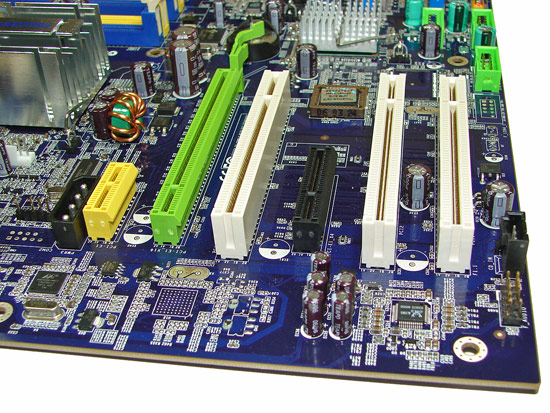
The board comes with one physical PCI Express x16 connector, one PCI Express x4, one PCI Express x1, and three PCI 2.3 connectors. The layout of this design offers one of the better single x16 connector designs we have worked with to date. Only the first PCI slot will be physically unavailable if you use a double slot video card in the PCI Express x16 slot. There is a 4-pin 12V Molex connector that is required for dual graphic card operation (though that will require the use of a non-x16 card as the second GPU) that worked with the latest BIOS release.
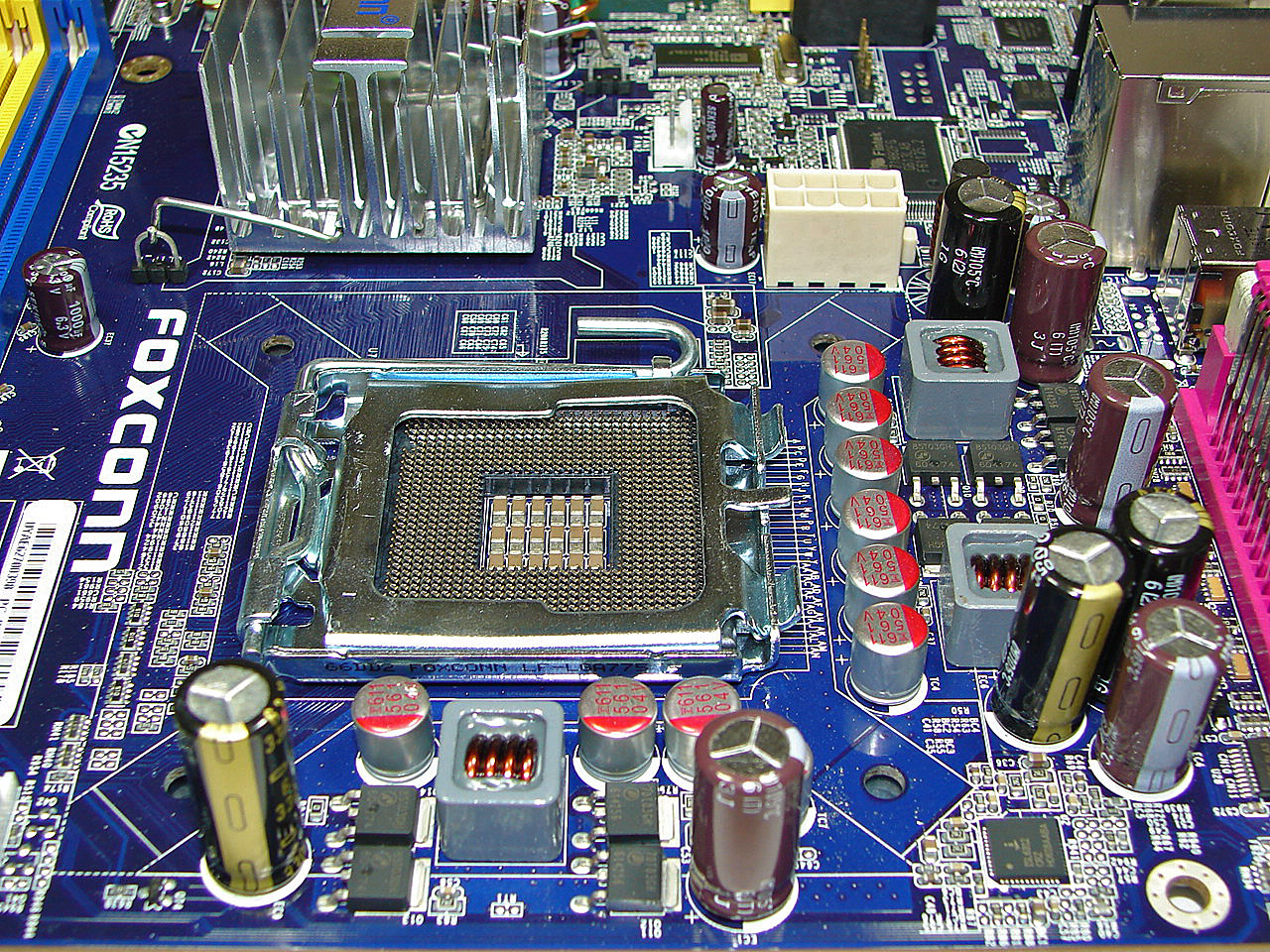
Getting back to the CPU socket area, we find a fair amount of room for alternative cooling solutions. We utilized the stock heatsink/fan in our normal testing but also verified a few larger Socket-775 air cooling solutions would fit in this area during our overclocking tests. The Intel P965 MCH chipset is passively cooled with a mid-rise heatsink unit that did not interfere with any installed peripherals. However, it was slightly difficult routing the 8-pin ATX power cable with a cooling solution like the Tuniq Tower 120 installed. Also, the large capacitor near the bottom right mounting hole requires some tender loving care when mounting a large air cooler.
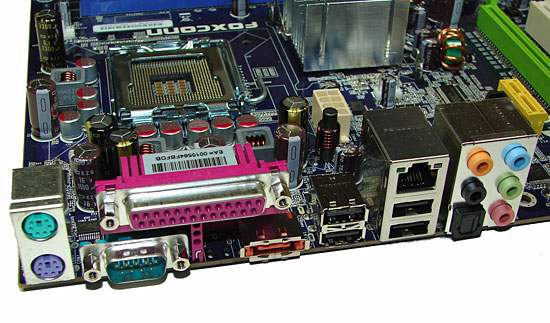
The rear panel contains the PS/2 mouse and keyboard ports, LAN port, and 4 USB 2.0 ports. The LAN (RJ-45) port has two LED indicators representing Activity and Speed of the connection through the Marvell 88E8056 Gigabit PCI-E chipset. The audio panel consists of 6 ports that can be configured for 2, 4, 6, and 8-channel audio connections for the Realtek ALC 883 HD codec along with an S/PDIF optical out port. The IO panel also has a serial, parallel, and e-SATA port.
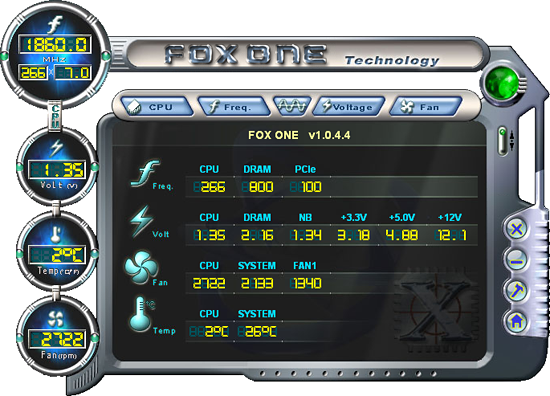
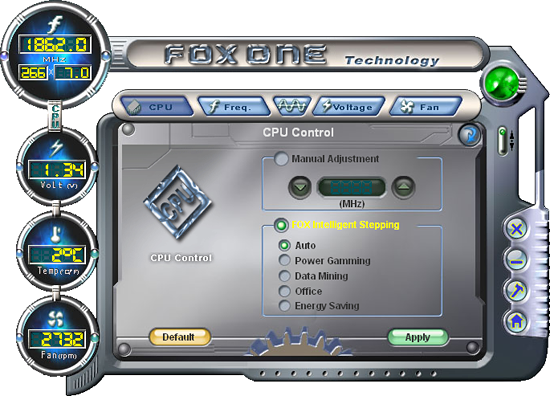
Foxconn includes their Fox One and Fox LiveUpdate software utilities with the board: an Overclock Program, Hardware Monitoring application, Smart Fan Utility, and an online BIOS update applet that is not pictured. The Fox One utility allows for changes to the FSB and basic system voltages and includes a smart fan utility that allows control of the system fan headers within Windows, though the BIOS options are more significant in regards to temperature control. The Hardware Monitoring utility allows for real-time monitoring of CPU temperature, CPU fan speeds, and basic system voltages. Foxconn includes an automatic overclocking utility in their BIOS that offers five different settings.
We selected the Power Gaming setting in the BIOS and after a quick reboot our speeds increased by around 5%~7% during usage. Overall, the automatic overclocking worked without any issues and provided an increase in speed or power savings just as Foxconn intended. As usual, users will still be able to eke more performance out of the board through manual overclocking.
 |
| Click to enlarge |
Foxconn did a really nice job with the layout of this board and the color combination is subdued and almost elegant when compared to some of the more garish color schemes we have seen recently on other boards. The board was a breeze to install in our Cooler Master CM Stacker 830. However, we have concerns about the location of the 8-pin ATX connector near the CPU area causing cable management issues with larger air coolers like the Scythe Infinity. We recommend installing the 8-pin ATX connector first as it is difficult to attach it once your air cooler is installed. The board features a total of three fan headers that are controlled via the BIOS. A fourth one would have been preferred near the I/O panel. The board features a three-phase voltage regulator system that provided superb stability throughout testing.
The DIMM module slots' color coordination is correct for dual channel setup based upon the premise of installing DIMMs in the same colored slots for dual-channel operation. It was very easy to install memory modules with a full size video card placed in the PCI Express x16 slot. Foxconn places the CPU fan header above the first DIMM slot and it is an easy reach for most CPU fan/heatsink cables.
The four Intel ICH8 SATA ports are blue and are conveniently located below the ICH8 Southbridge along with the second fan header. The SATA ports feature the newer clamp and latch design. We found the positioning of the SATA ports to be very good when utilizing the PCI 2.3 slots although we had to bend our SATA cable a little when using the first port with an NVIDIA 8800GTX . The ICH8 is passively cooled and remained cool to the touch throughout testing. The chassis panel and USB connectors are located along the left edge of the board.
The board comes with one physical PCI Express x16 connector, one PCI Express x4, one PCI Express x1, and three PCI 2.3 connectors. The layout of this design offers one of the better single x16 connector designs we have worked with to date. Only the first PCI slot will be physically unavailable if you use a double slot video card in the PCI Express x16 slot. There is a 4-pin 12V Molex connector that is required for dual graphic card operation (though that will require the use of a non-x16 card as the second GPU) that worked with the latest BIOS release.
 |
| Click to enlarge |
Getting back to the CPU socket area, we find a fair amount of room for alternative cooling solutions. We utilized the stock heatsink/fan in our normal testing but also verified a few larger Socket-775 air cooling solutions would fit in this area during our overclocking tests. The Intel P965 MCH chipset is passively cooled with a mid-rise heatsink unit that did not interfere with any installed peripherals. However, it was slightly difficult routing the 8-pin ATX power cable with a cooling solution like the Tuniq Tower 120 installed. Also, the large capacitor near the bottom right mounting hole requires some tender loving care when mounting a large air cooler.
The rear panel contains the PS/2 mouse and keyboard ports, LAN port, and 4 USB 2.0 ports. The LAN (RJ-45) port has two LED indicators representing Activity and Speed of the connection through the Marvell 88E8056 Gigabit PCI-E chipset. The audio panel consists of 6 ports that can be configured for 2, 4, 6, and 8-channel audio connections for the Realtek ALC 883 HD codec along with an S/PDIF optical out port. The IO panel also has a serial, parallel, and e-SATA port.
Foxconn includes their Fox One and Fox LiveUpdate software utilities with the board: an Overclock Program, Hardware Monitoring application, Smart Fan Utility, and an online BIOS update applet that is not pictured. The Fox One utility allows for changes to the FSB and basic system voltages and includes a smart fan utility that allows control of the system fan headers within Windows, though the BIOS options are more significant in regards to temperature control. The Hardware Monitoring utility allows for real-time monitoring of CPU temperature, CPU fan speeds, and basic system voltages. Foxconn includes an automatic overclocking utility in their BIOS that offers five different settings.
We selected the Power Gaming setting in the BIOS and after a quick reboot our speeds increased by around 5%~7% during usage. Overall, the automatic overclocking worked without any issues and provided an increase in speed or power savings just as Foxconn intended. As usual, users will still be able to eke more performance out of the board through manual overclocking.
Originally published at https://www.anandtech.com/show/2144 (Wayback Machine).