
GEEKOM A7 mini-PC Review : Premium Phoenix in a Compact 4x4 Package
Power Consumption and Thermal Characteristics
The power consumption at the wall was measured with a 4K display being driven through the HDMI port of the system. In the graph below, we compare the idle and load power of the GEEKOM A7 with other systems evaluated before. For load power consumption, we ran the AIDA64 System Stability Test with various stress components, as well as our custom stress test with Prime95 / Furmark, and noted the peak as well as idling power consumption at the wall.
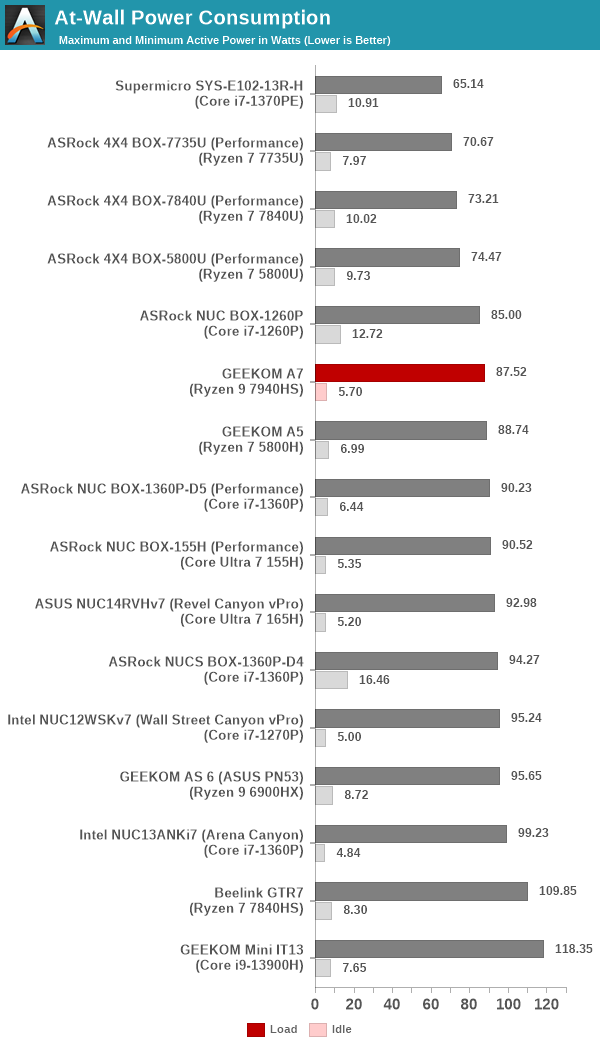
The numbers are consistent with the TDP and suggested PL1 / PL2 values for the processors in the systems, and do not come as any surprise. Idling power has improved tremendously compared to older / other AMD-based machines, but the Intel-based ones are consistently able to win out on the idle power metric.
Stress Testing
Our thermal stress routine is a combination of Prime95, Furmark, and Finalwire's AIDA64 System Stability Test. The following 9-step sequence is followed, starting with the system at idle:
- Start with the Prime95 stress test configured for maximum power consumption
- After 30 minutes, add Furmark GPU stress workload
- After 30 minutes, terminate the Prime95 workload
- After 30 minutes, terminate the Furmark workload and let the system idle
- After 30 minutes of idling, start the AIDA64 System Stress Test (SST) with CPU, caches, and RAM activated
- After 30 minutes, terminate the previous AIDA64 SST and start a new one with the GPU, CPU, caches, and RAM activated
- After 30 minutes, terminate the previous AIDA64 SST and start a new one with only the GPU activated
- After 30 minutes, terminate the previous AIDA64 SST and start a new one with the CPU, GPU, caches, RAM, and SSD activated
- After 30 minutes, terminate the AIDA64 SST and let the system idle for 30 minutes
Traditionally, this test used to record the clock frequencies - however, with the increasing number of cores in modern processors and fine-grained clock control, frequency information makes the graphs cluttered and doesn't contribute much to understanding the thermal performance of the system. The focus is now on the power consumption and temperature profiles to determine if throttling is in play.


The package power sees three distinct levels - 60W, 45W, and 35W. Actual numbers may differ further down in the stress scenario, but they average out to one of the three levels in the long run. The skin-temperature aware power management (STAPM) allows for the implementation of a 'dynamic power limit'. The core temperature keeps increasing with sustained load / package power of 42W until the STAPM power catches up with 35W. At that point, the temperature of the cores / die is around 95C. However, moving down the package power itself to 35W brings down this temperature to a much more acceptable 80C. DRAM temperature peaks around 75C, while the SSD under stress does not cross 50C. These are the good thermal aspects of the GEEKOM A7. Ultimately, the form-factor of the system makes it almost impossible to escape the fan noise associated with the cooling solution.
Originally published at https://www.anandtech.com/show/21409/geekom-a7-minipc-review (Wayback Machine).