
Intel P965: MSI P965 Platinum and ECS PX1 Extreme
- Posted in
- Motherboards
MSI P965 Platinum: Board Layout and Features
The P965 Platinum board has an excellent layout for the most part, the color combination is pleasing to the eyes, and it was extremely easy to install in our Cooler Master CM Stacker 830. However our concern is the location of the 8-pin ATX and 4-pin Molex power connectors near the CPU area, as they could cause cable management issues with larger air coolers like the Scythe Infinity. We also recommend installing the 8-pin ATX connector first if you plan to install a large air cooling system. The board features a total of four fan headers and a four-phase voltage regulator system that provided superb stability throughout our standard testing.
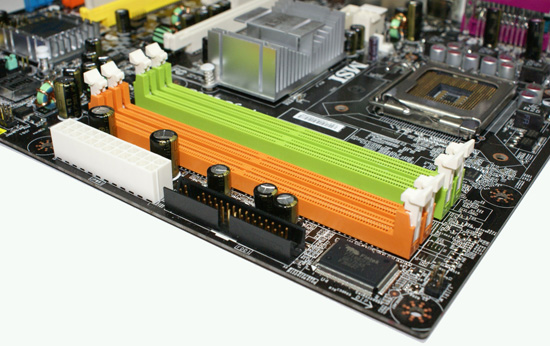
The DIMM module slots' color coordination is not correct for dual-channel setup based upon the premise of installing DIMMs in the same colored slots for dual-channel operation. Thus, you will want to install DIMMs in different colored slots. The color coordination is a minor point, however, and is at least partially outweighed by the fact that it is very easy to install memory modules with a full size video card placed in the first PCI Express x16 slot. The 24-pin ATX connector and floppy drive connector are conveniently placed along the bottom edge of the board underneath the memory slots.
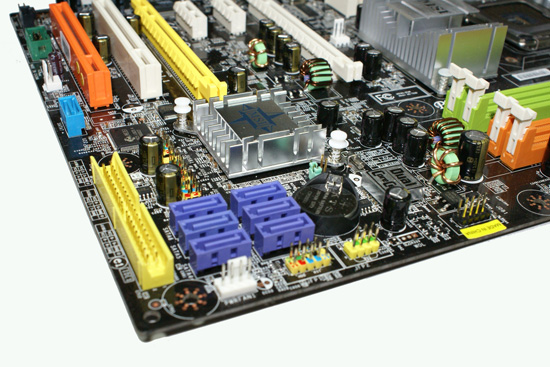
The six Intel ICH8R SATA ports are blue and are located to the left of the battery and above the second fan header. The SATA ports feature the newer clamp and latch design. We found the positioning of the SATA ports to be very good when utilizing the PCI 2.3 slots but you will lose SATA ports 3 and 6 when utilizing a double slot video card in the second x16 physical slot. The single IDE connector is located on the lower far left edge of the board, which isn't the best location for the majority of people that will use an IDE optical drive located in one of the upper 5.25" bays. The ICH8R is passively cooled and remained cool to the touch throughout testing. The chassis panel is located below the SATA ports.
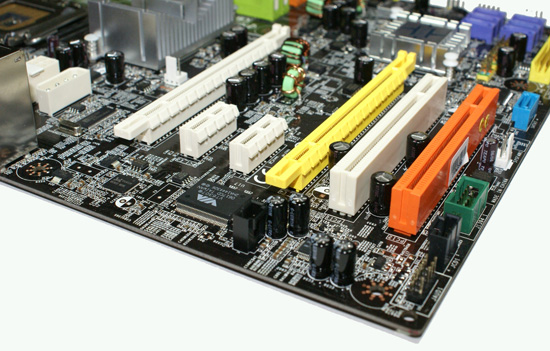
The board comes with two physical PCI Express x16 connectors (x16 and x4 electrical), two PCI Express x1 connectors, and two PCI 2.3 connectors. The layout of this design offers one of the better dual x16 connector designs we have worked with as you will only lose a single x1 PCI-E and PCI slot when operating with two dual slot video cards. You can also see the third fan header and the JMicron SATA port located next to the last PCI slot, and the fourth fan header is located next to the first x16 PCI Express connector.
Getting back to CPU socket area, we find a fair amount of room for alternative cooling solutions. We utilized the stock heatsink/fan in our normal testing but also verified a few larger Socket 775 air cooling solutions would fit in this area during our overclocking tests. The Intel P965 MCH chipset is passively cooled with a mid-rise heatsink unit that did not interfere with any installed peripherals. The 4-pin Molex connector is required when utilizing dual graphics cards.
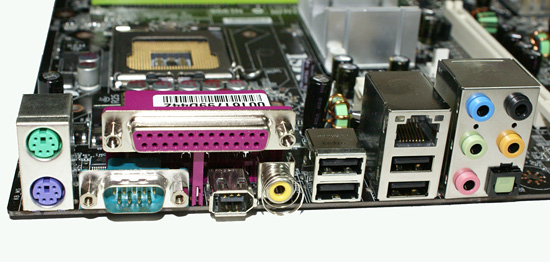
The rear panel contains the PS/2 mouse and keyboard ports, LAN port, serial, Firewire, and parallel ports along with four USB 2.0 ports. The LAN (RJ-45) port has two LED indicators representing Activity and Speed of the connection through the Realtek RTL8111B Gigabit PCI-E chipset. The audio panel consists of six ports that can be configured for 2, 4, 6, and 8-channel audio connections for the Realtek ALC883 HD codec. The panel also includes S/PDIF optical and coaxial out ports.
 |
| Click to enlarge |
The P965 Platinum board has an excellent layout for the most part, the color combination is pleasing to the eyes, and it was extremely easy to install in our Cooler Master CM Stacker 830. However our concern is the location of the 8-pin ATX and 4-pin Molex power connectors near the CPU area, as they could cause cable management issues with larger air coolers like the Scythe Infinity. We also recommend installing the 8-pin ATX connector first if you plan to install a large air cooling system. The board features a total of four fan headers and a four-phase voltage regulator system that provided superb stability throughout our standard testing.
The DIMM module slots' color coordination is not correct for dual-channel setup based upon the premise of installing DIMMs in the same colored slots for dual-channel operation. Thus, you will want to install DIMMs in different colored slots. The color coordination is a minor point, however, and is at least partially outweighed by the fact that it is very easy to install memory modules with a full size video card placed in the first PCI Express x16 slot. The 24-pin ATX connector and floppy drive connector are conveniently placed along the bottom edge of the board underneath the memory slots.
The six Intel ICH8R SATA ports are blue and are located to the left of the battery and above the second fan header. The SATA ports feature the newer clamp and latch design. We found the positioning of the SATA ports to be very good when utilizing the PCI 2.3 slots but you will lose SATA ports 3 and 6 when utilizing a double slot video card in the second x16 physical slot. The single IDE connector is located on the lower far left edge of the board, which isn't the best location for the majority of people that will use an IDE optical drive located in one of the upper 5.25" bays. The ICH8R is passively cooled and remained cool to the touch throughout testing. The chassis panel is located below the SATA ports.
The board comes with two physical PCI Express x16 connectors (x16 and x4 electrical), two PCI Express x1 connectors, and two PCI 2.3 connectors. The layout of this design offers one of the better dual x16 connector designs we have worked with as you will only lose a single x1 PCI-E and PCI slot when operating with two dual slot video cards. You can also see the third fan header and the JMicron SATA port located next to the last PCI slot, and the fourth fan header is located next to the first x16 PCI Express connector.
 |
| Click to enlarge |
Getting back to CPU socket area, we find a fair amount of room for alternative cooling solutions. We utilized the stock heatsink/fan in our normal testing but also verified a few larger Socket 775 air cooling solutions would fit in this area during our overclocking tests. The Intel P965 MCH chipset is passively cooled with a mid-rise heatsink unit that did not interfere with any installed peripherals. The 4-pin Molex connector is required when utilizing dual graphics cards.
The rear panel contains the PS/2 mouse and keyboard ports, LAN port, serial, Firewire, and parallel ports along with four USB 2.0 ports. The LAN (RJ-45) port has two LED indicators representing Activity and Speed of the connection through the Realtek RTL8111B Gigabit PCI-E chipset. The audio panel consists of six ports that can be configured for 2, 4, 6, and 8-channel audio connections for the Realtek ALC883 HD codec. The panel also includes S/PDIF optical and coaxial out ports.
Originally published at https://www.anandtech.com/show/2128 (Wayback Machine).