
Intel P965: MSI P965 Platinum and ECS PX1 Extreme
- Posted in
- Motherboards
MSI P965 Platinum: Feature Set
The MSI P965 Platinum motherboard offers a significant amount of options for the price and has a BIOS designed for the performance user, although we wish the DRAM settings were expanded beyond the typical four settings. Still, the DRAM memory ratios are the best we have seen in a P965 motherboard. The Realtek ALC883 is a good onboard audio solution but we feel like the newer ALC885 or ALC888 would have been a better choice from a Realtek perspective. We understand the price pressures MSI is under to get this motherboard to market at $135 or less but other MSI Platinum motherboards offer the Creative sound chips and that choice would have set this board apart from others in the audio area.
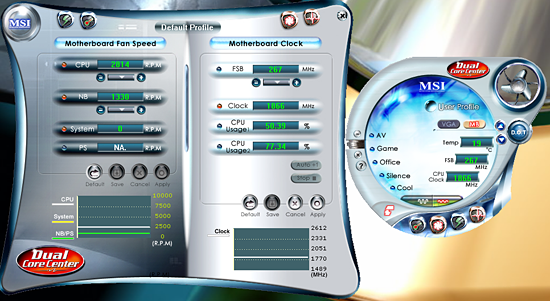
MSI includes several software utility functions under their Dual Core Center application: a Dynamic Overclock Program, Hardware Monitoring application, Smart Fan capability, and FSB overclocking. The dynamic overclock utility allows for automatic changes to the FSB based upon profiles or set percentages. The smart fan application allows control of the CPU and system fan headers within Windows although the BIOS options are more significant in regards to temperature control. The Hardware monitoring application allows for real time monitoring of temperature and basic system voltages. MSI also includes their Live Update program to download and install BIOS and driver updates. The DigiCell application is also included that ties all of the various software utilities together under a single interface and provides for hardware diagnostics.
Besides the Windows applications, MSI includes a dynamic overclocking utility in their BIOS that offers three different control points with CPU, PCI Express, or both as overclocking options along with percentages up to 23% available. The dynamic overclocking capability is based upon CPU loading as the system will gradually increase your set percentage overclock up to the maximum three values set in the BIOS or through Dual Core center.
We selected the maximum of 23% for the CPU overclock only (which also increases memory, voltages, fan speeds) and were greeted with a blank screen. This is not uncommon with these types of "automatic" systems as they require you to try several different settings to find the one that is optimal based upon your system components. We ended up with a 10% overclock that resulted in a 7x292FSB and memory speed is dependent on your set ratio and memory capability. Overall, the dynamic overclocking worked without any issues and provided an increase in speed although we expected a little more. As usual, you will still get much better results by manually tuning the BIOS.
| MSI P965 Platinum | |
| Market Segment: | Mid-Range Performance - $134.99 (Year End Rebate of $15.00 = $119.99) |
| CPU Interface: | Socket T (Socket 775) |
| CPU Support: | LGA775-based Pentium 4, Celeron D, Pentium D, Pentium EE, Core 2 Duo, Core 2 Extreme |
| Chipset: | Intel P965 + ICH8R |
| Bus Speeds: | 200 to 500 in 1MHz Increments |
| Memory Speeds: | Auto, 533, 667, 800, 709, 866, 1067 |
| PCIe Speeds: | Auto, 100MHz~133MHz in 1MHz Increments |
| PCI: | Fixed at 33.33 |
| Core Voltage: | Default CPU V to +0.7875V in 0.0125V increments |
| CPU Clock Multiplier: | Auto, 6x-11x in 1X increments if CPU is unlocked, downwards locked, Core 2 Duo |
| DRAM Voltage: | 1.85V ~ 2.45V |
| DRAM Timing Control: | Auto, 4 DRAM Timing Options |
| NB Voltage: | 1.2V~1.84V |
| Memory Slots: | Four 240-pin DDR2 DIMM Slots Dual-Channel Configuration Regular Unbuffered Memory to 8GB Total |
| Expansion Slots: | 2 - PCIe X16 (1-x16 electrical, 1-x4 electrical) 2 - PCIe X1 2 - PCI Slot 2.3 |
| Onboard SATA/RAID: | 6 SATA 3Gbps Ports - Intel ICH8R (RAID 0, 1, 5, 1+0, JBOD) 1 SATA 3Gbps Ports - JMicron JMB361 |
| Onboard IDE: | 1 ATA133/100/66 Port (2 drives) - JMicron JMB361 |
| Onboard USB 2.0/IEEE-1394: | 10 USB 2.0 Ports - 4 I/O Panel - 6 via Headers 1 Firewire 400 Port by VIA VT6308P - 1 via Header |
| Onboard LAN: | Realtek RTL8111B - PCI Express Gigabit Controller |
| Onboard Audio: | Realtek ALC883 8-Channel HD Audio Codec |
| Power Connectors: | ATX 24-pin, 8-pin EATX 12V, 4-pin Molex |
| I/O Panel: | 1 x PS/2 Keyboard 1 x PS/2 Mouse 1 x Serial Port 1 x S/PDIF Optical 1 x S/PDIF Coaxial 1 x IEEE 1394a 1 x Audio Panel 1 x RJ45 4 x USB 2.0/1.1 |
| BIOS Revision: | Award 1.2 |
| Board Revision: | 1 |
The MSI P965 Platinum motherboard offers a significant amount of options for the price and has a BIOS designed for the performance user, although we wish the DRAM settings were expanded beyond the typical four settings. Still, the DRAM memory ratios are the best we have seen in a P965 motherboard. The Realtek ALC883 is a good onboard audio solution but we feel like the newer ALC885 or ALC888 would have been a better choice from a Realtek perspective. We understand the price pressures MSI is under to get this motherboard to market at $135 or less but other MSI Platinum motherboards offer the Creative sound chips and that choice would have set this board apart from others in the audio area.
MSI includes several software utility functions under their Dual Core Center application: a Dynamic Overclock Program, Hardware Monitoring application, Smart Fan capability, and FSB overclocking. The dynamic overclock utility allows for automatic changes to the FSB based upon profiles or set percentages. The smart fan application allows control of the CPU and system fan headers within Windows although the BIOS options are more significant in regards to temperature control. The Hardware monitoring application allows for real time monitoring of temperature and basic system voltages. MSI also includes their Live Update program to download and install BIOS and driver updates. The DigiCell application is also included that ties all of the various software utilities together under a single interface and provides for hardware diagnostics.
Besides the Windows applications, MSI includes a dynamic overclocking utility in their BIOS that offers three different control points with CPU, PCI Express, or both as overclocking options along with percentages up to 23% available. The dynamic overclocking capability is based upon CPU loading as the system will gradually increase your set percentage overclock up to the maximum three values set in the BIOS or through Dual Core center.
We selected the maximum of 23% for the CPU overclock only (which also increases memory, voltages, fan speeds) and were greeted with a blank screen. This is not uncommon with these types of "automatic" systems as they require you to try several different settings to find the one that is optimal based upon your system components. We ended up with a 10% overclock that resulted in a 7x292FSB and memory speed is dependent on your set ratio and memory capability. Overall, the dynamic overclocking worked without any issues and provided an increase in speed although we expected a little more. As usual, you will still get much better results by manually tuning the BIOS.
Originally published at https://www.anandtech.com/show/2128 (Wayback Machine).