
Intel P965: MSI P965 Platinum and ECS PX1 Extreme
- Posted in
- Motherboards
Gaming Performance - FPS
As usual, gaming performance was tested with a variety of current games. We ran benchmarks with our standard 1280x1024 resolution. Given the number of users that run 19" LCDs these days, 1280x1024 represents one of the most commonly used resolutions. We will be showing 1600x1200 4xAA/8xAF and 1920x1200 4xAA/8XAF results this time, along with CrossFire performance where applicable.
Battlefield 2
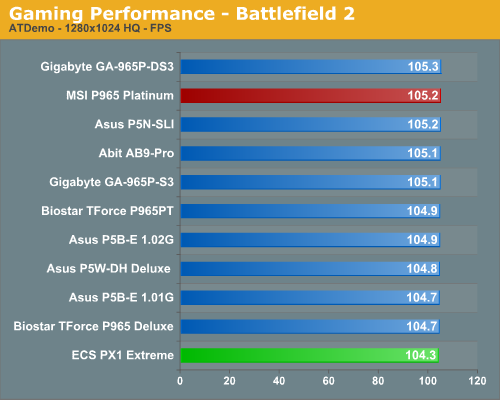
This benchmark is performed using DICE's built-in demo playback functionality with additional capture capabilities designed in house. During the benchmark, the camera switches between players and vehicles in order to capture the most action possible. There is a significant amount of smoke, explosions, and vehicle usage as this a very GPU intensive Battlefield 2 benchmark. We run Battlefield 2 using the highest quality graphics settings available in the video settings. The game itself is best experienced with average in-game frame rates of 35 and up.
F.E.A.R.
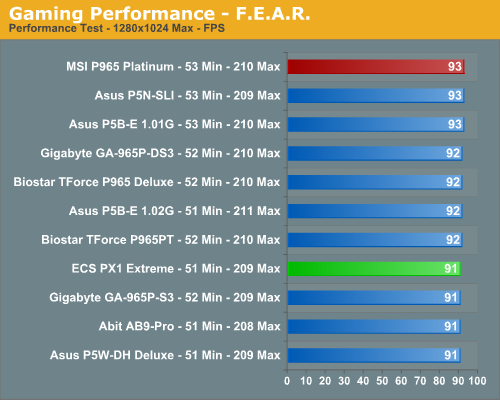
F.E.A.R. uses a built-in performance test that generates graphical test scenes based upon the actual game engine. This test consists of a couple of different action sequences, a stressful water flyby, and heavy use of shadows while traveling through hallways. F.E.A.R. is a very graphics intensive game and we switch all settings to maximum while leaving soft shadows disabled. An average frame rate for F.E.A.R. that can dip into the teens is not good for a first person shooter, but the game is still playable to around 25 fps, although we prefer 35fps.
Half Life 2: Lost Coast
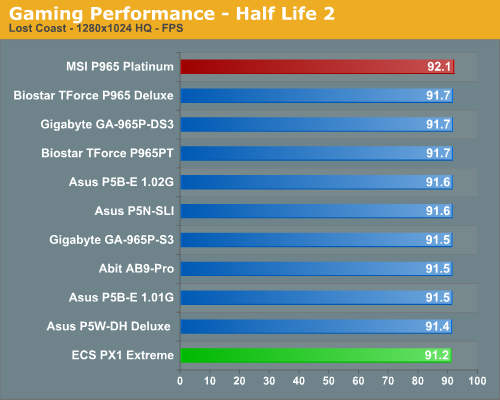
We use the built-in timedemo feature to benchmark the game. Our timedemo consists of starting at the bottom of the hill near the lake and ending in the old church. The Source engine timedemo feature is similar to the nettimedemo of Id's Doom 3 engine, in that it plays back more than just the graphics. The highest visual quality settings possible were used with HDR turned on. While the Source engine is notorious for giving great frame rates for almost any hardware setup, we find the game isn't as enjoyable if it isn't running at 35fps or above.
Quake 4
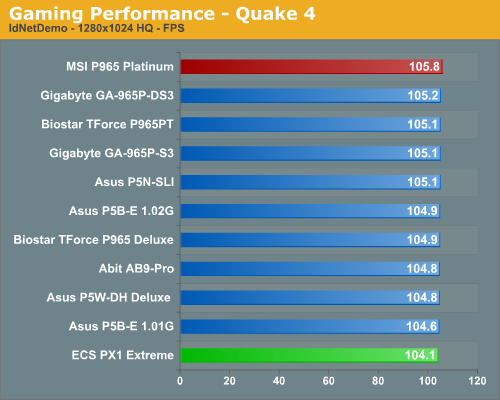
We utilize the nettimedemo test rather than the timedemo option for motherboard benchmarking of Quake 4. To be clear, this means our test results focus mostly on the performance one would experience during actual game play. Additionally, Quake 4 limits frame rate to 60 fps during gameplay whether or not VSync is enabled. Our benchmark utilizes the IdNetDemo. This demo includes mainly outdoor areas with numerous players trying to wipe each other out. We tested the game with High Quality settings (uncompressed normal maps), and we enabled all the advanced graphics options except for VSync.
FPS Gaming Summary
Speed kills and MSI shows it by winning three of our four First Person Shooter tests. The board actually seemed faster than it scored as we did not notice any issues with stutters or hiccups during game play. The ECS board was also very solid but in titles where memory performance matters it trailed the packed. Also, we had some issues in gaming over extended periods with both boards locking up until we installed the latest BIOS releases. This has been a common theme in the P965 boards as the motherboard and memory suppliers have worked through compatibility issues.
We did not experience any issues during testing or during game play with either board once we had the updated BIOS revisions installed. We generally play every game for at least a couple of hours on each board to ensure there are no issues such as overheating, stuttering, or network lag issues. In fact, as you will soon see in our network tests, the Intel NIC on the ECS PX1 provided an excellent network connection and provided the best gaming experience of our onboard NIC solutions.
As usual, gaming performance was tested with a variety of current games. We ran benchmarks with our standard 1280x1024 resolution. Given the number of users that run 19" LCDs these days, 1280x1024 represents one of the most commonly used resolutions. We will be showing 1600x1200 4xAA/8xAF and 1920x1200 4xAA/8XAF results this time, along with CrossFire performance where applicable.
Battlefield 2
This benchmark is performed using DICE's built-in demo playback functionality with additional capture capabilities designed in house. During the benchmark, the camera switches between players and vehicles in order to capture the most action possible. There is a significant amount of smoke, explosions, and vehicle usage as this a very GPU intensive Battlefield 2 benchmark. We run Battlefield 2 using the highest quality graphics settings available in the video settings. The game itself is best experienced with average in-game frame rates of 35 and up.
F.E.A.R.
F.E.A.R. uses a built-in performance test that generates graphical test scenes based upon the actual game engine. This test consists of a couple of different action sequences, a stressful water flyby, and heavy use of shadows while traveling through hallways. F.E.A.R. is a very graphics intensive game and we switch all settings to maximum while leaving soft shadows disabled. An average frame rate for F.E.A.R. that can dip into the teens is not good for a first person shooter, but the game is still playable to around 25 fps, although we prefer 35fps.
Half Life 2: Lost Coast
We use the built-in timedemo feature to benchmark the game. Our timedemo consists of starting at the bottom of the hill near the lake and ending in the old church. The Source engine timedemo feature is similar to the nettimedemo of Id's Doom 3 engine, in that it plays back more than just the graphics. The highest visual quality settings possible were used with HDR turned on. While the Source engine is notorious for giving great frame rates for almost any hardware setup, we find the game isn't as enjoyable if it isn't running at 35fps or above.
Quake 4
We utilize the nettimedemo test rather than the timedemo option for motherboard benchmarking of Quake 4. To be clear, this means our test results focus mostly on the performance one would experience during actual game play. Additionally, Quake 4 limits frame rate to 60 fps during gameplay whether or not VSync is enabled. Our benchmark utilizes the IdNetDemo. This demo includes mainly outdoor areas with numerous players trying to wipe each other out. We tested the game with High Quality settings (uncompressed normal maps), and we enabled all the advanced graphics options except for VSync.
FPS Gaming Summary
Speed kills and MSI shows it by winning three of our four First Person Shooter tests. The board actually seemed faster than it scored as we did not notice any issues with stutters or hiccups during game play. The ECS board was also very solid but in titles where memory performance matters it trailed the packed. Also, we had some issues in gaming over extended periods with both boards locking up until we installed the latest BIOS releases. This has been a common theme in the P965 boards as the motherboard and memory suppliers have worked through compatibility issues.
We did not experience any issues during testing or during game play with either board once we had the updated BIOS revisions installed. We generally play every game for at least a couple of hours on each board to ensure there are no issues such as overheating, stuttering, or network lag issues. In fact, as you will soon see in our network tests, the Intel NIC on the ECS PX1 provided an excellent network connection and provided the best gaming experience of our onboard NIC solutions.
Originally published at https://www.anandtech.com/show/2128 (Wayback Machine).