
NVIDIA 680i: The Best Core 2 Chipset?
- Posted in
- CPUs
NVIDIA Control Panel & nTune 5
One of most interesting features at the nForce 500 launch was the revamped control panel and nTune 5.0 performance applications. The Control Panel and nTune have undergone some fine tuning the past few months with version 5.05 launching for the nForce 600 and GeForce 8800 series of products shortly. NVIDIA has combined all of their various program applets into an integrated control panel to provide a common user interface. We found that this common interface makes it easier for a user to control the various functions of the board and video (NVIDIA based) from a central access point.
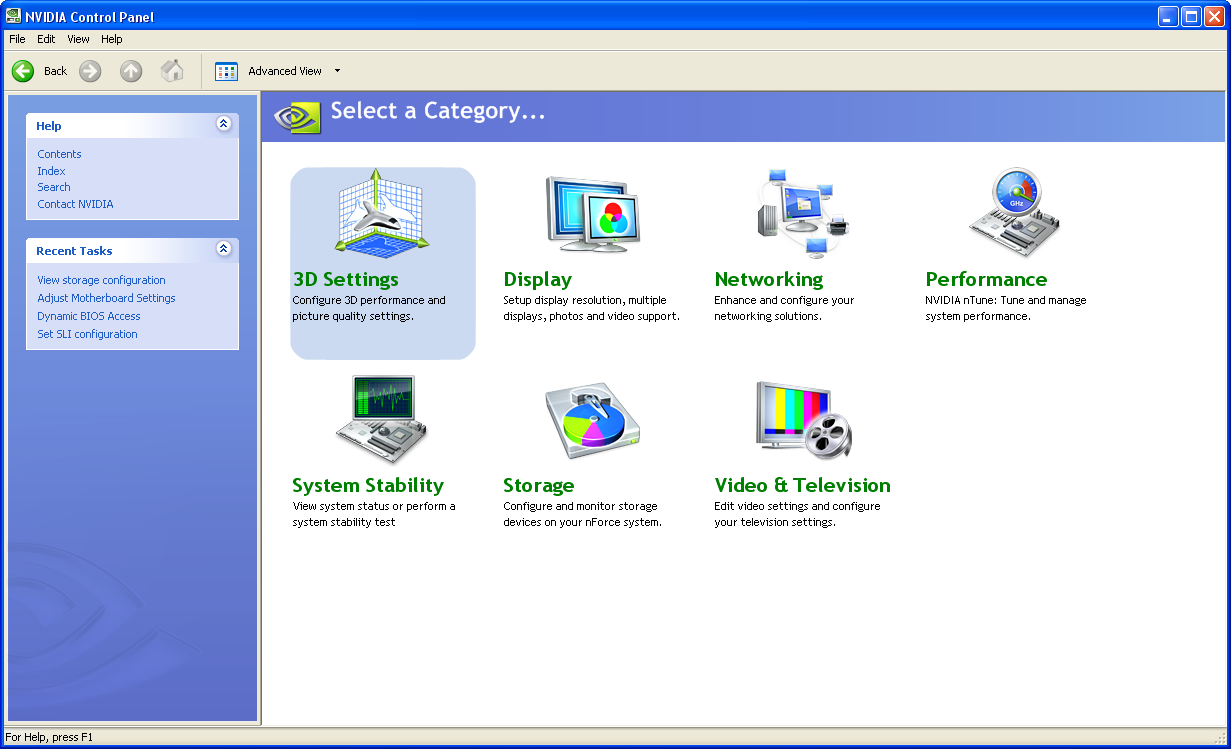
The new control panel offers configuration sections for 3D Settings for NVIDIA GPUs, Display settings, Networking options, Performance, System Stability testing, Storage, and Video/Television settings. The information contained in each section will already be familiar to those with nForce4 or nForce 500 boards but will include a few extended configuration options for the nForce 600 and GeForce 8800 products.
One noteworthy change with the GeForce 8800 series is that Coolbits no longer works for overclocking the GPU. The overclocking panel will still be visible in the legacy control panel but it will tell you to download nTune in order to overclock your GPU. The new GPU overclocking utility works in the same manner but is now integrated into the revised Control Panel.
One of the more interesting features for us is the Adjust Motherboard Settings application. We found the ability to dynamically write a significant number of performance settings directly to the BIOS without requiring a reboot a very quick and easy way to test or set overclocking options without exiting Windows. There are several third party applications that perform this same function but we believe the official support within the BIOS and nTune software gives it a significant advantage over the other solutions. The settings can be saved in a profile that can be loaded within Windows without having to reset the BIOS for individualized situations where settings for games might differ from those for audio/video playback. The system also allows for automatic or direct fan control on supported fan headers.
The Dynamic BIOS Access section offers the ability to change BIOS setting in five different categories that will take effect on reboot. The two sections not displayed are for power management and peripheral settings.
If you are not the type to enter the BIOS and tune your system or set it up for overclocking then NVIDIA offers an application that can do it for you based on your combination of components. We found the Coarse Tuning option would generally set up our system for a 6%~9% overclock of the FSB and memory along with a 3%~5% overclock on the GPU. The Fine Tuning option resulted in an 8%~15% overclock of the FSB and memory while the GPU usually increased 5%~8%.
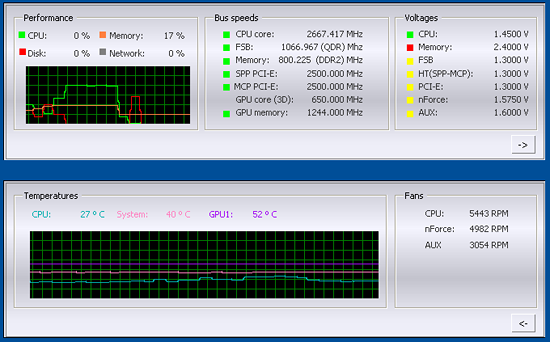
NVIDIA also includes a System Information utility along with a Windows based monitoring application. Overall, the polished look, feel, and operation of the new control panel along with the performance improvements offered in nTune 5.05 has raised the bar once again for user enhancements offered by the core logic suppliers.
One of most interesting features at the nForce 500 launch was the revamped control panel and nTune 5.0 performance applications. The Control Panel and nTune have undergone some fine tuning the past few months with version 5.05 launching for the nForce 600 and GeForce 8800 series of products shortly. NVIDIA has combined all of their various program applets into an integrated control panel to provide a common user interface. We found that this common interface makes it easier for a user to control the various functions of the board and video (NVIDIA based) from a central access point.
 |
| Click to enlarge |
The new control panel offers configuration sections for 3D Settings for NVIDIA GPUs, Display settings, Networking options, Performance, System Stability testing, Storage, and Video/Television settings. The information contained in each section will already be familiar to those with nForce4 or nForce 500 boards but will include a few extended configuration options for the nForce 600 and GeForce 8800 products.
 |
| Click to enlarge |
One noteworthy change with the GeForce 8800 series is that Coolbits no longer works for overclocking the GPU. The overclocking panel will still be visible in the legacy control panel but it will tell you to download nTune in order to overclock your GPU. The new GPU overclocking utility works in the same manner but is now integrated into the revised Control Panel.
 |
 |
| Click to enlarge |
One of the more interesting features for us is the Adjust Motherboard Settings application. We found the ability to dynamically write a significant number of performance settings directly to the BIOS without requiring a reboot a very quick and easy way to test or set overclocking options without exiting Windows. There are several third party applications that perform this same function but we believe the official support within the BIOS and nTune software gives it a significant advantage over the other solutions. The settings can be saved in a profile that can be loaded within Windows without having to reset the BIOS for individualized situations where settings for games might differ from those for audio/video playback. The system also allows for automatic or direct fan control on supported fan headers.
 |
 |
 |
| Click to enlarge |
The Dynamic BIOS Access section offers the ability to change BIOS setting in five different categories that will take effect on reboot. The two sections not displayed are for power management and peripheral settings.
 |
| Click to enlarge |
If you are not the type to enter the BIOS and tune your system or set it up for overclocking then NVIDIA offers an application that can do it for you based on your combination of components. We found the Coarse Tuning option would generally set up our system for a 6%~9% overclock of the FSB and memory along with a 3%~5% overclock on the GPU. The Fine Tuning option resulted in an 8%~15% overclock of the FSB and memory while the GPU usually increased 5%~8%.
 |
| Click to enlarge |
NVIDIA also includes a System Information utility along with a Windows based monitoring application. Overall, the polished look, feel, and operation of the new control panel along with the performance improvements offered in nTune 5.05 has raised the bar once again for user enhancements offered by the core logic suppliers.
Originally published at https://www.anandtech.com/show/2115 (Wayback Machine).