
EPoX EP-5P945 PRO: Budget 945P Performance
- Posted in
- Motherboards
Features and Layout
EPoX designed a well laid out board with all major connections easily reached. The layout provides very good clearance for all cards and most components and was very easy to install in our mid-size ATX case. The board features a well-designed 4-phase voltage regulator power design that provided superb stability during general usage and light overclocking. EPoX installed a combination of solid state capacitors along with high quality Sanyo electrolyte capacitors.
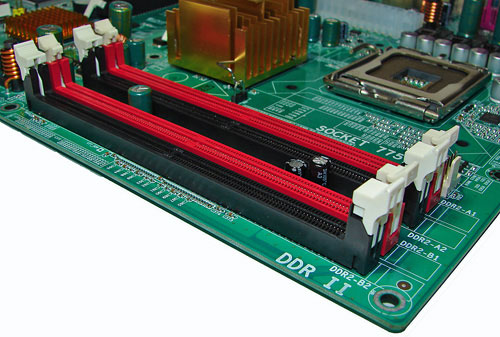
The DIMM module slots' color coordination is correct for dual channel setup. The memory modules are easy to install with a full size video card placed in the primary PCI Express X16 slot.
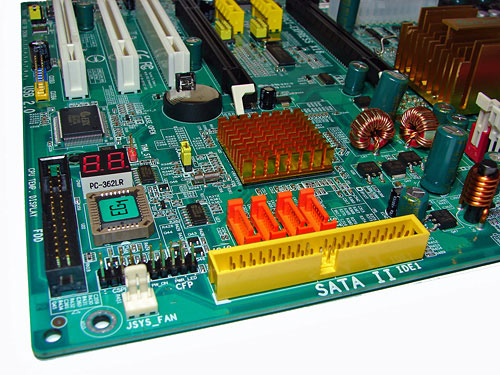
The orange ICH7 SATA ports are conveniently near the board's edge and in front of the to the yellow IDE port connector. Unlike other recently reviewed boards the SATA ports are not color coded for primary and secondary operation if this is important to you. We found the positioning of the SATA ports to be excellent when utilizing the PCI slots or the single IDE port connector. The Intel ICH7 chipset is passively cooled with a low-rise heatsink.
The yellow IDE connector did not present any connection issues in our mid-size ATX test case. The location of this connector is very good for most cases and those users still utilizing IDE hard drives, though most will use it for an optical drive(s) instead. The chassis panel and system fan header are located on the left of the drive ports. The black floppy drive connector is located in an inconvenient position at the left edge of the board. The CP80P post port debug LED is to the right of the floppy drive connector and in front of the EPoX EG1 I/O controller chip. The two USB 2.0 headers are located on the left edge of the board next to the last PCI slot.
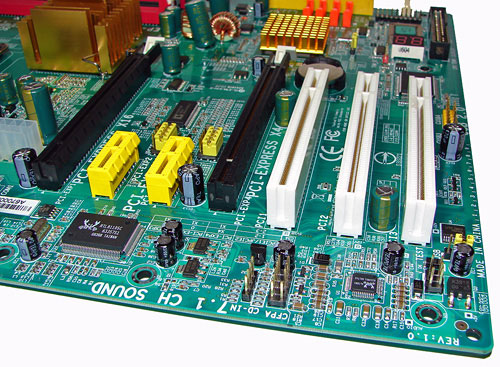
The board comes with two physical PCI Express X16 connectors, two PCI Express X1 connectors, and three PCI 2.3 compliant 32-bit connectors. The layout of this design offers an exceptional balance of expansion slots for a full size ATX board.
Returning to the CPU socket area, we find a limited amount of room for alternative cooling solutions. We utilized the stock Intel heatsink and heatsinks such as the Cooler Master X-Dream P775 that utilize the same footprint size as the retail unit without issue. However, we verified our Tuniq 120 Tower and Scythe Infinity would not fit properly in this area during our tests due to the close proximity of the 945P MCH heatsink. We doubt most users of this board would go to that extreme to cool the processor due to the limited overclocking capabilities of the board.
Our other fitment concern is the location of the 24-pin ATX power connector as the cabling tends to interfere with the CPU heatsink/fan during usage. EPoX places the four-pin ATX power connector next to the 24-pin ATC connector. The cabling to this connector proved difficult to install if the main power cable was already attached.
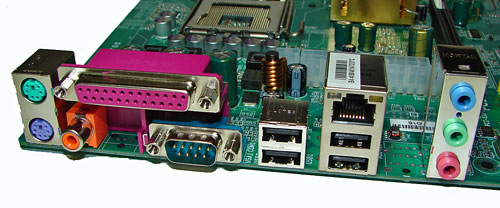
The PS/2 mouse and keyboard ports are located to the left of the LPT parallel port, 9-pin serial port, and S/PDIF Coaxial port. The first two USB 2.0 ports are located next and are followed by the LAN (RJ-45) port and the second pair of USB 2.0 connectors. The audio panel consists of 3 ports that can be configured for 2, 4, and 6-channel audio connections.
 |
| Click to enlarge |
EPoX designed a well laid out board with all major connections easily reached. The layout provides very good clearance for all cards and most components and was very easy to install in our mid-size ATX case. The board features a well-designed 4-phase voltage regulator power design that provided superb stability during general usage and light overclocking. EPoX installed a combination of solid state capacitors along with high quality Sanyo electrolyte capacitors.
The DIMM module slots' color coordination is correct for dual channel setup. The memory modules are easy to install with a full size video card placed in the primary PCI Express X16 slot.
The orange ICH7 SATA ports are conveniently near the board's edge and in front of the to the yellow IDE port connector. Unlike other recently reviewed boards the SATA ports are not color coded for primary and secondary operation if this is important to you. We found the positioning of the SATA ports to be excellent when utilizing the PCI slots or the single IDE port connector. The Intel ICH7 chipset is passively cooled with a low-rise heatsink.
The yellow IDE connector did not present any connection issues in our mid-size ATX test case. The location of this connector is very good for most cases and those users still utilizing IDE hard drives, though most will use it for an optical drive(s) instead. The chassis panel and system fan header are located on the left of the drive ports. The black floppy drive connector is located in an inconvenient position at the left edge of the board. The CP80P post port debug LED is to the right of the floppy drive connector and in front of the EPoX EG1 I/O controller chip. The two USB 2.0 headers are located on the left edge of the board next to the last PCI slot.
The board comes with two physical PCI Express X16 connectors, two PCI Express X1 connectors, and three PCI 2.3 compliant 32-bit connectors. The layout of this design offers an exceptional balance of expansion slots for a full size ATX board.
 |
| Click to enlarge |
Returning to the CPU socket area, we find a limited amount of room for alternative cooling solutions. We utilized the stock Intel heatsink and heatsinks such as the Cooler Master X-Dream P775 that utilize the same footprint size as the retail unit without issue. However, we verified our Tuniq 120 Tower and Scythe Infinity would not fit properly in this area during our tests due to the close proximity of the 945P MCH heatsink. We doubt most users of this board would go to that extreme to cool the processor due to the limited overclocking capabilities of the board.
Our other fitment concern is the location of the 24-pin ATX power connector as the cabling tends to interfere with the CPU heatsink/fan during usage. EPoX places the four-pin ATX power connector next to the 24-pin ATC connector. The cabling to this connector proved difficult to install if the main power cable was already attached.
The PS/2 mouse and keyboard ports are located to the left of the LPT parallel port, 9-pin serial port, and S/PDIF Coaxial port. The first two USB 2.0 ports are located next and are followed by the LAN (RJ-45) port and the second pair of USB 2.0 connectors. The audio panel consists of 3 ports that can be configured for 2, 4, and 6-channel audio connections.
Originally published at https://www.anandtech.com/show/2078 (Wayback Machine).