
Draft N Router Coverage: When the "n" in 802.11n really means "not yet"
- Posted in
- Networking
NETGEAR WNR834B
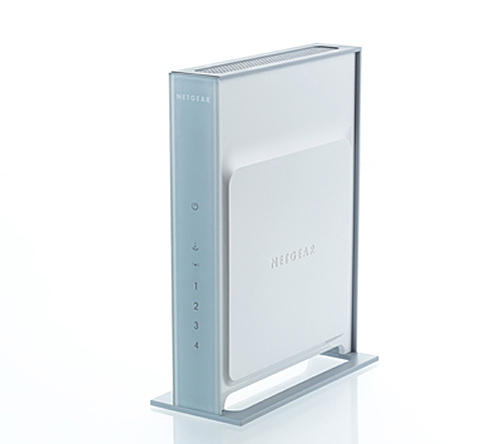
The new RangeMax Next series sports a new case design compared to previous RangeMax units. The RangeMax Next is a slim and sleek design with internal antennas instead of the typical external three antenna design. While having a very elegant design, it does not have a wall-mount option, and needs to be placed upright in order for the antenna to be properly oriented. The unit is very light and we experienced several situations where our cluttered test cable layout would pull the unit over on its side. Unlike the external unit designs, the only way to orient the antenna for better signal strength is to move the actual box around. The front panel has seven status lights that correspond to the LAN/WAN jacks, power status, and communication link with your wireless client.
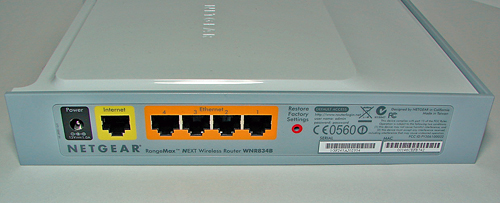
Due to the internal antenna placement the case is actually very thin with the rear panel consisting of the standard four 10/100 LAN jacks, one WAN jack, 12V power jack, and a pinhole reset button with proper color coding on each connection.
The included customer documentation is organized and easy to follow, especially if you have prior router installation experience. Upon opening the box you find a well labeled installation CD that informs you how to start the installation process. After the CD starts up you will come to a web-based menu that offers several options for setting up the router or reviewing the owner's manual.
You have two setup options that consist of a beginner's installation wizard or the option to configure the router manually by connecting directly to the browser based tool. The wizard will instruct the user in setting up the hardware and then offers a simple software setup routine. If you manually set up the router the configuration tool can be reached by entering the enclosed IP address or simply typing www.routerlogin.net.
Our first time network users found the NETGEAR browser tool to be very informative and almost as intuitive as the Belkin N1 while easily exceeding the Linksys documentation. NETGEAR only offers a limited one year warranty on this product and we found their technical support group to be very good at answering our questions.
The new RangeMax Next series sports a new case design compared to previous RangeMax units. The RangeMax Next is a slim and sleek design with internal antennas instead of the typical external three antenna design. While having a very elegant design, it does not have a wall-mount option, and needs to be placed upright in order for the antenna to be properly oriented. The unit is very light and we experienced several situations where our cluttered test cable layout would pull the unit over on its side. Unlike the external unit designs, the only way to orient the antenna for better signal strength is to move the actual box around. The front panel has seven status lights that correspond to the LAN/WAN jacks, power status, and communication link with your wireless client.
Due to the internal antenna placement the case is actually very thin with the rear panel consisting of the standard four 10/100 LAN jacks, one WAN jack, 12V power jack, and a pinhole reset button with proper color coding on each connection.
 |
| Click to enlarge |
The included customer documentation is organized and easy to follow, especially if you have prior router installation experience. Upon opening the box you find a well labeled installation CD that informs you how to start the installation process. After the CD starts up you will come to a web-based menu that offers several options for setting up the router or reviewing the owner's manual.
You have two setup options that consist of a beginner's installation wizard or the option to configure the router manually by connecting directly to the browser based tool. The wizard will instruct the user in setting up the hardware and then offers a simple software setup routine. If you manually set up the router the configuration tool can be reached by entering the enclosed IP address or simply typing www.routerlogin.net.
Our first time network users found the NETGEAR browser tool to be very informative and almost as intuitive as the Belkin N1 while easily exceeding the Linksys documentation. NETGEAR only offers a limited one year warranty on this product and we found their technical support group to be very good at answering our questions.
Originally published at https://www.anandtech.com/show/2072 (Wayback Machine).