
ECS: RD480 in the Extreme
- Posted in
- Motherboards
Firewire and USB Performance
After looking at many options for Firewire and USB testing, we finally determined that an external USB 2.0, Firewire 400, and Firewire 800 hard disk would be a sensible way to look at USB and Firewire throughput. We utilize a RAM disk as our "server", since memory removes almost all overhead from the serving end. We turn off disk caching on the USB and Firewire side by setting up the drives for "quick disconnect" so our results are consistent.
We use 1GB of fast 3-2-2-8 system memory set up as a 450MB RAM disk and 550MB of system memory. Our standard file is the SPECviewPerf install file, which measures 432,533,504 bytes (412.4961MB). After copying this file to our RAM disk, we measured the time for writing from the RAM disk to our external USB 2.0, Firewire 400, or Firewire 800 drive utilizing our internal Windows based timing program. The copy times in seconds were then converted into Megabits per second (Mb) to provide a convenient means of comparing throughput. Higher Rates therefore mean better performance in this particular test.
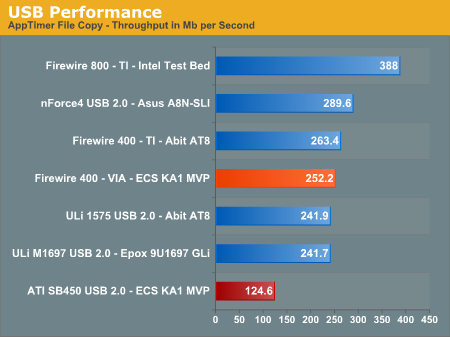
Possibly the most interesting finding in our Firewire and USB throughput tests is the continued performance of an external hard drive connected to Firewire 800. Our benchmarks show Firewire 800 is up to 46% faster than a drive connected to the more common Firewire 400, and about 29% faster than the fastest USB 2.0 solution.
The ECS board offers the excellent VIA based IEEE 1394 Firewire option that typically provides better performance than the TI chipset solutions except on this board. Although the performance is acceptable, it is about 7% lower than other boards that utilize this chipset.
The USB 2.0 performance is not competitive with the ULi and NVIDIA based controllers in throughput. Even though the USB 2.0 performance numbers of the ATI SB450 are up to 50% lower, we found in actual usage the performance is fine for most peripherals. Our only issue was streaming data from our storage drive to a USB 2.0 optical drive for backup purposes. The process of creating a DVD backup consisting of 2.31GB of data took an additional 2.3 minutes compared to the same process on our Asus A8N-SLI Premium.
Ethernet Performance
The current motherboard test suite includes LAN performance measurements. All of these boards utilize PCI or PCI Express based controllers with the only difference being the supplier of the core logic.
The Windows 2000 Driver Development Kit (DDK) includes a useful LAN testing utility called NTttcp. We used the NTttcp tool to test Ethernet throughput and the CPU utilization of the various Ethernet Controllers used on the Intel motherboards.
We set up one machine as the server; in this test, an Intel system with an Intel CSA Gigabit LAN connection. Intel CSA has a reputation for providing fast throughput and is a logical choice for our Gigabit LAN server.
On the server side, we used the following Command Line as suggested by the VIA whitepaper on LAN testing:
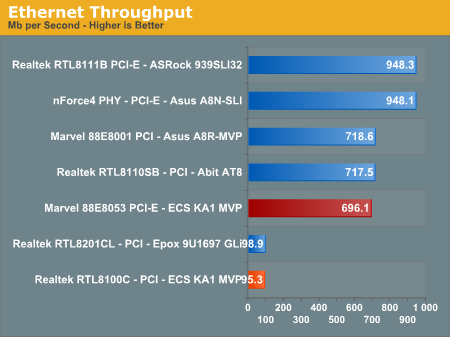
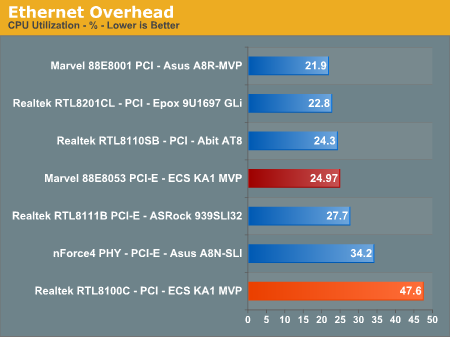
The SB450 natively supports 10/100Mb/s Ethernet operations so the choice of the PCI-E based Marvell 88E8053 10/100/1000Mb/s Ethernet controller is an excellent upgrade to this board. The addition of the Realtek RTL8100C PCI based 10/100Mb's LAN controller should have been dropped from the option list or at least replaced with a PCI based Gigabit LAN controller, though few people will likely use both LAN ports.
The performance of the Marvell 88E8053 Gigabit LAN controller is sub-par on the ECS board. We typically see a throughput range around 940 with this controller on other boards. The 1.0e BIOS provided us with a throughput score of 631 so the 1.1d BIOS has improved the performance slightly, but it still remains network challenged at this time. We have discussed this with ECS engineering and are awaiting a potential fix at this time.
All standard Ethernet tests were performed with standard frames and the NVIDIA Active Armor suite disabled unless otherwise noted. Gigabit Ethernet supports Jumbo frames as well and provides a further reduction in CPU overhead.
After looking at many options for Firewire and USB testing, we finally determined that an external USB 2.0, Firewire 400, and Firewire 800 hard disk would be a sensible way to look at USB and Firewire throughput. We utilize a RAM disk as our "server", since memory removes almost all overhead from the serving end. We turn off disk caching on the USB and Firewire side by setting up the drives for "quick disconnect" so our results are consistent.
We use 1GB of fast 3-2-2-8 system memory set up as a 450MB RAM disk and 550MB of system memory. Our standard file is the SPECviewPerf install file, which measures 432,533,504 bytes (412.4961MB). After copying this file to our RAM disk, we measured the time for writing from the RAM disk to our external USB 2.0, Firewire 400, or Firewire 800 drive utilizing our internal Windows based timing program. The copy times in seconds were then converted into Megabits per second (Mb) to provide a convenient means of comparing throughput. Higher Rates therefore mean better performance in this particular test.
Possibly the most interesting finding in our Firewire and USB throughput tests is the continued performance of an external hard drive connected to Firewire 800. Our benchmarks show Firewire 800 is up to 46% faster than a drive connected to the more common Firewire 400, and about 29% faster than the fastest USB 2.0 solution.
The ECS board offers the excellent VIA based IEEE 1394 Firewire option that typically provides better performance than the TI chipset solutions except on this board. Although the performance is acceptable, it is about 7% lower than other boards that utilize this chipset.
The USB 2.0 performance is not competitive with the ULi and NVIDIA based controllers in throughput. Even though the USB 2.0 performance numbers of the ATI SB450 are up to 50% lower, we found in actual usage the performance is fine for most peripherals. Our only issue was streaming data from our storage drive to a USB 2.0 optical drive for backup purposes. The process of creating a DVD backup consisting of 2.31GB of data took an additional 2.3 minutes compared to the same process on our Asus A8N-SLI Premium.
Ethernet Performance
The current motherboard test suite includes LAN performance measurements. All of these boards utilize PCI or PCI Express based controllers with the only difference being the supplier of the core logic.
The Windows 2000 Driver Development Kit (DDK) includes a useful LAN testing utility called NTttcp. We used the NTttcp tool to test Ethernet throughput and the CPU utilization of the various Ethernet Controllers used on the Intel motherboards.
We set up one machine as the server; in this test, an Intel system with an Intel CSA Gigabit LAN connection. Intel CSA has a reputation for providing fast throughput and is a logical choice for our Gigabit LAN server.
On the server side, we used the following Command Line as suggested by the VIA whitepaper on LAN testing:
Ntttcpr -m 4,0,‹server IP› -a 4 -l 256000 -n 30000
On the client side (the motherboard under test), we used the following Command Line:Ntttcps -m 4,0,‹client IP› -a 4 -l 256000 -n 30000
At the conclusion of the test, we captured the throughput and CPU utilization figures from the client screen.The SB450 natively supports 10/100Mb/s Ethernet operations so the choice of the PCI-E based Marvell 88E8053 10/100/1000Mb/s Ethernet controller is an excellent upgrade to this board. The addition of the Realtek RTL8100C PCI based 10/100Mb's LAN controller should have been dropped from the option list or at least replaced with a PCI based Gigabit LAN controller, though few people will likely use both LAN ports.
The performance of the Marvell 88E8053 Gigabit LAN controller is sub-par on the ECS board. We typically see a throughput range around 940 with this controller on other boards. The 1.0e BIOS provided us with a throughput score of 631 so the 1.1d BIOS has improved the performance slightly, but it still remains network challenged at this time. We have discussed this with ECS engineering and are awaiting a potential fix at this time.
All standard Ethernet tests were performed with standard frames and the NVIDIA Active Armor suite disabled unless otherwise noted. Gigabit Ethernet supports Jumbo frames as well and provides a further reduction in CPU overhead.
Originally published at https://www.anandtech.com/show/1983 (Wayback Machine).