
Apple Makes the Switch: iMac G5 vs. iMac Core Duo
- Posted in
- Mac
The new iMac
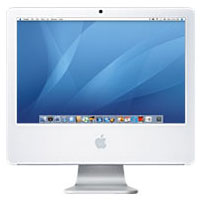 Although my wife has been using one for a while, I realized that I have never actually given my impressions of Apple's iMac platform, despite having looked at both their desktop and notebook offerings in my initial wave of Mac articles.
The iMac is an interesting option for the desktop user, as it is very much a "lifestyle" computer, but a very functional and capable one at that. The iMac is the epitome of what today's PC makers simply do not create - and that is a modern, stylish take on the desktop computer.
It has been done many times in the past. You combine a monitor with a computer and sell it as one. It was done so frequently and so poorly in the past on PCs that there is now a stigma associated with it, but let's think about that for a moment; some of the worst all-in-one designs came about well before LCD panels became mainstream, not to mention that user upgradability was a much bigger deal back then than it is today. With the advent of the LCD panel, you can actually have some pretty stylish integrated systems, if you design them properly, that is. And the issue of upgradability is far less of a demand today than it was back then for a number of reasons: the rate at which CPUs are released has slowed down tremendously, external storage is extremely easy to add, and if you aren't a gamer, then a good GPU today will last you years to come. The point is that these integrated designs were mostly terrible in the past, but that doesn't mean that they have to be today.
When Apple released the Mac mini, I looked at it and thought that they had struck gold; they basically took a notebook platform, massaged the shape, and stuck it in a wonderful form factor for the casual desktop user. In the process, you lose the ease of internal access that larger form factors would offer, but the end result is very close to the perfect form factor for casual users. With the iMac, Apple has pretty much done the same thing; they've taken a notebook motherboard and processor, although this time combined it with a 3.5" desktop hard drive, and mounted it behind a LCD panel - creating a very elegant desktop computer.
The trick to the iMac is in its form factor - although the design is a little bottom heavy, the iMac doesn't look all that much different than your standard LCD monitor. The very positive side effect of the iMac's integrated design is that when paired with a Bluetooth keyboard and mouse, you only have a single cable coming out of the system for power and that's all. The iMac has made it OK for a computer to be on top of your desk again, with as little as one cable coming out of the system - the days of a wiring nest collecting dust behind your computer are over. Granted, this machine isn't for everyone, and I definitely couldn't use it as my only computer simply because I would need a higher resolution panel attached to it, but as a second or third computer, or a computer for someone who just wants the basics (Web browsing, email, documents, music, photos, movies, etc.), the iMac does suffice.
Apple has done the bare minimum and outfitted these two systems with 512MB of memory. I mention that 512MB is the bare minimum because it honestly is for OS X, but I will mention that one of the first upgrades that I would perform on these machines is to bring them up to 1GB of memory. With only 512MB, there were a number of cases during my normal use of the machines (which, in this instance, didn't include any heavy multitasking) where I found them swapping to disk. Just browsing the web or checking email didn't trigger it, but it was once I started to really use any of the iLife '06 or iWork '06 applications that 512MB quickly became a burden.
Upgrading the memory on the iMac is about the only thing that you can do, as replacing the hard drive requires a complete disassembly of the machine (which isn't something that Apple wants end users to do - they would like you to bring it into their stores for those sorts of upgrades). Thankfully, upgrading the memory on the machine is fairly easy. Along the bottom of the machine, there are two screws that you can remove with a small screwdriver. Removing these screws releases a panel that covers either one or two slots for memory, depending on which iMac you own.
Although my wife has been using one for a while, I realized that I have never actually given my impressions of Apple's iMac platform, despite having looked at both their desktop and notebook offerings in my initial wave of Mac articles. The iMac is an interesting option for the desktop user, as it is very much a "lifestyle" computer, but a very functional and capable one at that. The iMac is the epitome of what today's PC makers simply do not create - and that is a modern, stylish take on the desktop computer.
It has been done many times in the past. You combine a monitor with a computer and sell it as one. It was done so frequently and so poorly in the past on PCs that there is now a stigma associated with it, but let's think about that for a moment; some of the worst all-in-one designs came about well before LCD panels became mainstream, not to mention that user upgradability was a much bigger deal back then than it is today. With the advent of the LCD panel, you can actually have some pretty stylish integrated systems, if you design them properly, that is. And the issue of upgradability is far less of a demand today than it was back then for a number of reasons: the rate at which CPUs are released has slowed down tremendously, external storage is extremely easy to add, and if you aren't a gamer, then a good GPU today will last you years to come. The point is that these integrated designs were mostly terrible in the past, but that doesn't mean that they have to be today.
When Apple released the Mac mini, I looked at it and thought that they had struck gold; they basically took a notebook platform, massaged the shape, and stuck it in a wonderful form factor for the casual desktop user. In the process, you lose the ease of internal access that larger form factors would offer, but the end result is very close to the perfect form factor for casual users. With the iMac, Apple has pretty much done the same thing; they've taken a notebook motherboard and processor, although this time combined it with a 3.5" desktop hard drive, and mounted it behind a LCD panel - creating a very elegant desktop computer.
The trick to the iMac is in its form factor - although the design is a little bottom heavy, the iMac doesn't look all that much different than your standard LCD monitor. The very positive side effect of the iMac's integrated design is that when paired with a Bluetooth keyboard and mouse, you only have a single cable coming out of the system for power and that's all. The iMac has made it OK for a computer to be on top of your desk again, with as little as one cable coming out of the system - the days of a wiring nest collecting dust behind your computer are over. Granted, this machine isn't for everyone, and I definitely couldn't use it as my only computer simply because I would need a higher resolution panel attached to it, but as a second or third computer, or a computer for someone who just wants the basics (Web browsing, email, documents, music, photos, movies, etc.), the iMac does suffice.
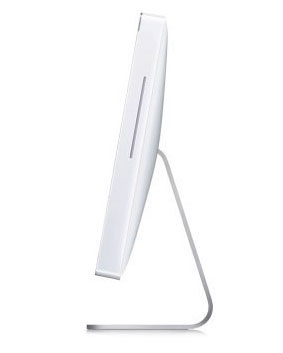
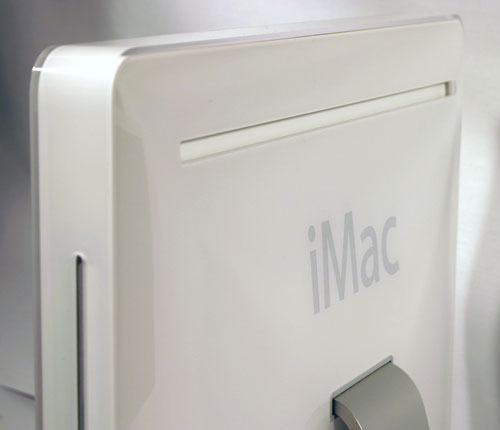
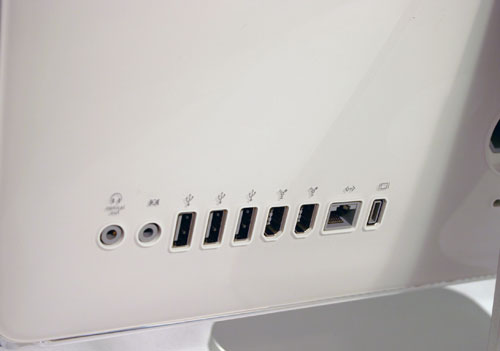
All of the ports are on the back of the system.
Apple has done the bare minimum and outfitted these two systems with 512MB of memory. I mention that 512MB is the bare minimum because it honestly is for OS X, but I will mention that one of the first upgrades that I would perform on these machines is to bring them up to 1GB of memory. With only 512MB, there were a number of cases during my normal use of the machines (which, in this instance, didn't include any heavy multitasking) where I found them swapping to disk. Just browsing the web or checking email didn't trigger it, but it was once I started to really use any of the iLife '06 or iWork '06 applications that 512MB quickly became a burden.
Upgrading the memory on the iMac is about the only thing that you can do, as replacing the hard drive requires a complete disassembly of the machine (which isn't something that Apple wants end users to do - they would like you to bring it into their stores for those sorts of upgrades). Thankfully, upgrading the memory on the machine is fairly easy. Along the bottom of the machine, there are two screws that you can remove with a small screwdriver. Removing these screws releases a panel that covers either one or two slots for memory, depending on which iMac you own.
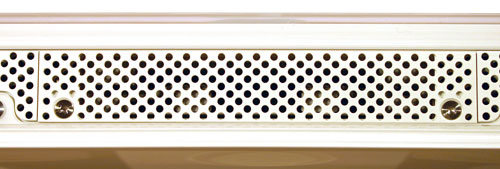
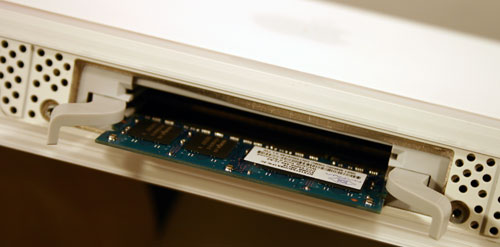
The 200-pin DDR2 SO-DIMM in the Intel based iMac.
Originally published at https://www.anandtech.com/show/1936 (Wayback Machine).