
Intel's Core Duo Launch - Notebook Performance Revealed
- Posted in
- Laptops
Lenovo T60 - Usability
Moving beyond the specifications and the ports on the T60, we get to honestly one of its biggest selling points - the keyboard. The keyboard on the T60 is absolutely stellar, with tactile feedback and key positioning among the best in the market. Much like the T and X series designs of the past, there is a keyboard light that is accessible using the Fn + PgUp keyboard shortcut. The light is mounted on the frame of the LCD panel and does a decent job of illuminating the keyboard. The effect is better than having an unlit keyboard, however we do prefer Apple’s fiber-optic lighting system if given an option.
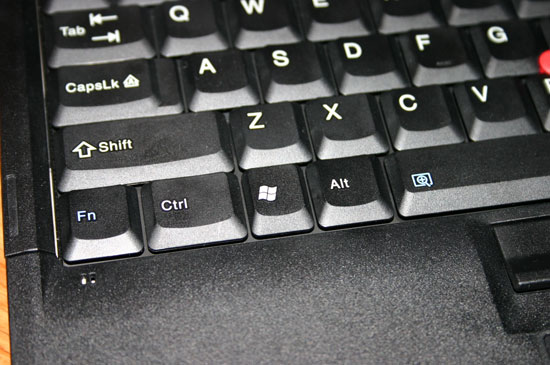
After Lenovo took over the Thinkpads finally got a Windows key, which had been kept off of their designs by IBM as a way of preserving the size and feel of the left CTRL and ALT keys. The inclusion of the Windows key results in a mixed bag of feelings, those who didn’t mind mapping it to another key on older Thinkpads will be displeased while those who sorely missed it will be ecstatic beyond belief. We’re not fond of it, but others may not share our sentiments.
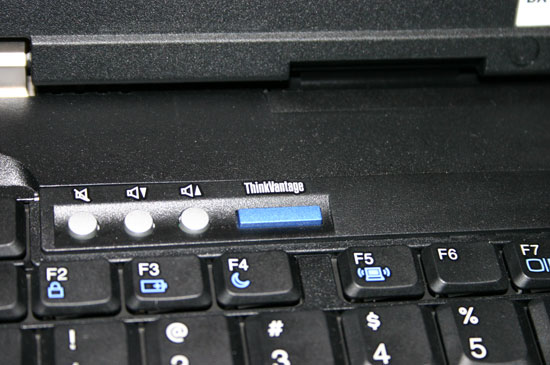
Also in the usual Thinkpad tradition, there’s a blue ThinkVantage button at the top left of the keyboard that will allow you to interrupt the normal startup of the machine and do anything from restore the entire state of the system back to its factory defaults, change boot devices or access the BIOS. While the ThinkVantage button was functional, the necessary software wasn’t present to allow us to test the functionality of the pre-boot loader. We’ll obviously look at ThinkVantage and other similar features once we have final shipping hardware (and software) in our possession.
Given that it uses a 14.1” 4:3 display, Lenovo had a large enough footprint on the T60 to include both a trackpad and TrackPoint on the system. Given how much of a passion users have for one method over the other, including both whenever possible never hurts - especially when you pair it up with an excellent keyboard. The TrackPoint stick is paired with three buttons, the middle which can be held down to turn the pointer into a virtual scroll wheel.
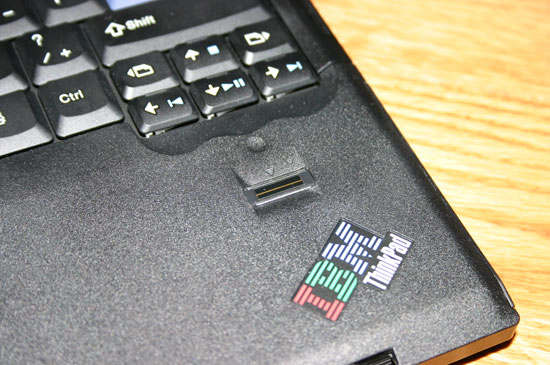
As with previous T series notebooks, the T60 does feature a fingerprint scanner and software that allows you to simply scan your fingerprint instead of having to type in Windows passwords. The supplied software will also manage website passwords for you, once again requiring just a finger swipe instead of remembering and typing in your password. The fingerprint scanner functionality has been on previous Thinkpad notebooks and unfortunately we didn’t have access to the shipping software for this review, so once again we will have to save our evaluation of the technology until a production level notebook is ready.
All in all the Thinkpad T60 was pretty much what we have come to expect from IBM, which is good to know since it is now manufactured by Lenovo. From what we’ve seen, the T60 looks to be just as strong as previous Thinkpad notebooks and now armed with Intel’s Centrino Duo platform, it could very well become one of the notebooks to get in 2006. We’ll reserve final judgment until shipping hardware is available, but so far it is looking promising.
Originally published at https://www.anandtech.com/show/1915 (Wayback Machine).