
Intel Core Duo (Yonah) Performance Preview - Part II
- Posted in
- CPUs
Media Encoding Performance with DVD Shrink, WME, Quicktime and iTunes
We were most curious about the Core Duo's media encoding performance, given that a number of the optimizations for the new processor were FP/SSE related. We've updated our entire media encoding test suite, including everything from the one-click DVD ripping utility DVD Shrink to including H.264 encoding performance with Quicktime 7.0.3 Pro. We wanted to include the latest version of DivX in this comparison. However, the recent release of DivX 6.1 left us with a few bugs that we're still trying to work out in our test beds, so we had to exclude it. However, as time goes on, H.264 encoding will quickly become far more important than even looking at DivX, so its omission from this article isn't as big of a loss in terms of forward-looking performance.
First up is DVD Shrink 3.2.0.15. Our test was simple - we took a copy of Star Wars Episode VI and ripped the full DVD to the hard drive without compression, effectively giving us an exact copy of the disc on the hard drive. Then, using the copy of the DVD on the hard drive (to eliminate any DVD drive bottlenecks), we performed a DVD shrink operation to shrink the movie to fit on a single 4.5GB DVD disc. All of the options were left on their defaults, so the test ends up being pretty easy to run and reproduce. The scores reported are DVD encoding times in minutes, with lower numbers meaning better performance.
The DVD Shrink test is quite important as DVD Shrink is quite possibly one of the easiest tools to rip a DVD. The easier a tool is to use, the more likely it's going to be used, and arguably the more important performance using it happens to be.
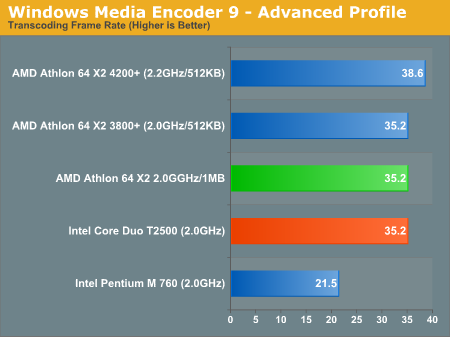
Moving on, we have our Windows Media Encoder 9 test, which uses the advanced profile settings for video encoding. We left all settings at their defaults and just proceeded with a MPEG-2 to WMV-HD conversion. The values reported are in frames per second, with higher numbers being better.
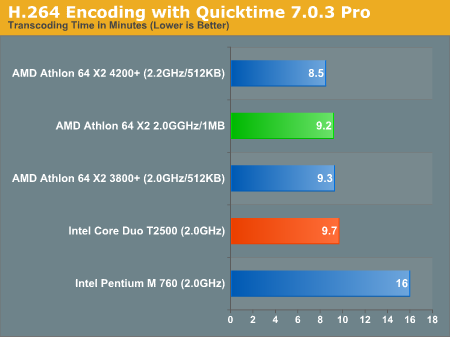
Next up, we have Quicktime Pro 7.0.3 and we perform a MPEG-2 to H.264 encoding task. All of the settings are left at their defaults, with the exception that we optimize the output file for download with a 256kbps data rate while leaving the resolution untouched. We also adjust the video options to optimize for the best quality. We report the transcoding time in minutes, with lower values being better.
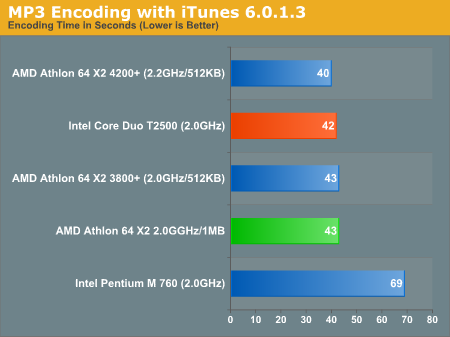
Finally, we have a MP3 encoding test using iTunes 6.0.1.3. For this test, we simply took a 304MB wav file and converted it to a 192kbps MP3 file, measuring the encode time in seconds. The only iTunes option that we changed was to prevent the playback of the song while encoding.
We were most curious about the Core Duo's media encoding performance, given that a number of the optimizations for the new processor were FP/SSE related. We've updated our entire media encoding test suite, including everything from the one-click DVD ripping utility DVD Shrink to including H.264 encoding performance with Quicktime 7.0.3 Pro. We wanted to include the latest version of DivX in this comparison. However, the recent release of DivX 6.1 left us with a few bugs that we're still trying to work out in our test beds, so we had to exclude it. However, as time goes on, H.264 encoding will quickly become far more important than even looking at DivX, so its omission from this article isn't as big of a loss in terms of forward-looking performance.
First up is DVD Shrink 3.2.0.15. Our test was simple - we took a copy of Star Wars Episode VI and ripped the full DVD to the hard drive without compression, effectively giving us an exact copy of the disc on the hard drive. Then, using the copy of the DVD on the hard drive (to eliminate any DVD drive bottlenecks), we performed a DVD shrink operation to shrink the movie to fit on a single 4.5GB DVD disc. All of the options were left on their defaults, so the test ends up being pretty easy to run and reproduce. The scores reported are DVD encoding times in minutes, with lower numbers meaning better performance.
The DVD Shrink test is quite important as DVD Shrink is quite possibly one of the easiest tools to rip a DVD. The easier a tool is to use, the more likely it's going to be used, and arguably the more important performance using it happens to be.
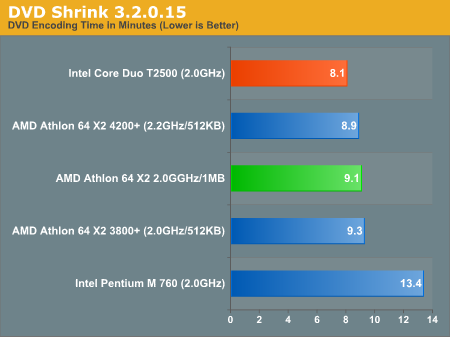
- The Pentium M performs exceptionally poorly, and
- The Core Duo performs exceptionally well.
Moving on, we have our Windows Media Encoder 9 test, which uses the advanced profile settings for video encoding. We left all settings at their defaults and just proceeded with a MPEG-2 to WMV-HD conversion. The values reported are in frames per second, with higher numbers being better.
Next up, we have Quicktime Pro 7.0.3 and we perform a MPEG-2 to H.264 encoding task. All of the settings are left at their defaults, with the exception that we optimize the output file for download with a 256kbps data rate while leaving the resolution untouched. We also adjust the video options to optimize for the best quality. We report the transcoding time in minutes, with lower values being better.
Finally, we have a MP3 encoding test using iTunes 6.0.1.3. For this test, we simply took a 304MB wav file and converted it to a 192kbps MP3 file, measuring the encode time in seconds. The only iTunes option that we changed was to prevent the playback of the song while encoding.
Originally published at https://www.anandtech.com/show/1900 (Wayback Machine).