
Gigabyte GA-G1 975X: Will a Turbo help the Pentium 4?
- Posted in
- Motherboards
FSB Overclocking Results
|
Front Side Bus Overclocking Testbed |
||
|
Processor: |
Pentium 4 Prescott LGA 775 |
|
CPU Voltage: |
1.4250v (1.4000v default) |
|
Memory Settings: CPU |
4-4-4-15 at 866MHz |
|
Memory Settings:
FSB |
3-3-3-8 at 732MHz |
|
Memory Voltage: |
2.2v |
|
NorthBridge Voltage: |
Auto |
|
|
Auto |
|
Cooling: |
Intel 840EE Heat Sink |
|
Power Supply: |
OCZ Power Stream 520 |
|
Maximum CPU OverClock |
260fsb x 16 (4160MHz) +30% |
|
Maximum FSB OverClock |
275fsb x 14 (3850MHz) +37% |
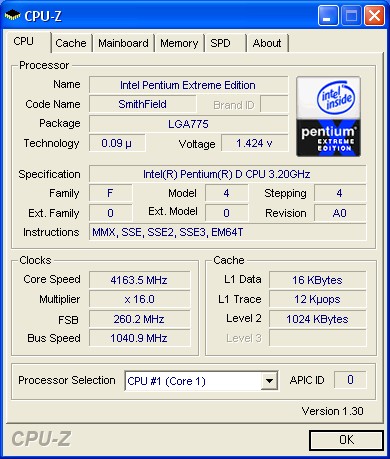
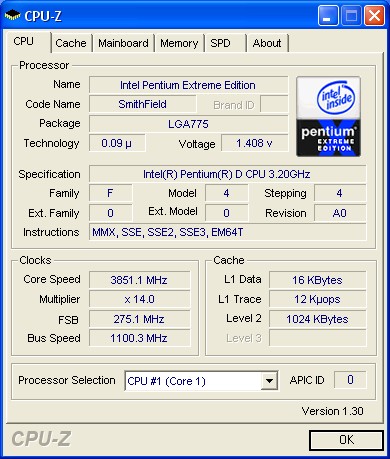
This board is an excellent overclocker in our initial tests. The board was able to complete the entire benchmark suite at these settings. We will continue to experiment with the board but it was able to boot into Windows at a FSB setting of 300 with the 14x multiplier.
Memory Stress Testing
Memory TestsMemory stress tests look at the ability of the Gigabyte GA-G1 975X to operate at the officially supported memory frequencies of 667MHz DDR2 at the best performing memory timings the Corsair CM2X512A-5400UL revision 1.3 will support.
|
Gigabyte GA-G1 975x
Deluxe |
|
|
Clock Speed: |
200MHz (800FSB) |
|
Timing Mode: |
667MHz - Default |
|
CAS Latency: |
3 |
|
RAS to CAS Delay: |
2 |
|
RAS Precharge: |
2 |
|
RAS Cycle Time: |
8 |
|
Voltage: |
2.1v |
The Gigabyte GA-G1 975X was completely stable with 2 DDR2 modules in Dual-Channel at the settings of 3-2-2-8 at 2.1v.
Test Setup
The Intel 975X chipset fully supports the 820, 830, and 840 dual core Pentium D processors in both stock and overclocked conditions. Dual core really makes a difference in certain multi-tasking scenarios, as was demonstrated in the dual core performance preview. If you are interested in how the various chipsets perform in a real world multitasking setup please take another look at that review.The board's memory was operated 3-2-2-8 for the benchmarking suites. The Gigabyte GA-G1 975X automatically overclocks the processor system bus up to a setting of 206 so our tests were conducted with a FSB setting of 199. We are very concerned about the inability to lock the FSB in manual mode between the settings of 200 and 205. We set the FSB to 200 in manual mode, the system at post would report a 200 FSB setting, and then the system would report a 206 FSB setting via CPU-Z or Everest once in Windows. We have relayed our concerns to Gigabyte and will report further on this feature and test results in the full article.
|
Performance
Test Configuration |
|
|
Processor: |
Intel Pentium 840EE (3.2GHz, 800FSB, Dual-Core, 2x1MB L2, HT) utilized for all tests. |
|
RAM: |
2 x 512mb Corsair
CM2X512A-5400UL revision 1.3 Settings- DDR2-667
as noted at (CL3-2-2-8) |
|
Hard Drive(s): |
2 x Maxtor MaXLine
III 7L300S0 300GB 7200 RPM SATA (16MB Buffer), 1 x Maxtor MaXLine III 7L300R0 300GB 7200 RPM
IDE (16MB Buffer). |
|
System Platform Drivers: |
Intel Chipset Software - 7.2.2.1006 |
|
Video Cards: |
1 x XFX 7800GTX OC (PCI Express) for all tests. |
|
Video Drivers: |
NVIDIA nForce 78.01 WHQL and 81.85 WHQL as noted |
|
Operating System(s): |
Windows XP Professional SP2 |
|
Motherboards: |
Asus P5N32-SLI Deluxe |
Originally published at https://www.anandtech.com/show/1859 (Wayback Machine).