
Asus A8N32-SLI Deluxe: NVIDIA Dual x16 for the Athlon 64
- Posted in
- Motherboards
NVIDIA SLI-AA
NVIDIA introduced special SLI-AA Modes beginning with driver version 77.7x. By running Coolbits, selecting "Advanced Settings" under "View" in the "Performance & Quality Settings" area, and selecting "SLI-Antialiasing" under the "SLI Rendering Mode", you have new options to run games at 16xAA or 8xAA independent of application control. There are many potential advantages to SLI-AA mode. You can find more information on how this feature works and the potential benefits at NVIDIA Announces 16x AA For SLI.
Since some have reported dramatic increases of up to double the speed using SLI-AA with the Dual x16 board, we ran benchmarks in SLI-AA modes using the same Far Cry game using our Regulator benchmark. As in our other testing the CPU, memory and drivers were the same for both boards. We even moved the hard drive between the two test setups to make sure everything except the motherboard was exactly the same. Since we had some problems with stability of the release 81.85 drivers in SLI-AA mode, we used the more recent 81.87 drivers which are also available in the Beta section at nVidia's wesite.
As you clearly see from the test results we did not find ANY performance improvement in either SLI-AA mode on the Dual x16 board compared to the Dual x8. In fact, the DFI Dual x8 was slightly faster than the Asus Dual x16 in theses tests. The results, however, were well within error tolerance and are equivalent - no difference. Perhaps more memory or lower resolutions would yield different results, but in the past we have consisitently found higher resolutions to benefit most from SLI and antialiasing.
NVIDIA introduced special SLI-AA Modes beginning with driver version 77.7x. By running Coolbits, selecting "Advanced Settings" under "View" in the "Performance & Quality Settings" area, and selecting "SLI-Antialiasing" under the "SLI Rendering Mode", you have new options to run games at 16xAA or 8xAA independent of application control. There are many potential advantages to SLI-AA mode. You can find more information on how this feature works and the potential benefits at NVIDIA Announces 16x AA For SLI.
Since some have reported dramatic increases of up to double the speed using SLI-AA with the Dual x16 board, we ran benchmarks in SLI-AA modes using the same Far Cry game using our Regulator benchmark. As in our other testing the CPU, memory and drivers were the same for both boards. We even moved the hard drive between the two test setups to make sure everything except the motherboard was exactly the same. Since we had some problems with stability of the release 81.85 drivers in SLI-AA mode, we used the more recent 81.87 drivers which are also available in the Beta section at nVidia's wesite.
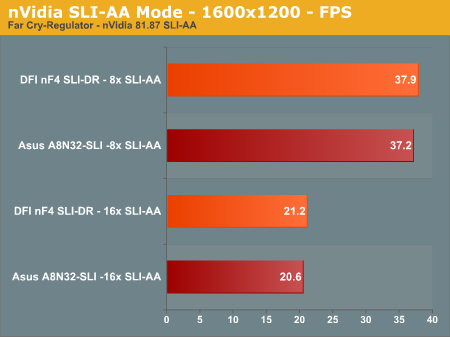
As you clearly see from the test results we did not find ANY performance improvement in either SLI-AA mode on the Dual x16 board compared to the Dual x8. In fact, the DFI Dual x8 was slightly faster than the Asus Dual x16 in theses tests. The results, however, were well within error tolerance and are equivalent - no difference. Perhaps more memory or lower resolutions would yield different results, but in the past we have consisitently found higher resolutions to benefit most from SLI and antialiasing.
Originally published at https://www.anandtech.com/show/1845 (Wayback Machine).