
USB Flash Drive Roundup - 10/2005
- Posted in
- Memory
USB Flash Drive Security
Even the largest of the drives in today's roundup is still fairly small, and with a device that you're always carrying around to various places and using in various computers, chances are that you may eventually lose the drive.
If you lose your drive, and you happen to have some sensitive information on it, making sure that it doesn't end up on the web the next day may be a concern of yours. Thankfully, almost all of the contenders in this roundup offer some sort of "security" for their flash drives, but the degree of security really varies from one drive to the next.
The most rudimentary security that is on most flash drives is the ability to create a password-protected partition on the drive; that is, only accessible using a password. You use a manufacturer-supplied utility to divide your drive in two, creating a public and a secure partition. For the most part, these two partitions aren't accessible simultaneously; you usually have to "login" to the secure partition and doing so hides the public partition (although some controllers don't feature this limitation). With a special utility, someone can always re-partition your drive, but at least they won't gain access to the data stored on the secure partition.
The downside to drives with encryption support is that some drives perform the encryption in software, which results in a performance penalty when encryption is enabled. Kingston is the only manufacturer in this roundup that actually has a hardware-based encryption engine designed to encrypt/decrypt files at drive speed so that there's no performance penalty when accessing your secure, encrypted partition.
The problem with both approaches to security is that they are largely software dependent, and most manufacturers only provide software support for Windows. So Apple and Linux users are generally out of luck here; while you can still access the public partition on virtually all systems, secure partition access will require Windows in most cases.
Even the largest of the drives in today's roundup is still fairly small, and with a device that you're always carrying around to various places and using in various computers, chances are that you may eventually lose the drive.
If you lose your drive, and you happen to have some sensitive information on it, making sure that it doesn't end up on the web the next day may be a concern of yours. Thankfully, almost all of the contenders in this roundup offer some sort of "security" for their flash drives, but the degree of security really varies from one drive to the next.
The most rudimentary security that is on most flash drives is the ability to create a password-protected partition on the drive; that is, only accessible using a password. You use a manufacturer-supplied utility to divide your drive in two, creating a public and a secure partition. For the most part, these two partitions aren't accessible simultaneously; you usually have to "login" to the secure partition and doing so hides the public partition (although some controllers don't feature this limitation). With a special utility, someone can always re-partition your drive, but at least they won't gain access to the data stored on the secure partition.
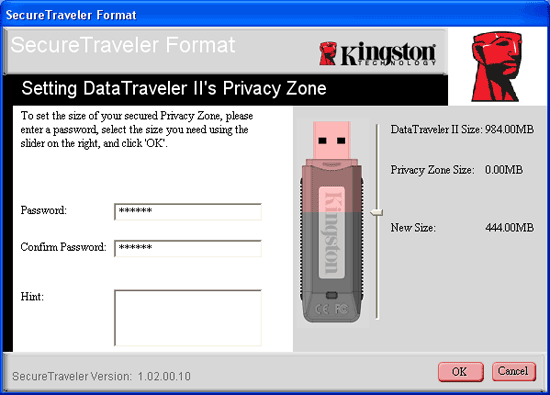
Kingston's SecureTraveler software allows you to partition a compatible Kingston drive into public and secure partitions.
The downside to drives with encryption support is that some drives perform the encryption in software, which results in a performance penalty when encryption is enabled. Kingston is the only manufacturer in this roundup that actually has a hardware-based encryption engine designed to encrypt/decrypt files at drive speed so that there's no performance penalty when accessing your secure, encrypted partition.
The problem with both approaches to security is that they are largely software dependent, and most manufacturers only provide software support for Windows. So Apple and Linux users are generally out of luck here; while you can still access the public partition on virtually all systems, secure partition access will require Windows in most cases.
Originally published at https://www.anandtech.com/show/1807 (Wayback Machine).