
Intel NUC13 Extreme Raptor Canyon Review: Sizzling SFF Performance Powerhouse
Miscellaneous Aspects and Concluding Remarks
Networking and storage are aspects that may be of vital importance in specific PC use-cases. The Intel NUC13RNGi9 (Raptor Canyon) leaves no stone unturned in both aspects. The networking credentials are top-notch - there is a 10G BASE-T port as well as a 2.5G BASE-T one. Killer Gaming Wi-Fi 6E AX1690i with external antennae ensure that the system is at the cutting edge on the wireless front.
On the storage side, the Intel NUC13RNGi9 (Raptor Canyon) has three M.2 slots, two exclusively for NVMe SSDs (one is CPU-attached), and the third one capable of supporting both NVMe and SATA SSDs. SATA ports are also available on the baseboard with 2.5" drives capable of being accommodated inside the voluminous chassis. From a benchmarking perspective, we provide results from the WPCstorage test of SPECworkstation 3.1. This benchmark replays access traces from various programs used in different verticals and compares the score against the one obtained with a 2017 SanDisk 512GB SATA SSD in the SPECworkstation 3.1 reference system.
| SPECworkstation 3.1.0 - WPCstorage SPEC Ratio Scores | |||
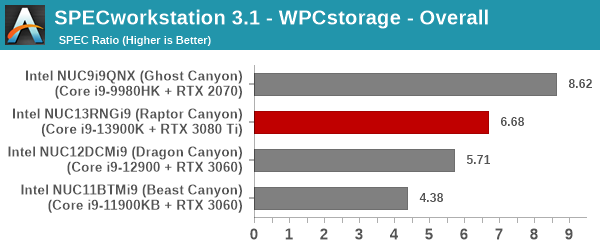
The graphs above present results for different verticals, as grouped by SPECworkstation 3.1. The storage workload consists of 60 subtests. Access traces from CFD solvers and programs such as Catia, Creo, and Soidworks come under 'Product Development'. Storage access traces from the NAMD and LAMMPS molecular dynamics simulator are under the 'Life Sciences' category. 'General Operations' includes access traces from 7-Zip and Mozilla programs. The 'Energy' category replays traces from the energy-02 SPECviewperf workload. The 'Media and Entertainment' vertical includes Handbrake, Maya, and 3dsmax. While the PCIe 4.0 x4 NVMe SSD manages to come out on top in a few scenarios, the Optane SSD in the Ghost Canyon NUC enjoys a significant lead in most of them. The net result is that the Kingston Fury Renegade PCIe 4.0 x4 NVMe SSD directly attached to the Raptor Lake CPU comes second only to an Optane SSD attached directly to a Core i9-9980HK.
Closing Thoughts
Intel first brought socketed desktop processors to the NUC lineup in the Dragon Canyon NUC. Within a short time, the company has released the second-generation product in that category - the Intel NUC13RNGi9 (Raptor Canyon). It builds upon the lessons from the first-generation product and delivers a highly compelling solution in terms of processing and gaming prowess. Assembling a Raptor Canyon NUC is a much more enjoyable experience compared to the Dragon Canyon NUC. The end result is a mini-tower with easily accessible ports. RGB lighting is still available for the gamers who desire them, and can be turned off if so desired.
With increasing volume, the Raptor Canyon NUC faces competition not only from traditional SFF gaming PCs such as the ZOTAC MAGNUS ONE, but also DIY builds featuring compact mini-ITX cases. For those scenarios, Intel's response seems to lie in the motherboard / Compute Element features. The presence of 10G networking, built-in Wi-Fi 6E, and dual Thunderbolt 4 ports land the Shrike Bay Compute Element in the ultra-premium motherboard category. The Thunderbolt ports also deliver some future-proofing in terms of I/O capabilities. The presence of a USB 3.2 Gen 2x2 Type-C port in the front panel and the complete absence of cumbersome recessed ports are bound to be appreciated by consumers.

Intel's NUC Extreme Models
(From L to R: Ghost Canyon, Beast Canyon, Dragon Canyon, and Raptor Canyon)
The 150W PL1 of the Core i9-13900K and the ability to accommodate powerful GPUs like the RTX 3080 Ti mean that the NUC13RNGi9 delivers processing and gaming power that have hitherto not been seen in such a small footprint. The NUC Extreme lineup has been slowly evolving over the last three generations, but the Raptor Canyon is indeed a quantum jump. UCFF purists might balk at the dimensions of the Raptor Canyon NUC and the energy consumption numbers, but those are the sacrifices one has to make for the amount of processing power packed into the system. The external Wi-Fi antennae may be off-putting to some (given that all NUC models usually have the wireless antenna embedded within the system, usually mounted somewhere on the chassis itself).
In terms of scope for improvement, Intel could probably integrate some sort of docking mechanism into the chassis. This could allow users to add after-market functionality such as card readers and/or extra USB ports to the system in a well-integrated manner. The previous-generation Extreme NUCs all had a SD card slot, but the Raptor Canyon NUC does away with it. A dock feature could be one way to address these types of issues. A USB card reader or hub could deliver the same functionality, but not in the sleek manner of a native port. Internally, the power delivery mechanism could also do with some improvement - preferably with a power backplane instead of multiple wires from the PSU. Cable management has become much simpler in the NUC13 Extreme compared to previous NUC Extreme kits, but there is always room for a better user experience.
Intel started to slowly build up a robust ecosystem around the Compute Elements a few years back. Focusing on the gaming market has enabled them to achieve economies of scale in order to drive their vision further. The NUC13 Extreme is an exciting product born out of that vision, and its potential is immense. On the pricing front, the Raptor Canyon NUC is available for pre-order at around $1800. This is not far off from the Ghost Canyon NUC's launch price in July 2020 ($1700). A premium is only to be expected for the socketed processor and additional thermal solution, more powerful CPU, and other features. Intel expects the Raptor Canyon NUCs to start selling with broad availability in Q1 2023.
Originally published at https://www.anandtech.com/show/17647/intel-nuc13-extreme-raptor-canyon-review-sizzling-sff-performance-powerhouse (Wayback Machine).