
SFF Roundup, Socket 939 Systems
- Posted in
- Systems
Encoding and Network Benchmarks
AutoGK
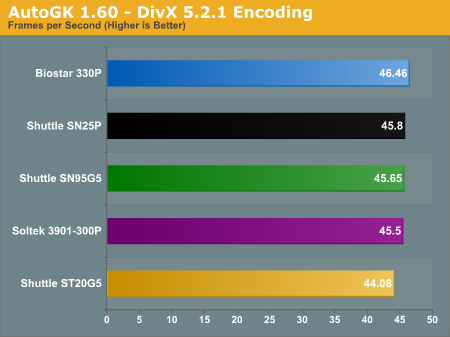
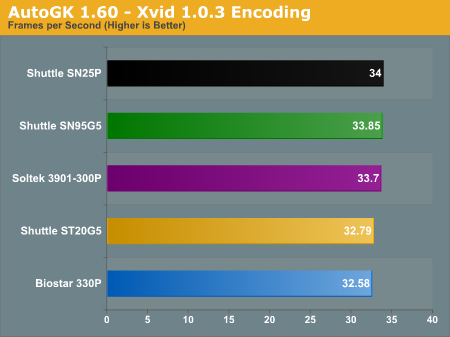
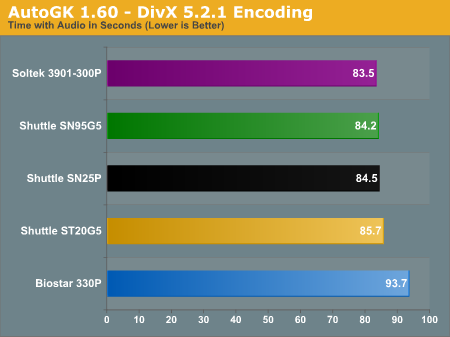
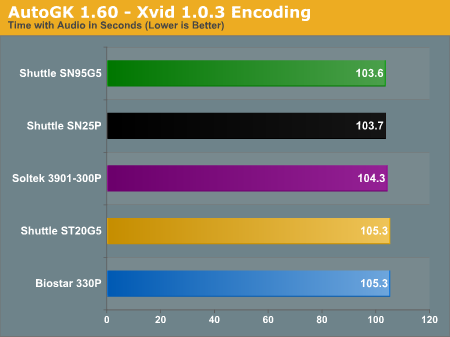
Our encoding benchmarks will use AutoGK with two different video files. We'll encode with both the DivX and Xvid codecs. Our movie encoding benchmark uses a chapter from The Sum of All Fears, and we encode it to 75% quality with no audio and the video size set to "Auto". In this test, Auto results in a 720x384 video clip. This is the most simplistic of video encoding tasks, as the 75% quality only requires a single pass. All tests were done with version 1.60 of AutoGK - the latest official release at the time that benchmarking was started. Version 1.96 is now available, but a quick test didn't show more than a 2% difference in performance.Our second encoding benchmark uses an MPEG-2 file that we created using the high quality TV input option from the Aopen EA-865-II. We took the 28MB file (for a 30-second clip) and set the target size to 5 MB. The encoding takes three passes: a compression analysis pass followed by two encoding passes. We report the total time required from the instant that we press the Start button to the conclusion of the second encoding pass. Video size is set to a fixed width of 640 pixels (i.e. no loss in video size) and audio was set to auto (which results in MP3 encoding). (If you prefer to compare frames per second, the video is 900 frames long, so divide by the time reported in our graphs.) Audio processing with multiple video passes slows the FPS down dramatically in comparison to the single pass test, of course.
You can check out the samples of the DivX and Xvid encoded video files if you're interested. When compared with the 28MB MPEG-2 source file, the benefits of re-encoding are readily apparent.
Networking
In order to test network performance, we used the NTTCP utility from the Windows 2000 Driver Development Kit. This is less prone to variance than the simple file copy that we used in the 478/754 roundup, though the results become more of a theoretical maximum than a representation of normal use. In most networking situations, you'll be limited by the performance of your hard drive - at least, if you're planning on using these SFFs. High Performance Computing can make good use of faster networks, but that's a different topic. We executed the following command at a Command Prompt on each system:ntttcpr.exe -m 4,0,[Server IP Address] -a 4 -l 256000 -n 30000
ntttcps.exe -m 4,0,[Client IP Address] -a 4 -l 256000 -n 30000
We ran each of the systems as both a client and a server, connected through a gigabit switch. Our companion PC for this test is an Athlon 64 3200+ system in an MSI K8N Neo Platinum motherboard. The reason for that choice is because it's my personal PC, so it's not as likely to be in a disassembled state as the other systems around the labs. This makes the results a bit more "real world" than a crossover cable, but we're not too concerned - we just want a baseline estimate of networking performance. Since all of the networking chips are gigabit Ethernet, we should in theory see results close together. Reality disagrees with that assumption, though.
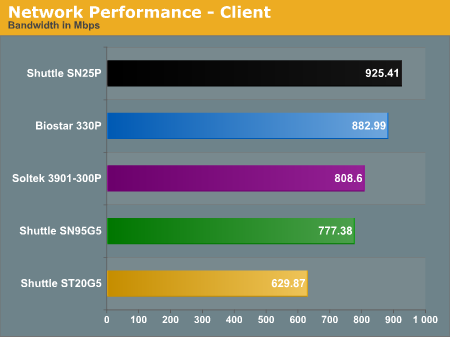
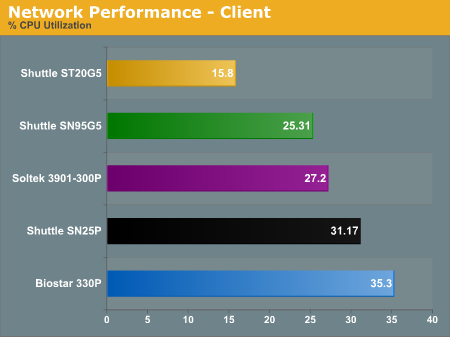
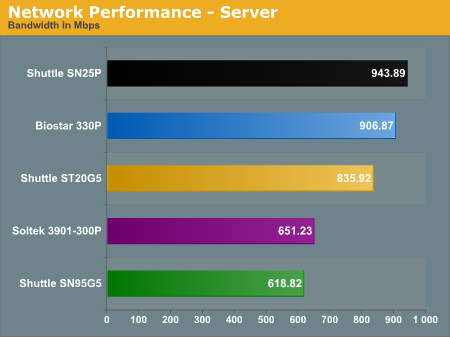
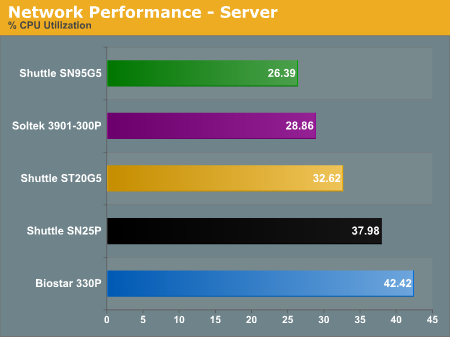
The interesting thing is that client performance seems to have very little relation to server performance, at least with the NTTCP utility. The fastest server is also the SN25P, actually surpassing its client score with 943.89 Mbps and 37.98% CPU load. The second fastest is the 330P, with a similar performance advantage over its client scores. What's interesting is the ST20G5, coming in at 835.92 Mbps with 32.6% CPU load - this despite being the slowest client. Note that the CPU load of the ST20G5 was almost twice as high when functioning as a server instead of a client. The difference in server performance is slightly higher than the spread in client performance: 53%.
Clearly, all gigabit Ethernet controllers are not created equal. Unfortunately, if networking performance is critical for your system use, we really don't have much to offer in the way of advice beyond stating that the SN25P and 330P seem to be the best implementations - likely helped by placing the NIC on the PCIe bus. There isn't a clear pattern among the remaining systems, as the ST20G5 also uses a PCIe network chip. The drivers are obviously important in realizing the maximum performance of the network solution. In everyday network use, though, the performance difference is not generally noticed: streaming movies, copying files, etc. all use far less than even the 630 Mbps of performance that the ST20G5 provided.
We did try to run some duplex tasks - i.e. having the system function as both client and server at the same time while another system was server and client. That should have pushed us over the 1 Gbps rate for total network traffic, and it could have made the non-PCI networking options stand out, as the PCI bus is limited to 133 MBps. Our attempts at getting a repeatable test failed, however, as CPU usage and network traffic varied wildly. The (cheap) network switch that we used may have played a role, and CPU multitasking likely had a part as well, but we didn't feel that it was worth pursuing the matter further.

Click to enlarge.
Originally published at https://www.anandtech.com/show/1754 (Wayback Machine).