
ULi M1695 PCIe/AGP for Athlon 64 – Part 2 with SLI
- Posted in
- Motherboards
USB, Firewire & Storage Performance
After looking at many options for Firewire and USB testing, we finally determined that an external USB 2.0, Firewire 400, and Firewire 800 hard disk might be a sensible way to look at USB and Firewire throughput.Our first efforts at testing with an IDE or SATA drive as the "server" yielded very inconsistent results, since Windows XP sets up cache schemes to improve performance. Finally, we decided to try a RAM disk as our "server", since memory removed almost all overhead from the serving end. We also managed to turn off disk caching on the USB and Firewire side by setting up the drives for "quick disconnect" and our results were then consistent over many test runs.
We used just 1GB of fast 2-2-2 system memory set up as a 450MB RAM disk and 550MB of system memory. Our stock file was the SPECviewPerf install file, which is 432,533,504 bytes (412.4961MB). After copying this file to our RAM disk, we measured the time for writing from the RAM disk to our external USB 2.0 or Firewire 400 or Firewire 800 drive using a Windows timing program written for AnandTech by our own Jason Clark. The copy times in seconds were then converted into Megabits per second (Mb) to provide a convenient means of comparing throughput. Higher Rates therefore mean better performance.
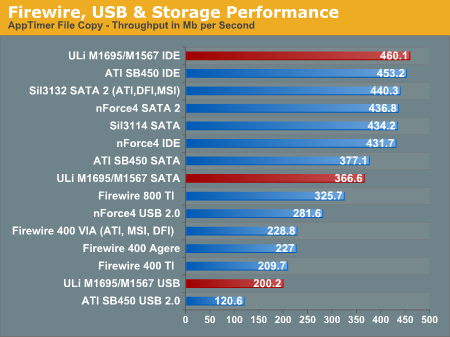
Keep in mind that this is the M1567 south bridge, and the one that you will see with the ATI Radeon Xpress 200 north bridge will likely be the M1573/M1575, which also features HD audio instead of AC'97. The M1573/75 have not yet been tested and may perform even better in USB.
Originally published at https://www.anandtech.com/show/1748 (Wayback Machine).