The Design: Sony DSC-T33
NOTE: We apologize for the absence of our standard studio product photos for the Sony DSC-T33. We took all the pictures and then lost the data to a weird flash card issue before we were able to post-process them. Unfortunately, we had already sent the camera back before realizing the images were missing. Below, we have extracted the product images from the user's guide.
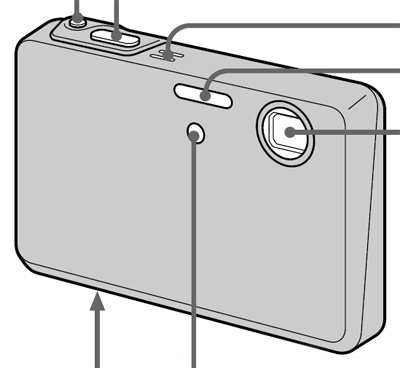
Image courtesy of Sony
The front of the Sony DSC-T33 features a 3x optical zoom with a focal range of 38 - 114mm (35mm equivalent). The T33 uses the same type of folded optics that can be seen on the T1 and F88. Directly to the left of the lens are the built-in flash and the AF-assist/self-timer lamp. From left to right, the following can be found on the top of the camera: main power button, shutter button, microphone.
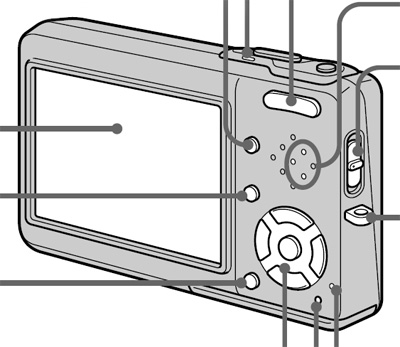
Image courtesy of Sony
The back of the T33 features a large 2.5" LCD monitor with 230K pixels. To the upper-right of the LCD monitor is the zoom controller that controls the optical zoom in Record mode and the magnification of images in Play mode. Below the zoom controller are the Display button and the speaker. Below this are the Menu button, Image size/Delete button, and 4-way controller with separate Set button in the middle. At the lower right corner are the Reset button and an access lamp that blinks whenever data is being written to the flash card. From this angle, we can also see the right side of the camera, which contains the main mode switch. This switch allows you to change the camera's current mode to Movie, Record, or Play. This side also contains a post for the included wrist strap.
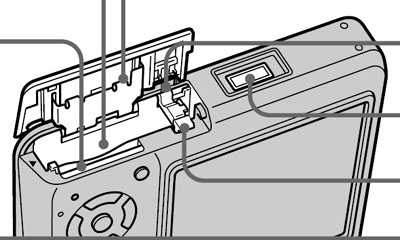
Image courtesy of Sony
On the bottom of the T33, you'll find the multi-connector, which can be used to attach the camera to the included dock. To the left of this is a door that conceals the compartment for the battery and flash card. The T33 uses Memory Stick Duo flash cards, which are much smaller than the original Memory Stick. The camera comes with a 32 MB Memory Stick Duo; however, you will probably want something larger like 256 MB to start out. You may have noticed that there is no tripod mount on the bottom of the T33. Instead, the charging dock has a tripod mount. So, in order to "mount" the T33 on a tripod, you must first put the T33 in its dock and then put the entire thing onto your tripod. Obviously, Sony doesn't think that people use tripods very often. This served as a significant source of frustration throughout our review. It seems that every time we needed to take a tripod shot with the T33, we would forget to bring the dock. We're not exactly sure why Sony couldn't have just put the tripod mount on the bottom of the camera - it's not as if there isn't enough real estate for it.
