
Vendor Cards: EVGA e-GeForce 7800 GTX
- Posted in
- GPUs
Performance Tests
For testing frame rates, we decided to go with three of the more popular games out today that would provide a good range of graphic variety for our cards to tackle. We tested Half Life 2 and Doom 3 at 1920x1440 and Battlefield 2 at 2048x1536. We also used 8x AF for all the games, which is turned on automatically in Doom 3 and Battlefield 2 when set on "high" quality.If you are interested in seeing how the 7800 stands up to other cards, take a look at our original G70 review. Note that this series of articles isn't meant to be a comparative review between G70 and other GPUs, but rather is designed to help you choose a 7800.
Here is the system that we used for the benchmarks:
MSI K8N Neo4 Platinum/SLI motherboard
AMD Athlon 64 FX-55 Processor
1 GB OCZ 2:2:2:6 DDR400 RAM
Seagate 7200.7 120 GB Hard Drive
OCZ 600 W PowerStream Power Supply
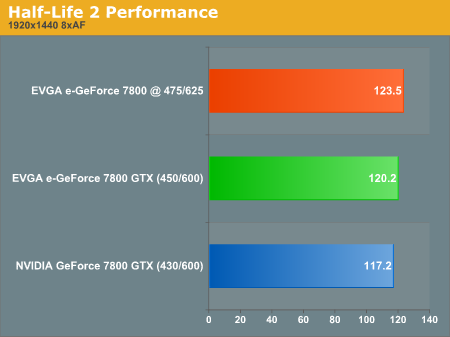
Half-life 2, despite its graphical quality, gets excellent frame rates on a wide variety of cards. This one is no exception. You can see that there is only about a 3 fps difference between the reference and the EVGA e-GeForce 7800 GTX, and it gains roughly another 3 when overclocked. These increases are less than 3%, and as a general rule, a less than 3% increase is insignificant. Doom 3 and Battlefield 2's increases are significant, however.
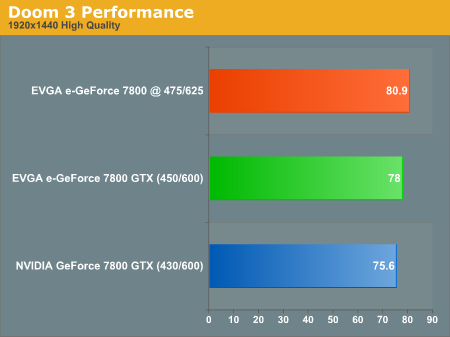
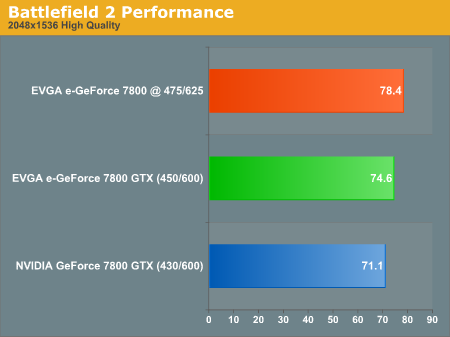
For those who think that 4 frames per second aren't enough to matter, over the course of one minute, 4 frames per second does add up to 240 total frames that wouldn't have been rendered otherwise. It all comes down to smoothness here, and those 240 frames help to fill in any gaps in the action. If we are going to pay somewhere near $600 for a card, we are going to expect all the smoothness that we can get.
A good question to ask is, "is it worth the risk of heat damage to overclock my card?" The short answer is, "It depends." The card is already faster than the reference right out of the box, and while you do get a small boost in frame rate when you overclock it, it's not enough to make a very big impact on your gaming experience. However, those hoping to get every last inch of an advantage might just get it by pushing the card to its limit. But do so at your own risk - overclocking these high-transistor count GPUs running at already high clock speeds can result in damage to your new $600 baby.
Originally published at https://www.anandtech.com/show/1734 (Wayback Machine).