Tiger's Finder
For the most part, Finder's appearance hasn't changed with Tiger. The Apple menu in the top left hand corner sports a new brighter blue color, as does the Spotlight button in the opposing corner. All highlight colors are now that same shade of blue, which is a nice, but a very small change.
| Mac OS X Tiger |
Mac OS X Panther |
 |
 |
 |
 |
Earlier betas did have some differences with how Finder worked, but thankfully, the decision was made to keep things relatively static from Panther to Tiger.
The biggest functional change to Finder is the support for Smart Folders. I will discuss the technology behind Smart Folders in greater depth when I talk about Tiger's Spotlight search engine, but know that Smart Folders are dynamic entities that behave as a folder would, but aren't actual folders.
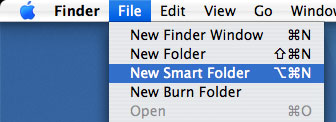
A Smart Folder is essentially a pointer to the results of a search of all files on your hard drive (or whatever locations you choose). For example, I can create a Smart Folder containing all documents that will appear to have every single document on my hard drive, regardless of where I've stored it. The power of Smart Folders is huge. It effectively removes the need for you to worry about where you download and save files. There's no limit to the number of Smart Folders that you can create, and they look and work just like regular folders. If at any time you should decide that you no longer want that Smart Folder, you can delete it without affecting any of its contents; remember, a Smart Folder doesn't actually store any files, but is rather just a pointer to a search designed to look and work like a regular folder. You can also modify the rules of the Smart Folder by hitting the edit button that exists in every Smart Folder.
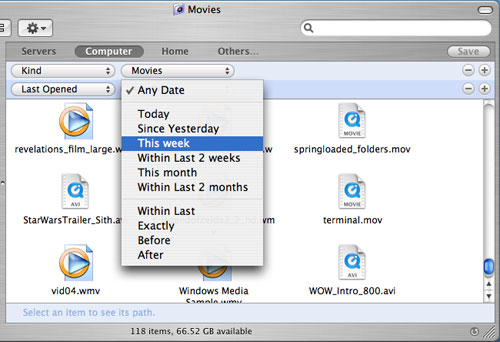

Although Smart Folders have been one of the least used features of Tiger for me, I think down the road, they will be very commonplace in my normal usage patterns. With the incredible searching capabilities of Tiger, many have assumed that organization is being cast aside in favor of just using a search bar for everything. However, Smart Folders are just as important as the ability to perform system-wide searches as they do improve organization.

You can also now create Burnable Folders that are folders of items that can easily be burned to a CD/DVD. You just drag whatever you want to the Folder and then hit burn to burn the files.
The Dock has a few changes in Tiger. Most notably is that now when you right-click on any item in the Dock, you have the ability to select Open at Login, which will launch the application whenever you login to Tiger. It's a nice option to be able to have those applications that you always open upon startup to be open automatically at Login (e.g. for me, that would be Mail, iChat, Adium X and Safari).
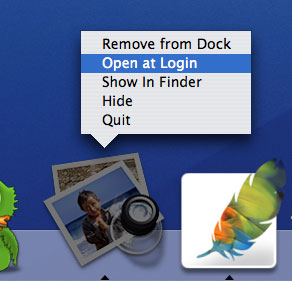
The Dock in Tiger does have one very reproducible and annoying bug if you have dock magnification enabled:
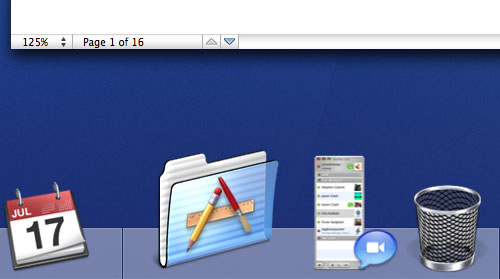
The Dock remains magnified even when our window focus is elsewhere.
If you right-click on any icon in the dock and then, instead of selecting any option from the contextual menu you instead click elsewhere, the dock will remain magnified even while your mouse is over another window. The only solution is to hover your mouse over the dock again and it will behave as normal again. It's a very annoying bug in Tiger that isn't present in Panther, but it is visible enough that hopefully, it will not take long for Apple to address it. Although not huge, there are a number of bugs in Tiger that are of the magnitude of this Dock bug.
My final complaint about the Finder in Tiger is the way deleted folders are handled if a window showing the folder's contents is still visible. For example, in Panther, if I had a folder called Useless Stuff open and I decided to delete the folder, doing so would cause the open Useless Stuff window to disappear as it had now been dragged into the Trash. In Tiger, the Useless Stuff window will still remain open, although its path will have changed as it is now in the Trash. To me, that doesn't seem particularly intuitive and it's something that does bug me a lot in Tiger.
