
The 20" LCD Shootout: Dell versus Apple
- Posted in
- Displays
Quantitative Analysis
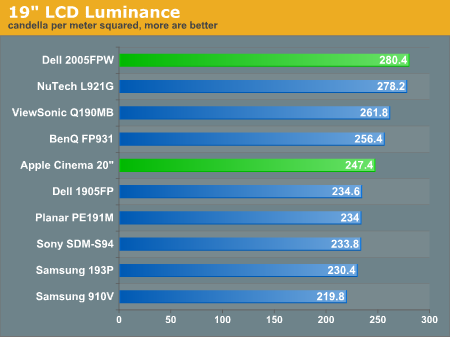
For the duration of this review, we connected the UltraSharp 2005FPW and Apple Cinema 20” simultaneously to a Radeon X800 Pro with factory default settings on both DVI connections unless stated otherwise. Brightness has been set to maximum as well.Luminance
Brightness ranked as one of our most important display qualities. The largest mistake that we see people make when they buy a new LCD is to put their new, bright LCD in a dim, dark room (and then turn the LCD down to 25% brightness). Not only is this terrible for your eyes, but it also unnecessarily offsets hues; a blue screen in a dark room doesn’t look the same as a blue screen in a well lit one!Below, you can see a comparison of the brightness for each of our LCD monitors.
Our Contrast Ratio
We will note the same observation from the 19” LCD Roundup two months ago. Using PreCal and our ColorVision Spyder, we will measure the luminance of a pure white image and a pure black image on the LCD monitor. The observed contrast ratio is simply the highest recorded luminance divided by the lowest. All measurements are in candela per meter squared; larger contrast ratios are more desirable.| Observed Contrast Ratio | |||
| Highest Recorded (white image) |
Lowest Recorded (black image) |
Observed Contrast Ratio | |
| Apple Cinema 20" | 247.4 | 2.4 | 103.1 |
| BenQ FP931 | 256.4 | 3.6 | 71.2 |
| Dell 1905FP | 234.6 | 2.6 | 90.2 |
| Dell 2005FPW | 280.4 | 2.6 | 107.8 |
| NuTech L921G | 278.2 | 2.6 | 107.0 |
| Planar PE191M | 234.0 | 3.0 | 78.0 |
| Samsung 193P | 230.4 | 2.2 | 104.7 |
| Samsung 910V | 219.8 | 2.6 | 84.5 |
| Sony SDM S94 | 233.8 | 3.0 | 77.9 |
| ViewSonic Q190MB | 261.8 | 2.6 | 100.7 |
Contrast ratios were fairly close to what we expected to observe. The Dell display does emit whiter whites, but at the same time, our darkest darks were not quite there. Keep in mind, the accuracy of our ColorVision Spyder is only within 0.2 cd/m 2, and this plagues the accuracy of our results. Our numbers should give you a good estimation of where each display falls in line with another, but it is far from an absolute authority.
For those who would like to see how the Apple Cinema 20” and Dell 2005FPW compare head to head, we placed an image spanning both displays on the desktop and took a snapshot. The image below is the raw image before we cleaned it up for easier comparison.

Click to enlarge.

Click to enlarge.
Originally published at https://www.anandtech.com/show/1668 (Wayback Machine).