
IDF Spring 2005 Day 1 - Gelsinger Speaks, nForce4 Intel and more
- Posted in
- Trade Shows
IAMT, VT, and why should I want Virtualization?
IAMT is Intel's new Active Management Technology. They didn't go into much (any) detail on how it works, but they talked about it as a separate entity on the hardware level that is able to monitor and correct problems on the rest of the system. This enables higher levels of reliability across the Intel platform. This will likely be more interesting to the server administrator than to the desktop customer. From other descriptions of IAMT, we can speculate that IAMT consists of a custom operating system stored in hardware (similar to the BIOS) that allows secure network access and is able to interact with the rest of the system. We know that IAMT will be able to operate regardless of software or hardware state. In other words, having a hard locked computer, dead hard drive, or even being powered down (as long as there is hard power to the system) won't get in the way of IAMT working.
One of the biggest advances Intel is trying to push now is virtualization (with Intel Virtualization Technology: VT). Other than simply adding another way to utilize the parallelism the dual core push will offer, hardware virtualization will allow quite a few new usage models for personal computers.
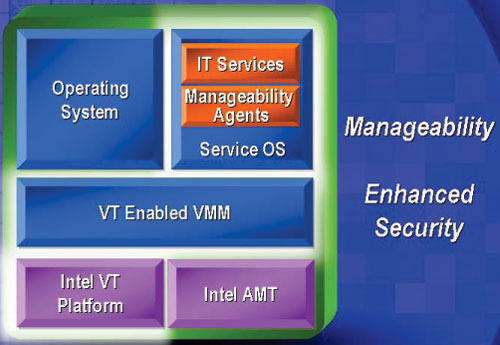
Hardware virtualization is the ability of the platform to partition hardware and allow software to run as if it had full control of the hardware. Companies like VMware have been building software level technology that attempts to virtualize systems for quite a while, but there are many more advantages to virutalizing at the hardware level.
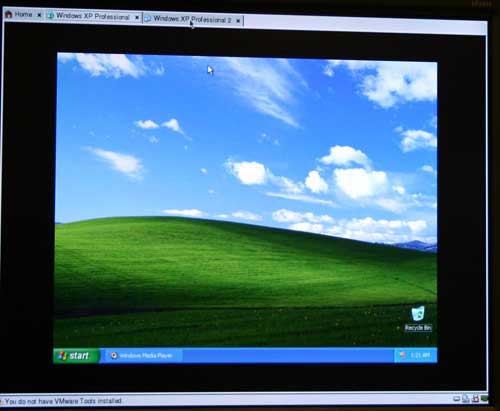
A version of VMware running with Intel VT support
As we have pointed out in past IDF shows, virtualization could allow one single computer to run more than one OS, even mixing Windows and Linux. Multiple people could be using a single system as if it were more than one, provided the processing power were adequate.
Aside from this perspective, Intel also sees security as a major advantage of virtualization. In the past, they have talked about maintaining a dedicated management partition running a standardized installation. This would allow companies to easily fix problems on a PC from a sort of quarantined operating system (that even the computer's everyday user would not have access to).
In order to show the advantage of this, Pat demonstrated what would happen if a computer on a corporate network was infected with a virus. In this demo, the IAMT enabled server that the computers are connected to automatically detects the virus and disconnects the machine from the network. If this happens on a non-virtualized computer, the user must run a virus scanner locally. On the virtualized hardware, Intel is able to disconnect the infected partition and enable the management partition to scan and clean the system. After the management partition has cleaned the virus, the user's partition is able to reconnect to the network virus free. The demo showed all of this happening in the time it took Pat to explain what was going on.
Originally published at https://www.anandtech.com/show/1632 (Wayback Machine).