
Value Case Roundup: A Look at the Affordable
- Posted in
- Cases/Cooling/PSUs
Foxconn CasEdge TK-09
Foxconn Electronics, Inc. is one of the bigger names in the computer industry. Besides PC cases, it is one of the leading manufacturers of motherboards, connectors, and just about everything OEM. With all this experience in the higher level electronics, how will its PC case product stand against others? Let's take a look.
External Design
The theme in our roundup so far has been subtlety in looks. AsiaPro, Linkworld, and Raidmax all kept things simple and left the flashy aspects like bright lights out to appeal to more users.
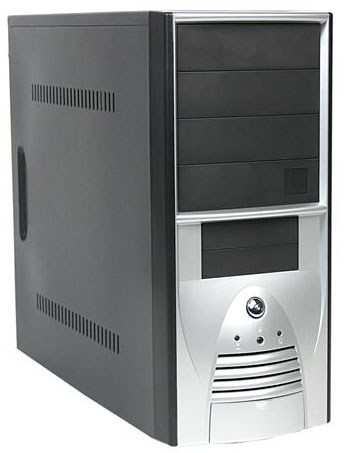
The bezel of the TK-09 is black and silver in color. There are four 5-1/4"; drive bay covers that are black and take up the top half of the bezel. There are also two black 3-1/2"; drive bay covers centered underneath.
The bottom section of the bezel features a large silver power button, a small reset button below that as well as power and HDD activity LEDs to the sides of the reset button. The reset button is extremely small and requires very small, child-sized fingers to press.
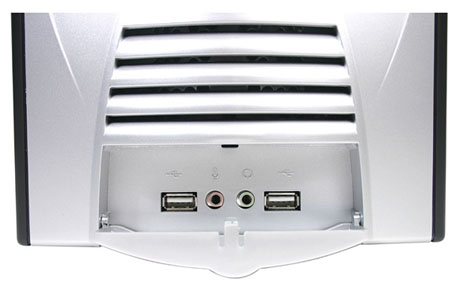
Under those components is a vent for optional intake fans to be mounted on the inside, as well as a fold-down door, which hides two USB ports and audio in/out ports. FireWire has not been implemented into this case, but the addition of the audio ports gives it some points.
The side panels are bare except for two rows of vents a few inches from the top and bottom of the panels. There is also an indentation on each panel to help users grip it to slide it back. The panels are secured to the case by two thumbscrews and can be removed easily.
Internal Design
There are four 5-1/4"; drive bays and a total of seven 3-1/2"; drive bays, two of them exposed. A small feature in the design of these bays is the single-sided mounting solution, which allows and really only requires each drive to be screwed in from one side - the left side. This will greatly reduce the installation time, since the right side panel will not have to be removed and extra screws will not have to be installed.
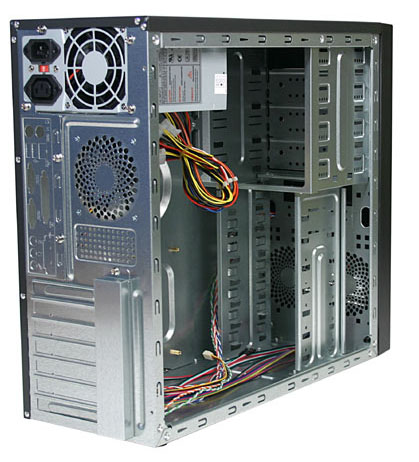
The motherboard tray has nothing out of the ordinary. It uses screw-in stand-offs to mount the motherboard and features a good number of options in placing those stand-offs.
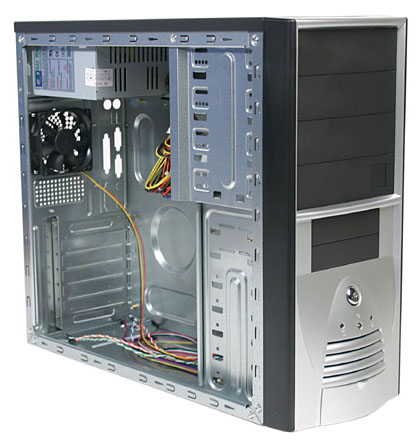
At the back, we see the expansion slots. The TK-09 uses a device to lock add-in cards in place by moving the mounts back to the outside of the case. There is a casing on the outside that protrudes about half an inch and covers the mounting points of the expansion slots. This casing can be removed by a single screw.
Originally published at https://www.anandtech.com/show/1604 (Wayback Machine).