
915 Motherboard Roundup: Socket 775 for the Rest of Us
- Posted in
- Motherboards
Abit AG8: Features and Layout
| Abit AG8 Motherboard Specifications | |
| CPU Interface | Socket 775 Pentium 4 (Prescott) |
| Chipset | Intel 915P/ICH6R |
| BUS Speeds | 100MHz to 400MHz (in 1MHz increments) |
| DDR Speeds | Auto, 333, 400 |
| PCI Speeds | 33.33, 36.36, 40.00 |
| Core Voltage | CPU Default to 1.7375V in 0.0125V increments |
| DRAM Voltage | 2.5V to 3.2V in 0.05V increments |
| NB (Northbridge) Voltage | 1.50V-2.05V in 0.05V increments |
| Memory Slots | Four 184-pin DDR 400 Slots Dual-Channel Unbuffered Memory to 4GB |
| Expansion Slots | 1 PCIe x16 Slot 3 PCIe x1 slot 2 PCI Slots |
| Onboard SATA/IDE RAID | 4 SATA 150 drives by ICH6R Can be combined in RAID 0, 1, Intel Matrix |
| Onboard IDE | One Standard ATA100/66 (2 drives) |
| Onboard USB 2.0/IEEE-1394 | 8 USB 2.0 ports 3 IEEE 1394 FireWire Ports by TI 4200R7T |
| Onboard LAN | Gigabit PCI Ethernet by Realtek 8110S-32 |
| Onboard Audio | AC'97 2.3 Realtek ALC658 8-Channel with SPDIF in/out |
| Tested BIOS | 1.7 Award |
With a name like AG8, you may be tempted to conclude that this must be an integrated graphics board, but in fact, the Abit AG8 is based on the Intel 915P chipset. You can certainly see the family resemblance to the Abit AA8 DuraMAX, which is one of the better performing 925X motherboards - and that is a good thing. Abit has included the ICH6R south bridge, which brings Intel Matrix RAID to the AG8. This is something many other boards in our roundup neglect as they choose the non-Raid ICH6 to save a few dollars on the cost of their 915 board. Abit also kept the Firewire ports on the AG8 - another area that is often cut to price down the 915 for the mainstream.
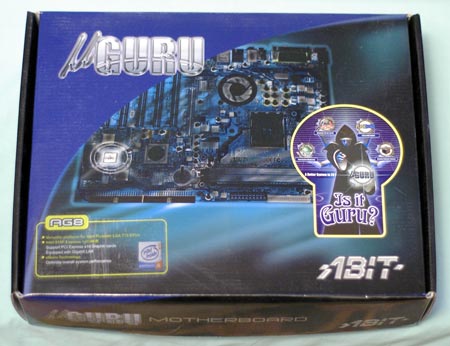
Abit made concessions to a price point on the AG8 in their choice of an average AC'97 2.3 audio solution instead of the extremely capable Azalia High-Definition audio. You will find Gigabit LAN on the AG8, but it is the version tied to the PCI bus instead of the faster PCI Express version. These concessions will matter to some and not much to others, but it does help Abit keep the price competitive in what they hope will be a very active market segment.
Abit has included their typical wide selection of voltages and frequencies to get the most from the AG8 and the Pentium 4 Prescott. Abit was one of the first motherboard makers to break through the overclocking limitations of the 925X chipset, and this is also reflected in the 915P AG8 where additional automatic manipulations are being made by µGuru at boot. The PCIe frequency is adjusted dynamically in relation to the CPU frequency prior to boot, to allow a higher overclock with the AG8. The overclocking controls are typically Abit, which means exceptionally wide ranges in BIOS compared to most other boards in the 915 roundup. Abit decided not to include PCI Express speed adjustments in the BIOS - they are being manipulated in µGuru instead.
The voltage adjustments for memory are particularly noteworthy, since they extend to 3.2V. This should be enough to satisfy most DDR users and it even provides options to use some of the fast high-voltage memory, which has recently been introduced to the High-end memory market. The range of available voltages for the CPU and Northbridge are also stands out - as you would expect from a company that so closely identifies with the computer enthusiast The Northbridge adjustments extend from the default 1.5V all the way to 2.05V, which is a wider range than what you find on any other board. As we saw on the AA8 Duramax, Abit has added a hefty heatsink with a side-blowing fan to the northbridge to handle the voltage range that they have built into the AG8.
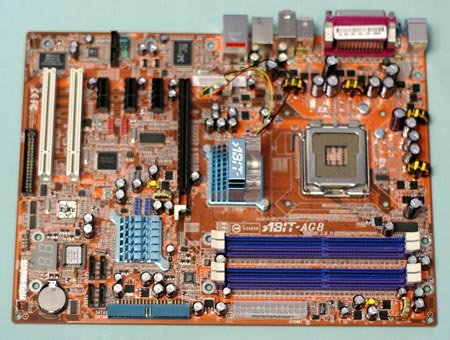
Abit uses a flat edge connector for the single IDE connection provided by the 915P chipset, which can be a difficult fit in most mid-tower cases. We suggest that you connect the IDE cable before you mount the board, since the connector falls under the hard drives in many case designs and is difficult to reach after the board is screwed down. We generally like the idea of edge connectors, but some case designs make it very difficult to connect the edge-connectors. If you still use a floppy, you will find the location to be a real problem at the very bottom center of the motherboard. When you try to route the floppy cable to clear the 4 SATA connectors, it tends to hide the diagnostic LEDs and interfere with the front-panel connectors. The bulky 24-pin power connector is on the right board edge and the 4-pin 12V connector is on the top board edge. Both these locations are excellent - you will not have to fish cables over or around the CPU. The Abit trademark 2-digit diagnostic LEDs are also found on the mainstream-priced AG8. They can be very useful for troubleshooting.
Abit uses the Realtek ALC658 codec instead of an Intel HD compliant audio codec on the AG8. You have to save money somewhere, but the HD audio is a trademark 925X/915 feature and it is a shame to lose this great feature. You can find more information on the features and specifications of the Realtek 658 at the Realtek website. While you're there, you should also do a little research on the High-Definition audio codecs also supplied by Realtek.
Originally published at https://www.anandtech.com/show/1561 (Wayback Machine).