
915 Motherboard Roundup: Socket 775 for the Rest of Us
- Posted in
- Motherboards
Soltek SL-915GPro-FGR: Features and Layout
| Soltek 915GPro-FGR Motherboard Specifications | |
| CPU Interface | Socket 775 Pentium 4 (Prescott) |
| Chipset | Intel 915P/ICH6 |
| BUS Speeds | 200MHz to 350MHz (in 1MHz increments) |
| DDR2 Speeds | Auto, 333, 400 |
| CPU Voltage | Auto, 0.85V to 1.60V in 0.0125V increments |
| DRAM Voltage | 2.6V to 2.9V in 0.1V increments |
| vCore (Chipset) Voltage | 1.50V-1.80V in 0.1V increments |
| Memory Slots | Four 184-pin DDR400 Slots Dual-Channel Unbuffered Memory to 4GB |
| Expansion Slots | 1 PCIe x16 Slot 3 PCIe x1 slot 2 PCI Slots |
| Onboard SATA/IDE RAID | 4 SATA 150 drives by ICH6 |
| Onboard IDE/RAID | One Standard ATA100/66 (2 drives) Plus 4 drives by ITE IT 8212F ITE drives RAID 0, 1, 0+1 |
| Onboard USB 2.0/IEEE-1394 | 8 USB 2.0 ports 2 IEEE 1394a FireWire Ports by VIA VT6307 |
| Onboard LAN | Gigabit PCI Ethernet by Realtek 8110S |
| Onboard Audio | AC'97 2.3 Realtek ALC850 8-Channel with SPDIF in/out |
| Tested BIOS | 1.3 AMI |
The Soltek 915GPro-FGR is the only motherboard in the roundup that is based on the Intel 915G chipset. Soltek has marketed the 915Gpro-FGR in the Pro packaging, which is reserved for the top Soltek boards.

The 915GPro-FGR is a PRO board targeted to provide outstanding value in the 915 market in a full-size board with integrated graphics. Unlike many of the OEM micro-ATX 915G motherboards, the Soltek is targeted to be satisfying for both the integrated graphics shopper and the enthusiast looking for a 915P motherboard. Does the Soltek succeed in satisfying both markets?
From a features standard, the Soltek is a bit too stripped for our tastes. We found this Soltek selling for about $126 at www.newegg.com, which is a low to mid-range price for a full-featured 915P board. However, Soltek has built the 915G Pro with the ICH6 south bridge instead of the ICH6R, so users will have to forego the advantage of Intel Matrix Raid. Many other boards designed to sell in this price range also do without the R south bridge, so this compromise makes sense. However, Soltek also does away with Intel High-Definition audio, opting instead for the 8-channel AC'97 2.3 ALC850. The Realtek 850 is a capable codec, but it does not boast specs that really compete with Azalia HD audio. Soltek does provide Gigabit LAN on the 915GPro, but the LAN runs on the slower PCI bus instead of the faster PCI Express bus. This will matter a great deal to some users and not at all to others. Also included are two Firewire ports, though they are the slower 1394a versions rather than the high-speed 1394b versions. A significant addition is the ITE 8212 controller, which adds four IDE ports to the anemic 2 IDE ports on the Intel ICH6. The IDE drives can also be combined in RAID configurations if the user chooses. Soltek does manage to provide a very complete lists of 915 features, including Intel integrated graphics, on a full-featured board that sells for just $126. We wish, however, that Soltek had at least found some way to keep high-definition audio on the feature list. If ICH6R, a PCIe Gigabit LAN instead on Azalia HD, had added about $15 to the total, we think that most buyers would prefer it; though, we do understand building to a price point.
The BIOS ranges and adjustments would be right at home on any quality 915P board. Memory voltage adjustments, CPU voltage, and chipset voltage all feature useful ranges that are at least as good as most others on 915 boards in this roundup. The same can be said for the range of FSB adjustments, since the 200-350 range will cover any FSB that you can actually use on a 915 board - even at 14X ratio.
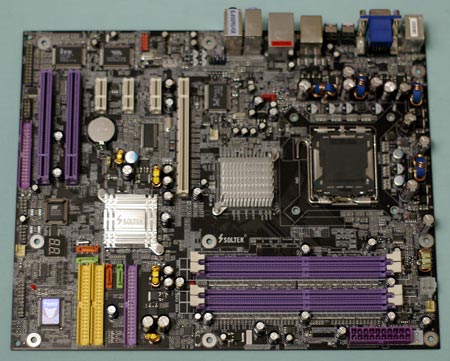
The Soltek is well laid out. In fact, we were more than a little surprised to find Soltek using the much preferred board edge locations for both the 20/24-pin power connector and the 4-pin 12V. These work best in most systems. The IDE and floppy connectors are located at the board edge, but on the lower right edge of the board instead of the preferred upper right. Even though they are not in the most preferred location, they still work well in most case designs.
Also located at the lower right are the 2-digit diagnostic LEDs and the 4 SATA connectors. While this is a busy area, you should have no problem with connectors here. Feature headers are located along the bottom edge of the board, which also contains the board's glaring misplacement - another floppy connector at the bottom of the board. This location for the floppy is particularly bad for tower cases, as you will need to find an extra long floppy cable to make a connection. This is particularly true in tower cases where the floppy drive is located in a top bay. Since many users no longer use a floppy drive, the floppy location won't matter at all.
Originally published at https://www.anandtech.com/show/1561 (Wayback Machine).