
915 Motherboard Roundup: Socket 775 for the Rest of Us
- Posted in
- Motherboards
Epox 5epa+: Features and Layout
| Epox 5epa+ Motherboard Specifications | |
| CPU Interface | Socket 775 Pentium 4 (Prescott) |
| Chipset | Intel 915P/ICH6R |
| BUS Speeds | 100MHz to 400MHz (in 1MHz increments) |
| Realtime Turbo Mode | 202, 206, 210, 214, 220, 226 |
| DDR2 Speeds | Auto, 333, 400 |
| PCI Express Speeds | 100MHz to 150MHz in 1MHz increments |
| Core Voltage | -0.10V to +0.2125V in 0.0125V increments |
| DRAM Voltage | +0.1V to +0.7V in 0.1V increments |
| Memory Slots | Four 184-pin DDR Slots Dual-Channel Unbuffered Memory to 4GB |
| Expansion Slots | 1 PCIe x16 Slot 2 PCIe x1 slot 4 PCI Slots |
| Onboard SATA/RAID | 4 SATA 150 drives by ICH6R Can be combined in RAID 0, 1, Intel Matrix |
| Onboard IDE/RAID | One Standard ATA100/66 (2 drives) Plus 4 ATA133/100/66 drives by IT8212F ITE drives can be combined as RAID 0, 1, 0+1 |
| Onboard USB 2.0/IEEE-1394 | 8 USB 2.0 ports No FireWire Ports |
| Onboard LAN | Gigabit PCI Ethernet by Marvell 88E8001 |
| Onboard Audio | AC'97 2.3 Realtek ALC850 8-Channel with SPDIF |
| Tested BIOS | M265 |
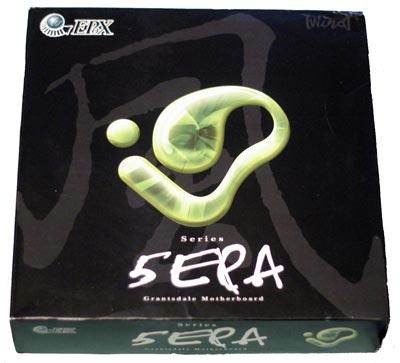
Just before we completed the 915 roundup, Epox shipped us their newest version of the 5epa+ motherboard. Epox is well known for fast motherboards that overclock well, so we had high expectations of the performance of overclocking capabilities of this latest Epox board. The packaging is flashy with a large black package and standout graphics.
The Epox that we tested was the 5epa+ version, which included the RAID version of the ICH6R south bridge. While it was a pleasure to see ICH6R available as an option on the Epox 915, it was a disappointment to see some of the other choices that were made to keep prices down. First, the Intel High Definition audio has been replaced by an AC'97 2.3 Realtek ALD850. The 850 is a capable 8-channel audio codec, but it is certainly not the equivalent of Intel Azalia HD audio. We wish that Epox had found a way to keep HD audio like others here have done with boards that will sell in a similar price range. Next, Gigabit LAN is a nice feature, but this Gigabit LAN rides the slower PCI bus instead of the PCIe bus that could have provided better performance. When attached to PCI, there really isn't much advantage to Gigabit LAN over 10/100 LAN. Some will argue that none of us really need Gigabit LAN right now when broadband is hardly constrained by 100 LAN. However, if you need or want the advantages of Gigabit LAN, you won't find them on a Gigabit LAN saddled with the slower PCI bus. Last, there are no Firewire ports on the Epox. If you need them, look elsewhere, but for most, the missing Firewire ports really won't matter very much.
It is a good thing that Epox also noticed that 2 IDE devices would be very limiting for some users of the 5epa+. To correct this potential handicap, Epox added an ITE 8212 controller that provides support for four additional IDE devices.
Epox does not disappoint in the controls and ranges available for tweaking the 5epa+ in BIOS. The +0.7V maximum memory voltage translates into 3.3V from the stock 2.6V for the DDR memory supported by the Epox 915. This should be a range that will satisfy most memory overclockers. CPU voltage is also a generous range from a slight underclock (for cooler operation) to a +0.2125V overclock. This translates into 1.60V maximum with a current Prescott Socket T CPU.
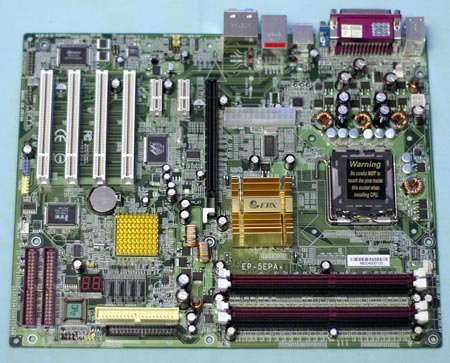
When we first looked at the Epox, we recognized the unusual layout from our review of the Biostar P4TGP 775. The boards are not identical, features are a little different, but the 20/24-pin power connector is badly placed in the center of the board on both. Be careful when connecting the bulky power cable because it has to be routed around and behind the processor. The 12V 4-pin connector is better placed along the top edge of the board. All the IDE and floppy connectors, those driven by the chipset as well as those supported by the ITE controller, are located near the lower right edge of the board, below the midline. This is not a favorite location, but it still works fine with most board designs. With the diagnostic LEDs, SATA ports, and BIOS also located in this same area, it becomes a very busy quadrant. You need to plan cable routing to make sure that everything is still visible and/or accessible after the board is installed.
The 4 DIMM slots are also quite tight to the PCIe video slot plane. However, they are set further back than on most board designs, so they will only interfere with changing memory when you are using a very large video card.
Originally published at https://www.anandtech.com/show/1561 (Wayback Machine).