
The AnandTech Linux XBOX PC Experiment
- Posted in
- Linux
Desktop Performance
There are several routes that we can take if we are just interested in converting our XBOX into a desktop. Our first option is to just boot the XBOX via the Xebian LiveCD bundled with the SmartXX mod chip. Xebian is a modified Debian LiveCD that comes with Freevo, Mozilla, GCC and a few other goodies. Choosing the Linux CD option in the SmartXX Linux boot brings us to this screen shortly before automatically launching X:Welcome to the : Xebian Version : 1.0.3.2-smartxx-edition Author : Edgar Hucek (hostmaster@ed-soft.at) Hostname : xbox.localdomain.local Linux Ver. : 2.4.26
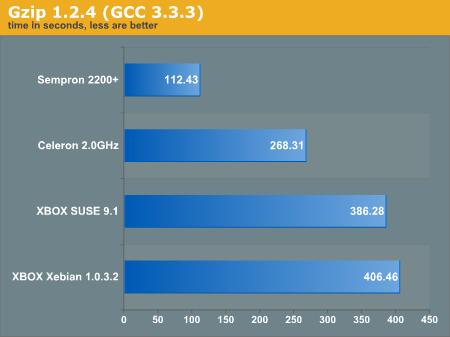
The first time that we ran Xebian without the Ethernet connected, the XBOX actually hung when we launched Mozilla. There is not much denying it - the XBOX PC is not any sort of workstation replacement. Performance benchmarks are not going to be very good at all, particularly compared with some other hardware solutions available today. However, for $200 bucks, the total system cost packs a "little" bit of a punch. For reference, we benchmarked a few small utilities here, just to show a point of reference on performance. Obviously, some of these systems use CPUs that cost more than the entire XBOX PC. Don't expect the XBOX PC to win any awards, but notice how well it performs for the price.
After running Xebian, we blew away the hard disk and installed a stripped down copy of SUSE 9.1 without the X window system. SUSE runs on the 2.6 kernel while Xebian runs on 2.4. Installing SUSE 9.1 was not very difficult; we cannibalized most of the modules and dependencies from Xebian and then essentially merged SUSE into the Xebian install. This gets a little messy, but provides us with a somewhat uniform platform for comparing our other benchmark machines. We compiled gzip from scratch using GCC 3.4.2 on both configurations. Below, you can see the machine gzip the same 700MB file that we use for our other gzip tests.
xbox:/mnt# time gzip 01.wav -c >/dev/null
We also decided to encode an MP3. Below, you can see the command that we used to encode the MP3, and playtime multiplier is listed in the graph.
# lame sample.wav -b 192 -m s -h - >/dev/null
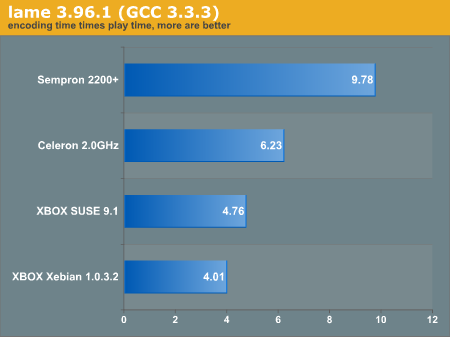
We can see from here that the performance is a tad faster running the OS from the hard drive rather than the LiveCD. Xebian lags heavily to do much of anything, including just email. Xebian does not come with an office suite, although when we installed Open Office, we had a bit of difficulty using it effectively. Running a local install onto the hard drive was significantly faster and recommended instead of running the Xebian CD.
Keep in mind, the system and video card share the same memory; tasks like Mozilla are incredibly slow, since we are taxing the system memory and the video memory at the same time. If you plan on running X on this type of system, you may be better off grabbing a minimal desktop like Blackbox or something that does not rely as heavily on video memory.
Originally published at https://www.anandtech.com/show/1539 (Wayback Machine).