
The AnandTech Linux XBOX PC Experiment
- Posted in
- Linux
The Test and Initialization
Obviously, we want to benchmark a few things on our XBOX cluster, but we need some points of reference. To do that, we took a few systems that we had around the lab of various cost and power, and configured them with SUSE Linux 9.1. All of our benchmarks are run without X running, since we want to minimize the load on the systems. Below is a breakdown of several of the systems that we are looking at to compare our XBOX on a desktop level.| Various Cheap Desktops | |||
| Desktop | XBOX Linux Cluster | Sempron 2200+ | Celeron 2.0GHz |
| Processor | PIII 733MHz 128K L2 | Sempron 2200+ | Celeron 2.0GHz |
| Motherboard | NVIDIA MCPX X3 | MSI K7N2G | ASROCK P4I45GV R5 |
| Hard Drive | Seagate 5400RPM 8GB | Seagate 5400RPM 8GB | |
| RAM | 64MB Shared PC3200 | 256MB PC2100 | |
| Operating System | Xebian 1.03.2 SUSE 9.1 |
SUSE 9.1 | |
| Kernel | 2.4.26 (Xebian) 2.6.4 (SUSE) |
2.6.4 | |
| Compiler | linux:~ # gcc -v Reading specs from /usr/lib64/gcc-lib/x86_64-suse-linux/3.3.3/specs Configured with: ../configure --enable-threads=posix --prefix=/usr --with-local-prefix=/usr/local --infodir=/usr/share/info --mandir=/usr/share/man --enable-languages=c,c++,f77,objc,java,ada --disable-checking --libdir=/usr/lib64 --enable-libgcj --with-gxx-include-dir=/usr/include/g++ --with-slibdir=/lib64 --with-system-zlib --enable-shared --enable-__cxa_atexit x86_64-suse-linux Thread model: posix gcc version 3.3.3 (SuSE Linux) | ||
| Cost | $210 (including mod chip) | $287 | $277 |
As you can see, it's pretty difficult to get a cheap AMD or Celeron system in the fray (cost includes case, CPU, motherboard, memory, hard drive, DVD Player and cooling). All configurations use integrated video. The Semprons and Celerons are going to be much faster than our 733MHz XBOX, although the footprints on the Sempron and Celeron setups are pretty terrible - they take up the full space of a mid-ATX case. The XBOX is also the significantly quieter solution. Unfortunately, the XBOX has very little memory and when we fire X, the XBOX is really going to take a hit in performance.
As you may notice, we are still running SUSE 9.1 instead of 9.2; we haven't had the chance to validate and update 9.2 yet, and our server benchmarks were already done on SUSE 9.1 configurations with GCC 3.3.3.
| Various Performance Configurations | |||
| Desktop | XBOX Linux Cluster | Dual Opteron 250 | Dual Xeon 3.6GHz |
| Processor | (8) PIII 733MHz 128K L2 | (2) Opteron 250 | (2) Xeon 3.6GHz |
| Motherboard | NVIDIA MCPX X3 | Tyan K8W | SuperMicro X6DA8-G2 |
| Hard Drive | (8) Seagate 5400RPM 10GB | Seagate 120GB 7200RPM IDE 8MB Cache | |
| RAM | 64MB Shared PC2100 | 4GB DDR-400 | 4GB DDR2-400 |
| Operating System | SUSE 9.1 | SUSE 9.1 | SUSE 9.1 |
| Kernel | 2.6.4 | 2.6.4 | |
| Compiler | linux:~ # gcc -v Reading specs from /usr/lib64/gcc-lib/x86_64-suse-linux/3.3.3/specs Configured with: ../configure --enable-threads=posix --prefix=/usr --with-local-prefix=/usr/local --infodir=/usr/share/info --mandir=/usr/share/man --enable-languages=c,c++,f77,objc,java,ada --disable-checking --libdir=/usr/lib64 --enable-libgcj --with-gxx-include-dir=/usr/include/g++ --with-slibdir=/lib64 --with-system-zlib --enable-shared --enable-__cxa_atexit x86_64-suse-linux Thread model: posix gcc version 3.3.3 (SuSE Linux) | ||
| Cost | $1680 (included mod chips) | ›$4000 | ›$4000 |
Our XBOX cluster costs considerably less than a performance workstation or server. The machines listed above were actually tested back in August, so we used the same OS and compiler setup from August. The eight-node XBOX cluster comes in at less than half that of the Opteron or Xeon setup, but of course, cannot offer us 64-bit capabilities amount other things.
Installing SUSE on the XBOX for the first time was not a simple task. The problem is that that the 8GB hard drives shipped with each XBOX is "locked" (you may read more about this here) so that it may only be booted by its own XBOX. There is an old, hacky guide that details how to get the normal XBOX hard drive to boot on a PC so that we can cross-install an operating system. The basic jist of the article follows:
- Leave the hard drive connected via the IDE and power cable to the XBOX and boot the Microsoft BIOS
- Boot the PC, but pause the installer before the Linux kernel loads
- Hot swap the hard drive from the XBOX to the PC (dangerous)
- Install Linux near the end of the hard drive
- Disconnect IDE cable, reboot PC
- Connect IDE cable before kernel initializes, then continue with installation and configuration of the OS
- Power down PC and XBOX, then reconnect the hard drive to the XBOX as usual
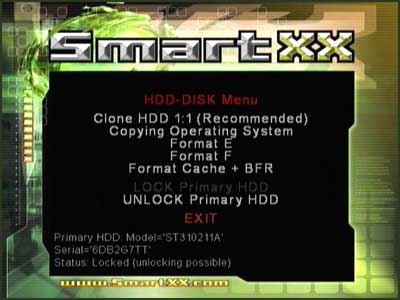
In the SmartXX OS, we actually have a tool to unlock the hard drive completely (or lock it back up later). This saved us a ton of work and we simply unlocked all of the 10GB hard drives shipped with our system. Thanks, SmartXX!
Originally published at https://www.anandtech.com/show/1539 (Wayback Machine).