
The AMD Radeon RX 5500 XT Review, Feat. Sapphire Pulse: Navi For 1080p
Power, Temperature, & Noise
Last, but not least of course, is our look at power, temperatures, and noise levels. While a high performing card is good in its own right, an excellent card can deliver great performance while also keeping power consumption and the resulting noise levels in check.
| Radeon Video Card Voltages | |||||
| 5700 Max | 5500 XT Max | 5700 Idle | 5500 XT Idle | ||
| 1.025v | 1.141v | 0.775v | 0.700v | ||
Back when the RX 5700 series launched, AMD’s voltages surprised me; the RX 5700 XT went as high as 1.2v on TSMC’s 7nm process. For better or worse, it looks like those voltages aren’t a fluke, as we see high voltages with the RX 5500 XT as well. In this case the card tops out at 1.141v, a not insubstantial decrease from the RX 5700 XT, though it’s still relatively high. AMD’s GPUs are still the only high-throughput GPU-like product we’ve seen voltages for on this process, so it’s hard to say whether this is a TSMC thing or an AMD thing. But either way, as AMD’s own voltage/frequency curve helpfully illustrates, the last couple of hundred MHz on the RX 5500 XT gets to be quite expensive in terms of power.

| Radeon Video Card Average Clockspeeds (Rounded to the Nearest 10MHz) |
|||
| Game | 5500 XT | 5700 | |
| Max Boost Clock | 1860MHz | 1750MHz | |
| Official Game Clock | 1717MHz | 1625MHz | |
| Tomb Raider | 1810MHz | 1680MHz | |
| F1 2019 | 1810MHz | 1650MHz | |
| Assassin's Creed | 1750MHz | 1700MHz | |
| Metro Exodus | 1800MHz | 1640MHz | |
| Strange Brigade | 1840MHz | 1660MHz | |
| Total War: TK | 1840MHz | 1690MHz | |
| The Division 2 | 1800MHz | 1630MHz | |
| Grand Theft Auto V | 1830MHz | 1690MHz | |
| Forza Horizon 4 | 1830MHz | 1700MHz | |
Despite that power cost, however, the RX 5500 XT manages to keep its clockspeeds rather high. Even without Sapphire’s higher power cap performance BIOS, their 8GB card is frequently at 1800MHz or better, putting it well ahead of AMD’s official game clock of 1717MHz. This means the card is running fairly close to its clockspeed limit – so Sapphire’s extra power doesn’t do a whole lot – but it also means the card is doing all of this on 130W (or less) of power.
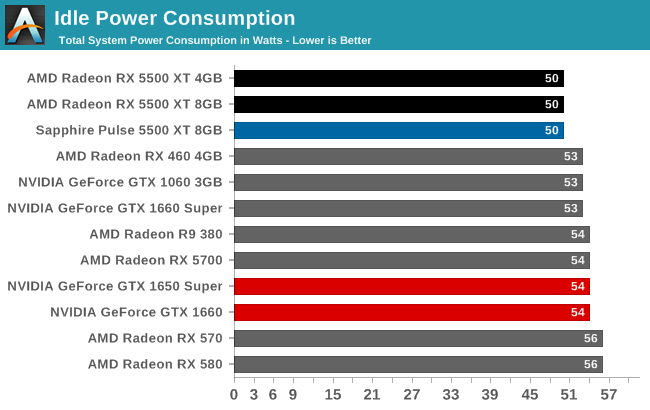
With the combination of TSMC’s 7nm process, AMD’s firmware optimizations, and I suspect the use of just 8 PCIe lanes, the RX 5500 XT fares very well when it comes to idle power. At 50W for the entire system, this is lower than any other configuration by a few watts. Which for idling, where power consumption is already low, is huge. No wonder Sapphire is able to offer zero fan speed idle here; the card is burning very little power at idle.
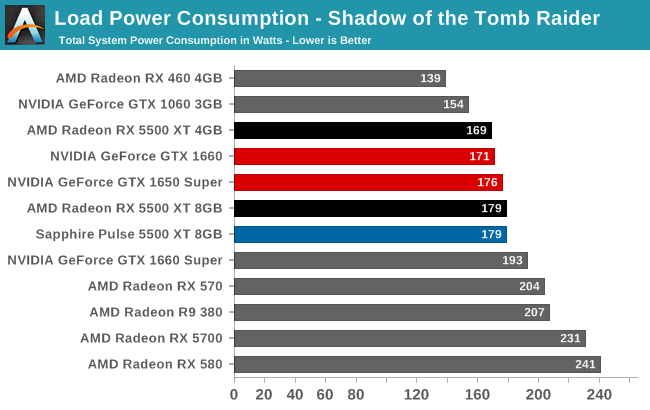
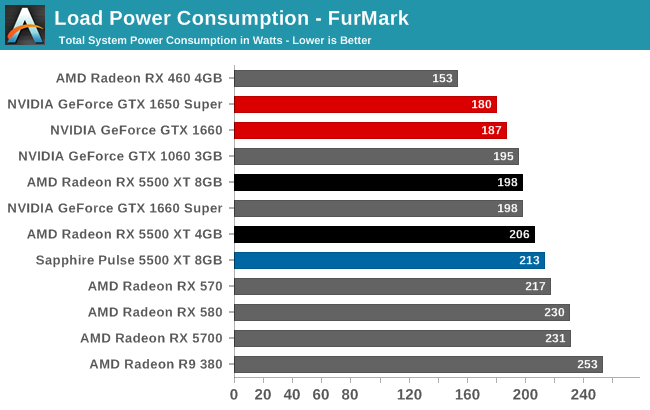
Similarly, load power is looking fairly good as well. Under Tomb Raider, the total system power consumption with the AMD cards is highly competitive with the NVIDIA competition (though as we’ve seen, actual game framerates trail a bit). Though AMD does fall behind under FurMark, as the 130W+ RX 5500 XT cards all have higher TDPs than NVIDIA’s 120W/125W equivalents, and FurMark will drive all of these cards to their power limits.
In practice, all of this generally reflects the cards’ relative specifications. The RX 5500 XT is able to hang with the somewhat inefficient GTX 1650 Super, however once we get to the more efficient GTX 1660, NVIDIA is consuming less power while delivering better performance.
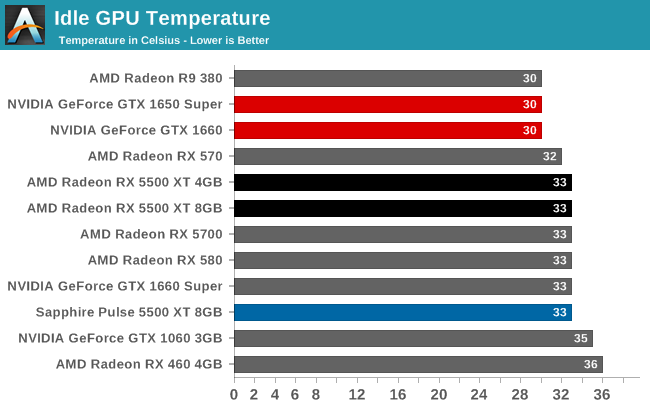
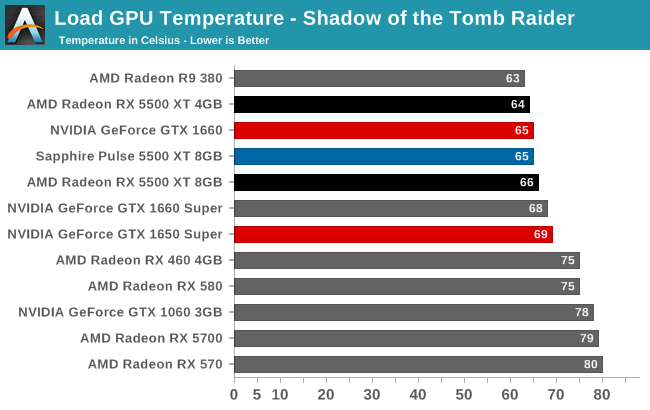
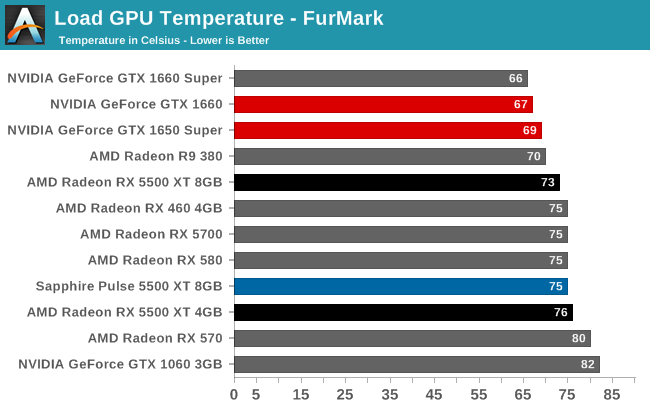
Early on I mentioned that Sapphire’s Pulse cards might be a bit overbuilt, and now that we’re getting into temperature and noise measurements, we get to see why. The idle GPU temperatures are what we’d expect for a zero fan speed idle card; meanwhile the load temperatures don’t crack 70C under Tomb Raider, and even FurMark only pushes the worst card to a well within tolerances 76C.
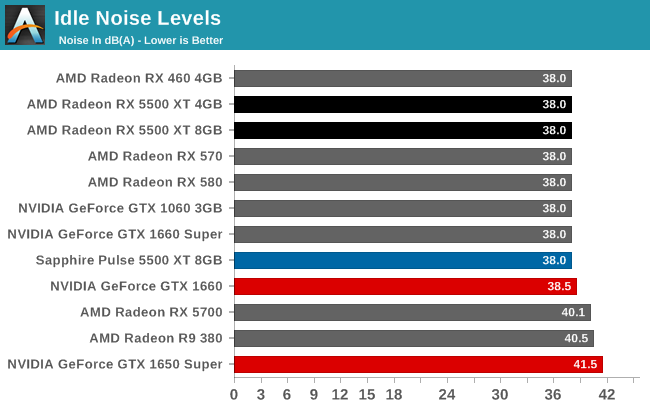
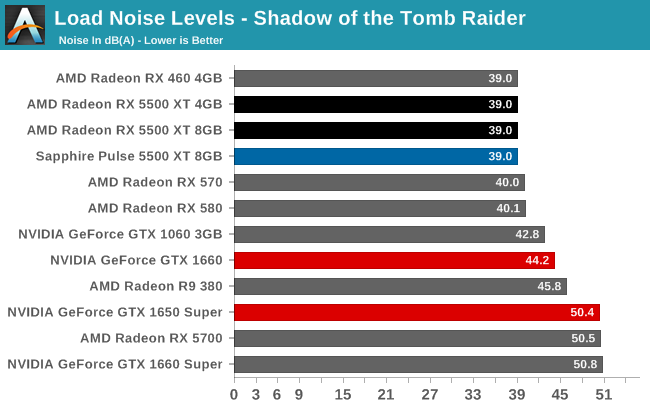
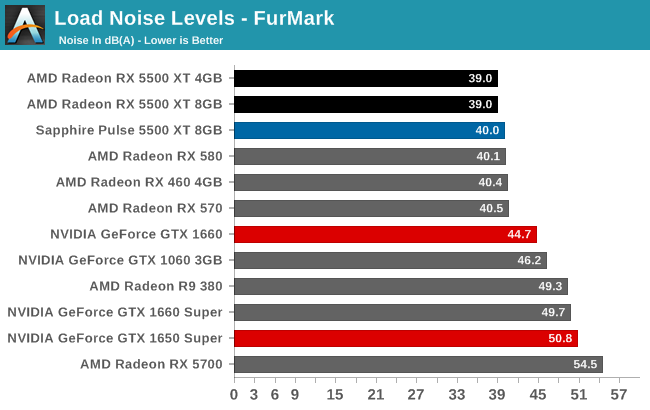
But when we get to noise, this is where Sapphire blows our socks off. Or rather, doesn’t blow our socks off?
The load noise levels I measured here were so low that it required extra effort to properly duplicate the results and isolate noise sources. With a card TDP of 130W, those big 95mm fans end up doing very little work. The PWM and monitoring-enabled fans run at under 800 RPM on gaming workloads, and it’s only when we’re using Sapphire’s higher TDP performance BIOS that the fans crack 1000 RPM.
Sapphire could probably cool a 200W card with this cooler, and I wouldn’t be too surprised to learn that it’s exactly such a card they took it from. But the net result is that while the card is a space hog, it’s a silent space hog. With load noise levels below 40 dB(A) for everything except FurMark, the card is barely louder than the rest of the system. Compared to our GeForce cards, all of which are smaller cards with equally small fans, the difference is extensive. Sapphire may have overbuilt their card, but as a result they’ve struck a great balance between temperatures and cooling performance, and delivering great acoustics in the process.
Originally published at https://www.anandtech.com/show/15206/the-amd-radeon-rx-5500-xt-review (Wayback Machine).