
Microsoft Windows XP Media Center Edition 2005: Feature and Performance Investigation
- Posted in
- Smartphones
- Mobile
Multituner Performance
For our next test we wanted to see how much more overhead adding a second tuner card and recording two programs would cost us. We recorded a show in the background while watching another TV show, once again all while varying CPU clock speed over time - the rest of our testbed remained the same.
We left the results from only a single tuner on the same graph to see the extra penalty incurred by going to dual tuners. As you can see, you basically add on another 10% CPU usage for recording one program while watching another. You can extrapolate that to get an idea of what kind of hardware you'd need for 3 tuners.
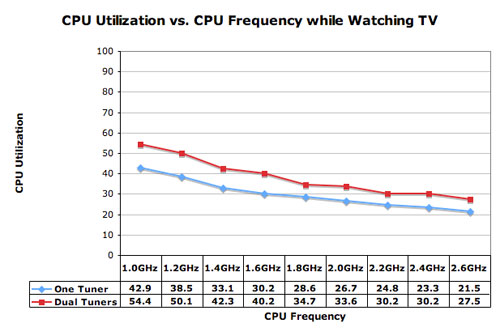
But once again, even in the worst configuration we're still only looking at 54% CPU usage, that's more than enough to spare. But what happens when you start scrolling through the program guide for something else to watch when you're sick of one of your programs?
We continued our experiment by scrolling through the program guide while recording one program and while we had another show running in its window in the corner of the guide. Here the average CPU utilization increases dramatically, with everything slower than 2GHz racking up over 90% CPU utilization.
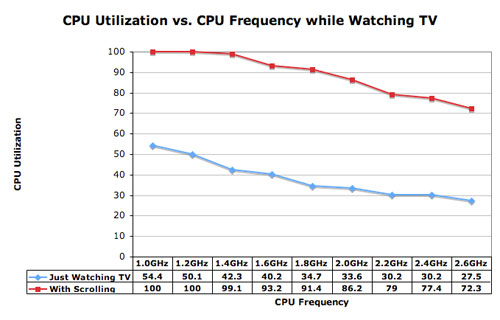
Once you get closer to 100% CPU utilization that's when things start to get choppy and we saw some serious reductions in smoothness on our lower end configurations. Interestingly enough, even in our choppiest configuration the MCE system was still more responsive and faster navigating through the guide than a Tivo. What we lost was the smooth transitions from one page in the guide to the next, or from one listing to the next, everything was a lot more jerky.
The plot thickens when you look at maximum CPU utilization during the time period, while the three fastest CPUs had their average utilizations in the 70s, their peak CPU usage figures were in the 80s and 90s, bordering on 100% CPU utilization. Whenever we hit 100%, something had to give, but luckily it was always the speed of the menu, never the frames in the video - something we were very appreciative of.
Another interesting phenomenon we noticed was that the slower the system got, the more prone it was to crashes. The larger the processing and disk queues got, the more our custom built Socket-939 testbed with aggressive memory timings started to crash. The majority of the crashes were hard locks and they didn't happen at all with the faster CPU configurations, but they definitely happened once we dropped below 1.6GHz.
Originally published at https://www.anandtech.com/show/1508 (Wayback Machine).